


CDP Configuration on Cisco Routers & Switches: Neighbor Discovery
Lab Objective
- Configure and use CDP on Cisco routers and switches
- Disable CDP on Cisco routers and switches
- Learn essential CDP commands
🛠️ Equipment Needed for This Lab
- 1 Cisco router
- 1 Cisco switch
- 2 PCs
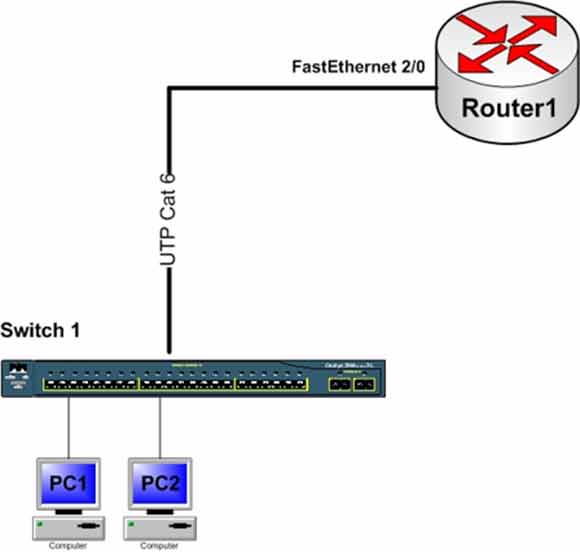
Network Topology
Router1 Port Connections
| Router1 Port | Connected Device | IP Address |
|---|---|---|
| FastEthernet 0/0 | Switch1 | 192.168.1.1 |
Switch1 Port Connections
| Switch1 Port | Connected Device | Cable Type |
|---|---|---|
| FastEthernet 0/2 | Router1 | UTP Cat 6 |
| FastEthernet 0/3 | PC1 | UTP Cat 6 |
| FastEthernet 0/4 | PC2 | UTP Cat 6 |
PC Configuration
| Computer | IP Address | Subnet Mask | Default Gateway |
|---|---|---|---|
| PC1 | 192.168.1.2 | 255.255.255.0 | 192.168.1.1 |
| PC2 | 192.168.1.3 | 255.255.255.0 | 192.168.1.1 |
What Is Cisco Discovery Protocol (CDP)?
CDP stands for Cisco Discovery Protocol. It’s a proprietary Cisco protocol that lets network administrators discover information about devices directly connected to a router or switch.
Using CDP, you can gather a wide range of information — device type, Layer 3 details like IP address, and the IOS version of directly connected routers and switches. This is invaluable for troubleshooting and network documentation.
CDP Parameters
To configure CDP correctly, you need to understand two key parameters:
CDP Timer
The time interval in seconds that CDP packets should be sent out from active interfaces. These packets report CDP information to neighboring devices.
CDP Holdtime
The time interval in seconds that information received from neighboring devices with CDP enabled is retained before being discarded.
CDP works at Layer 2 (the Data-Link layer) and is enabled by default on Cisco routers and switches.
What CDP Reports About Neighbors
- IP Address
- Device hostname
- Device type — switch or router
- Local interface and neighbor interface specifications
CDP works across all major network technologies — Ethernet, Token Ring, ATM, Frame Relay, PPP, and HDLC.
Step 1: Configure the Router and Set IP Addresses on Router Interfaces
Configure FastEthernet 0/0 and set the IP address with these commands:
Router#config t
Router(config)#hostname Router1
Router1(config)#interface fastEthernet 0/0
Router1(config-if)#ip address 192.168.1.1 255.255.255.0
Router1(config-if)#no shutdown
Step 2: Connect to the Switch and Configure It
Connect to the switch through PuTTY the same way you connected to the router, and enter User Mode. What do you see at the command prompt?
If you see the prompt below, you’ve successfully entered User Mode. If not, check the console cable connection between the switch and PC.
Switch>
Now configure the switch hostname:
Switch#config t
Switch(config)#hostname Switch1
Switch1(config)#
Step 3: Enable CDP on Router1 and Switch1
CDP is enabled by default on routers and switches. If it’s been disabled — or if you need to re-enable it — use the commands below.
To enable CDP on the router:
Router1(config)#cdp run
To enable CDP on the switch:
Switch1(config)#cdp run
Step 4: Get Neighbor Information from Router1 Using CDP
Use the command below to get information about routers and switches directly connected to Router1 — including device name, IP address, and device type:
Router1#show cdp neighbors

Capability Codes: R - Router, T - Trans Bridge, B - Source Route Bridge, S - Switch, H - Host, I - IGMP, r - Repeater, P - Phone

Device ID          Local Intrfce   Holdtme    Capability       Platform        Port ID
Switch1            Fas 0/0         155        S                2960            Fas 0/2
Understanding the CDP Neighbors Output
| Column | Description |
|---|---|
| Device ID | The hostname of the device directly connected to Router1. In this example, one device named Switch1 is connected. |
| Local Intrfce | The local interface on the device where the command was run. In this example, Router1’s Fas 0/0 — the interface connected to Switch1. |
| Holdtme | The time in seconds that CDP packet information from the neighbor is retained. In this example, 155 seconds. When this timer reaches zero without an update, the information is discarded. |
| Capability | A code identifying the neighbor’s device type. See the Capability Codes — S means Switch. |
| Platform | The model and number of the device. In this example, switch model 2960. |
| Port ID | The interface or port on the remote device. In this example, Switch1 connects to Router1 through Fas 0/2. |
Step 5: Get Neighbor Information from Switch1 Using CDP
Use the command below to get information about routers and switches directly connected to Switch1 — including device name, IP address, and device type:
Switch1#show cdp neighbors

Capability Codes: R - Router, T - Trans Bridge, B - Source Route Bridge, S - Switch, H - Host, I - IGMP, r - Repeater, P - Phone

Device ID        Local Intrfce   Holdtme    Capability      Platform      Port ID
Router1          Fas 0/2         153        R               C2600         Fas 0/0
For more detail, use the show cdp neighbors detail command:
Switch1#show cdp neighbors detail

Device ID: Router
Entry address(es):
IP address : 192.168.1.1
Platform: cisco C1841, Capabilities: Router
Interface: FastEthernet0/2, Port ID (outgoing port): FastEthernet0/0
Holdtime: 178

Version :
Cisco IOS Software, 1841 Software (C1841-ADVIPSERVICESK9-M), Version 12.4(15)T1, RELEASE SOFTWARE (fc2)
Technical Support: http://www.cisco.com/techsupport
Copyright (c) 1986-2007 by Cisco Systems, Inc.
Compiled Wed 18-Jul-07 04:52 by pt_team

advertisement version: 2
Duplex: full
What you get with detail: IP address, IOS version, hardware platform, and duplex mode — everything you need to identify a neighbor and document your network.
Step 6: Disable CDP on Switch1 or Router1
To disable CDP on the router:
Router1(config)#no cdp run
To disable CDP on the switch:
Switch1(config)#no cdp run
CDP Command Reference
Router Global Configuration Commands
| Command | Description |
|---|---|
| Router(config)#cdp run | Enables CDP on the router. CDP is enabled by default on Cisco devices. |
| Router(config)#no cdp run | Disables CDP on the entire router. |
| Router(config)#cdp holdtime 180 | Sets how long (in seconds) the router retains CDP packets before discarding them. Example: 180 seconds. |
| Router(config)#cdp timer 60 | Sets how often (in seconds) the router sends CDP packets out active interfaces to neighbors. |
Switch Global Configuration Commands
| Command | Description |
|---|---|
| Switch(config)#cdp run | Enables CDP on the switch. CDP is enabled by default on Cisco devices. |
| Switch(config)#no cdp run | Disables CDP on the entire switch. |
| Switch(config)#cdp holdtime 180 | Sets how long the switch retains CDP packets before discarding them. |
| Switch(config)#cdp timer 60 | Sets how often the switch sends CDP packets to neighbors. |
Interface-Level CDP Commands
| Command | Description |
|---|---|
| Router(config)#interface FastEthernet 0/0 | Enters Interface Configuration Mode for FastEthernet 0/0. |
| Router(config-if)#cdp enable | Enables CDP on FastEthernet 0/0 — the interface can send and receive CDP packets. |
| Router(config-if)#no cdp enable | Disables CDP on FastEthernet 0/0. |
| Switch(config)#interface FastEthernet 0/1 | Enters Interface Configuration Mode for FastEthernet 0/1. |
| Switch(config-if)#cdp enable | Enables CDP on FastEthernet 0/1. |
| Switch(config-if)#no cdp enable | Disables CDP on FastEthernet 0/1. |
Show and Verification Commands
| Command | Description |
|---|---|
| Router#show cdp | Displays CDP information and timer values. |
| Router#show cdp neighbors | Displays devices directly connected to the router with CDP enabled. |
| Router#show cdp neighbors detail | Displays detailed information about directly connected CDP neighbors. |
| Router#show cdp entry Switch1 | Displays detailed information about a specific neighbor by hostname. |
| Router#show cdp entry * | Displays detailed information about all connected devices. |
| Router#show cdp interface | Displays CDP information for router interfaces running CDP. |
| Router#show cdp interface fastEthernet 0/0 | Displays CDP information for FastEthernet 0/0 specifically. |
| Router#show cdp traffic | Displays CDP traffic statistics — input and output packets. |
CDP Troubleshooting Commands
| Command | Description |
|---|---|
| Router#clear cdp counters | Resets CDP traffic counters. |
| Router#clear cdp table | Clears the CDP table. |
| Router#debug cdp adjacency | Shows CDP adjacency changes between directly connected devices. |
| Router#debug cdp events | Shows all CDP-related events. |
| Router#debug cdp packets | Shows CDP packet information. |
CDP Capability Codes
| Code | Device Type |
|---|---|
| R | Router |
| T | Trans Bridge |
| B | Source Route Bridge |
| S | Switch |
| H | Host |
| I | IGMP |
| r | Repeater |
| P | Phone |
✅ Key Takeaways
- CDP is a Cisco-proprietary protocol at Layer 2.
- CDP is enabled by default on Cisco routers and switches.
cdp runenables CDP globally;no cdp rundisables it.cdp enableandno cdp enablecontrol CDP at the interface level.- CDP timer controls how often CDP packets are sent.
- CDP holdtime controls how long neighbor info is retained.
show cdp neighborslists directly connected Cisco devices.show cdp neighbors detailadds IP address and IOS version.- CDP works across Ethernet, Token Ring, ATM, Frame Relay, PPP, and HDLC.
- Disable CDP on untrusted interfaces for security.
