


Default Route Configuration: Routing Traffic to the Internet
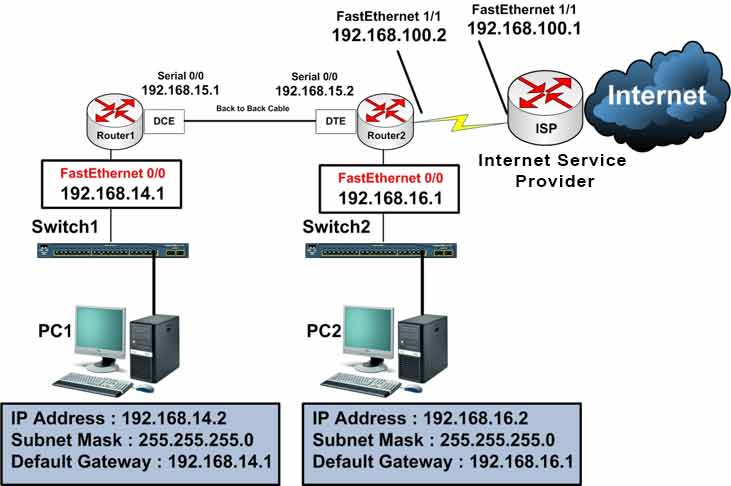
Lab Objective
- Configure a Default Route to send packets toward the ISP router
🛠️ Equipment Needed for This Lab
- 2 Cisco routers
- 2 Cisco 2960 switches
- 2 PCs
- 1 internet access connection
Router Interface Configuration
| Router | Interface | IP Address | Subnet Mask | Serial Type |
|---|---|---|---|---|
| Router 1 | FastEthernet 0/0 | 192.168.14.1 | 255.255.255.0 | — |
| Router 1 | Serial 0/0 | 192.168.15.1 | 255.255.255.0 | DCE |
| Router 2 | Serial 0/0 | 192.168.15.2 | 255.255.255.0 | DTE |
| Router 2 | FastEthernet 0/0 | 192.168.16.1 | 255.255.255.0 | — |
| Router 2 | FastEthernet 1/1 | 192.168.100.2 | 255.255.255.0 | — |
ISP Router Interface Configuration
| Router | Interface | IP Address | Subnet Mask |
|---|---|---|---|
| ISP | FastEthernet 1/1 | 192.168.100.1 | 255.255.255.0 |
PC Configuration
| Computer | IP Address | Subnet Mask | Default Gateway |
|---|---|---|---|
| PC1 | 192.168.14.2 | 255.255.255.0 | 192.168.14.1 |
| PC2 | 192.168.16.2 | 255.255.255.0 | 192.168.16.1 |
Previous labs covered static routing. This lab focuses on default routing.
Step 1: Configure Router1 and Router2 and Set IP Addresses on Router Interfaces
Configure FastEthernet 0/0 on Router1:
Router1#config t
Router1(config)#interface fastEthernet 0/0
Router1(config-if)#ip address 192.168.14.1 255.255.255.0
Router1(config-if)#no shutdown
Configure Serial 0/0 on Router1:
Router1(config)#interface serial 0/0
Router1(config-if)#ip address 192.168.15.1 255.255.255.0
Router1(config-if)#clock rate 64000
Router1(config-if)#no shutdown
Configure FastEthernet 0/0 on Router2:
Router2#config t
Router2(config)#interface fastEthernet 0/0
Router2(config-if)#ip address 192.168.16.1 255.255.255.0
Router2(config-if)#no shutdown
Configure FastEthernet 1/1 on Router2 (facing the ISP):
Router2#config t
Router2(config)#interface fastEthernet 1/1
Router2(config-if)#ip address 192.168.100.2 255.255.255.0
Router2(config-if)#no shutdown
Configure Serial 0/0 on Router2:
Router2(config)#interface serial 0/0
Router2(config-if)#ip address 192.168.15.2 255.255.255.0
Router2(config-if)#no shutdown
Step 2: Configure Static Routes on Router1 and Router2
Configure a static route on Router1 for the 192.168.16.0 network (connected to Router2):
Router1(config)#ip route 192.168.16.0 255.255.255.0 192.168.15.2
Configure a static route on Router2 for the 192.168.14.0 network (connected to Router1):
Router2(config)#ip route 192.168.14.0 255.255.255.0 192.168.15.1
After these configurations, Router1’s routing table can route packets to three networks: 192.168.14.0/24, 192.168.15.0/24, and 192.168.16.0/24.
Router1# show ip route

Gateway of last resort is not set
C 192.168.14.0/24 is directly connected, FastEthernet 0
C 192.168.15.0/24 is directly connected, Serial 0
S 192.168.16.0/24 [1/0] via 192.168.15.2
❓ Question 1: What Happens to Packets with Unknown Destinations?
If Router1 receives a packet with a destination other than the three networks in its routing table, what does the router do?
Answer: The router drops the packet — it doesn’t forward it to other routers or out any other interface.
❓ Question 2: Can Users Reach Google or Cisco.com?
If a user wants to reach Google.com (64.233.167.101), Cisco.com (72.163.4.161), or Ciscoiran.ir (67.23.254.61), is there a route in the router’s table for these networks?
Answer: No — there’s no route for these addresses, or for the millions of other internet IP addresses.
❓ Question 3: How Do We Route Millions of Internet Addresses?
Answer: With a Default Route.
A default route is a catch-all route with the lowest priority. If no specific route exists in the routing table for a packet’s destination, the packet is routed through the default route.
For example, if a user on Router1 tries to reach Ciscoiran.ir (67.23.254.61), the router first checks its routing table. There’s no route to that network. So if a default route exists, the router forwards the packet through it.
Step 3: Configure the Default Route on Router1
Configure a default route so all unknown packets (those without a matching route in the routing table) go to Router2 — which connects directly to the internet:
Router1#config t
Router1(config)#ip route 0.0.0.0 0.0.0.0 192.168.15.2
In this command, any packet with any destination (0.0.0.0) and any subnet mask (0.0.0.0) that has no matching route in the routing table is sent to Router2 at 192.168.15.2.
Step 4: Configure the Default Route on Router2
Configure a default route on Router2 to send all unknown packets to the ISP router:
Router2#config t
Router2(config)#ip route 0.0.0.0 0.0.0.0 192.168.100.1
Any packet with any destination and any mask that has no matching route is sent to the ISP router at 192.168.100.1.
Step 5: View the Routing Tables on Router1 and Router2
Run show ip route on Router1:
Router1#show ip route

C    192.168.14.0/24 is directly connected, FastEthernet0/0
C    192.168.15.0/24 is directly connected, Serial0/0
S    192.168.16.0/24 [1/0] via 192.168.15.2
S*   0.0.0.0/0 [1/0] via 192.168.15.2
Run show ip route on Router2:
Router2#show ip route

S    192.168.14.0/24 [1/0] via 192.168.15.1
C    192.168.15.0/24 is directly connected, Serial0/0
C    192.168.16.0/24 is directly connected, FastEthernet0/0
C    192.168.100.0/24 is directly connected, FastEthernet1/1
S*   0.0.0.0/0 [1/0] via 192.168.100.1
As you can see in both routing tables, the default route has been added for internet packet routing. When a router receives a packet with any destination and no matching route exists, the router forwards the packet through the default route.
The S* code: S means static — * means it’s the candidate default route. This route is used only when no other route matches.
Router1 Final Configuration
hostname Router1
!
!
!
interface fastEthernet 0/0
 ip address 192.168.14.1 255.255.255.0
 no shutdown
!
!
!
interface Serial 0/0
 ip address 192.168.15.1 255.255.255.0
 clock rate 64000
 no shutdown
!
!
!
ip route 192.168.16.0 255.255.255.0 192.168.15.2
ip route 0.0.0.0 0.0.0.0 192.168.15.2
!
!
End
Router2 Final Configuration
hostname Router2
!
!
!
interface fastEthernet 0/0
 ip address 192.168.16.1 255.255.255.0
 no shutdown
!
!
!
interface fastEthernet 1/1
 ip address 192.168.100.2 255.255.255.0
 no shutdown
!
!
!
interface Serial 0/0
 ip address 192.168.15.2 255.255.255.0
 no shutdown
!
!
!
ip route 192.168.14.0 255.255.255.0 192.168.15.1
ip route 0.0.0.0 0.0.0.0 192.168.100.1
!
!
End
Default Route Command Reference
| Command | Description |
|---|---|
| Router(config)#ip route 0.0.0.0 0.0.0.0 [next-hop] | Configures a default route using the next-hop gateway IP address. Used on Router1 and Router2 in this lab. |
| Router(config)#ip route 0.0.0.0 0.0.0.0 [exit-interface] | Configures a default route using a local outgoing interface instead of a next-hop IP. |
| Router#show ip route | Displays the routing table, including the S* default route. |
Static vs. Default Route
| Feature | Static Route | Default Route |
|---|---|---|
| Destination | Specific network | Any network (0.0.0.0/0) |
| Mask | Matches the network | 0.0.0.0 |
| Priority | Specific match | Lowest — used last |
| Routing Table Code | S | S* |
| Use Case | Known remote networks | Internet, ISP, unknown destinations |
Routing Table Codes
| Code | Meaning | How It’s Added |
|---|---|---|
| C | Connected | Automatically — directly connected |
| S | Static | Manually — ip route |
| S* | Static Default | Manually — ip route 0.0.0.0 0.0.0.0 |
| R | RIP | Dynamic |
| D | EIGRP | Dynamic |
| O | OSPF | Dynamic |
Default Route Best Practices
- Use a default route on edge routers that connect to an ISP.
- The default route is the last resort — it only kicks in when no specific route matches.
- You can only have one active default route per routing table (unless using floating static routes).
- Combine default routes with specific static routes for internal networks.
- Verify with
show ip route— the default route shows asS*. - For redundancy, use a floating static default route with a higher administrative distance.
✅ Key Takeaways
- A default route is a catch-all route for unknown destinations.
- The command is
ip route 0.0.0.0 0.0.0.0 [next-hop]. - Routers drop packets with no matching route if no default route exists.
- The default route is used only after all other routes are checked.
- In the routing table, the default route shows as S*.
- Default routes are essential for internet access from internal networks.
- You can have only one active default route per routing table.
- Edge routers point default routes to the ISP’s next-hop IP.
- Internal routers point default routes to the edge router.
