


EIGRP Configuration: Advanced Distance Vector Routing on Cisco Routers
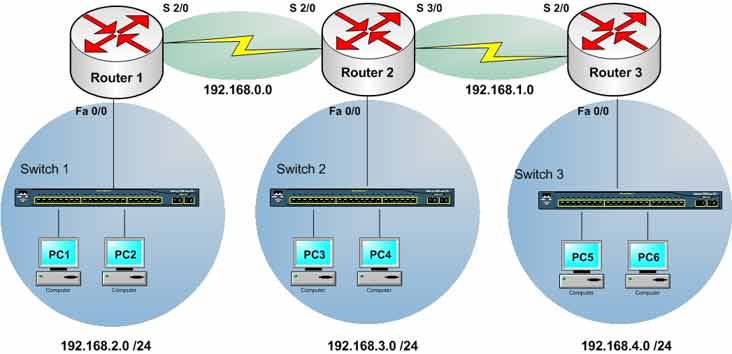
Lab Objective
- Configure routers with IP addresses
- Configure the EIGRP routing protocol
- Learn EIGRP configuration commands
🛠️ Equipment Needed for This Lab
- 3 Cisco routers
- 3 Cisco 2960 switches
- 6 PCs
Router Interface Configuration
Router1 Interfaces
| Interface | IP Address | Subnet Mask | Serial Type |
|---|---|---|---|
| FastEthernet 0/0 | 192.168.2.1 | 255.255.255.0 | — |
| Serial 2/0 | 192.168.0.1 | 255.255.255.0 | DCE |
Router2 Interfaces
| Interface | IP Address | Subnet Mask | Serial Type |
|---|---|---|---|
| FastEthernet 0/0 | 192.168.3.1 | 255.255.255.0 | — |
| Serial 2/0 | 192.168.0.2 | 255.255.255.0 | DTE |
| Serial 3/0 | 192.168.1.1 | 255.255.255.0 | DCE |
Router3 Interfaces
| Interface | IP Address | Subnet Mask | Serial Type |
|---|---|---|---|
| FastEthernet 0/0 | 192.168.4.1 | 255.255.255.0 | — |
| Serial 2/0 | 192.168.1.2 | 255.255.255.0 | DTE |
PC Configuration
| PC | IP Address | Subnet Mask | Default Gateway |
|---|---|---|---|
| PC1 | 192.168.2.2 | 255.255.255.0 | 192.168.2.1 |
| PC2 | 192.168.2.3 | 255.255.255.0 | 192.168.2.1 |
| PC3 | 192.168.3.2 | 255.255.255.0 | 192.168.3.1 |
| PC4 | 192.168.3.3 | 255.255.255.0 | 192.168.3.1 |
| PC5 | 192.168.4.2 | 255.255.255.0 | 192.168.4.1 |
| PC6 | 192.168.4.3 | 255.255.255.0 | 192.168.4.1 |
What Is EIGRP?
EIGRP stands for Enhanced Interior Gateway Routing Protocol. It’s a Cisco-proprietary protocol with many advantages over Distance Vector protocols like RIP.
Cisco combined the best features of Link State and Distance Vector protocols into EIGRP. It uses the DUAL algorithm — Diffusing Update Algorithm — to select the best path.
Unlike RIP, which sends the full routing table every 30 seconds, EIGRP sends only changes to neighbors. This uses link bandwidth far more efficiently.
EIGRP routers form neighbor relationships with adjacent routers running EIGRP.
Key EIGRP Features
- Easy, simple configuration
- Works in LAN, WAN, and topologies like MPLS, VPN, Leased Line, Wireless
- Classless protocol — sends subnet mask in updates and supports VLSM
- Routes IP, IPX, and AppleTalk
- Uses Hello packets for automatic neighbor discovery
- Fast convergence
- Uses multicast and unicast instead of broadcast
- Advanced metric using Bandwidth and Delay by default
- Load balancing across 6 equal-cost and 6 unequal-cost paths
- Works in large networks
- Compatible with legacy Cisco IGRP
- Cisco-only — all routers must be Cisco
EIGRP’s Three Tables
Every router running EIGRP maintains three tables:
- Neighbor Table
- Topology Table
- Routing Table
Neighbor Table
First, EIGRP routers send and receive Hello packets with their neighbors. If their AS numbers match, they form an adjacency.
EIGRP uses Hello packets to discover neighbors — this is called Neighbor Discovery. Sending Hellos regularly serves two purposes: forming neighbor relationships and keeping them alive.
By default, EIGRP routers send Hello packets every 5 seconds — this is the hello-interval. If a router doesn’t receive a Hello from a neighbor within 15 seconds, it considers that router dead — this is the hold-time.
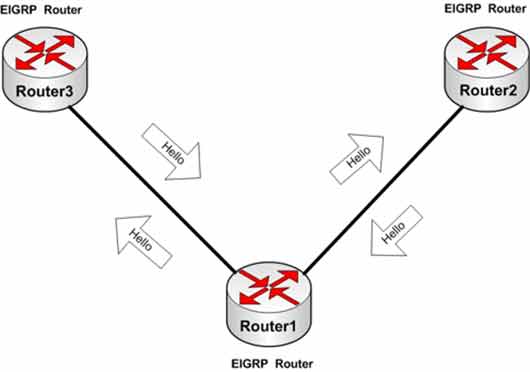
After routers exchange Hello packets, each router adds the names and info of its neighbors to the Neighbor Table. View it with:
Router#show ip eigrp neighbors

IP-EIGRP neighbors for process 100

H   Address         Interface   Hold    Uptime    SRTT    RTO     Q       Seq
                                (sec)             (ms)            Cnt     Num
0   192.168.0.1     Ser2/0      11      00:01:15  40      1000    0       4
1   192.168.1.2     Ser3/0      13      00:00:55  40      1000    0       4
| Column | Description |
|---|---|
| H | Handle — a number used to identify neighbor routers |
| Address | IP address of the neighbor router |
| Interface | Local interface connecting to the neighbor |
| Hold | Time remaining before the neighbor is declared dead |
| Uptime | How long the neighbor relationship has been up |
Topology Table
Once the Neighbor Table is built, routers send updates about their routes to neighbors. EIGRP routers collect all updates from neighbors into the Topology Table — every path for every destination.
Router#show ip eigrp topology

IP-EIGRP Topology Table for AS 100

Codes: P - Passive, A - Active, U - Update, Q - Query, R - Reply, r - Reply status

P 192.168.1.0/24, 1 successors, FD is 20512000
   via Connected, Serial3/0

P 192.168.0.0/24, 1 successors, FD is 20512000
   via Connected, Serial2/0
| Code | Meaning |
|---|---|
| P | Passive — the router has a working path to the network. No recalculation needed. |
| A | Active — no working path exists. The router is actively recalculating a route. |
Routing Table
After the Topology Table is complete, the DUAL algorithm runs on it and selects the best paths — placing them in the Routing Table.
Router#show ip route

Gateway of last resort is not set
C    192.168.0.0/24    is directly  connected,   Serial2/0
D    192.168.1.0/24    [90/21024000]  via  192.168.2.2,  00:00:07,   Serial3/0
                                   [90/21024000]  via  192.168.0.1,  00:00:03,   Serial2/0
C    192.168.2.0/24    is directly  connected,  Serial3/0
C    192.168.3.0/24    is directly  connected,  FastEthernet0/0
D    192.168.4.0/24    [90/20514560]  via  192.168.2.2,  00:00:07,   Serial3/0
EIGRP Best Path Selection
EIGRP uses the DUAL algorithm. The path with the lowest metric becomes the primary route; paths with slightly higher metrics become backup routes.
EIGRP uses a composite metric. Five parameters are available, but only Bandwidth and Delay are used by default. Reliability, Load, and MTU can also be used, but they’re not recommended because they can reduce routing efficiency.
K Values
| Parameter | K Value |
|---|---|
| Bandwidth | K1 |
| Load | K2 |
| Delay | K3 |
| Reliability | K4 |
| MTU | K5 |
Default: K1 = 1, K2 = 0, K3 = 1, K4 = 0, K5 = 0
K values are carried inside Hello packets. If two routers have different K values, they can’t form a proper adjacency.
Metric Formula
Bandwidth = (10,000,000 / lowest path bandwidth) * 256
Delay     = (sum of path delays) * 256

EIGRP Metric = Bandwidth + Delay


Metric Example
For a path R1 → R2 → R3 → R4 with lowest bandwidth 64 Kbps and total delay 6000:
Bandwidth = (10000000 / 64) * 256 = 40,000,000
Delay     = (2000 + 2000 + 2000) * 256 = 1,536,000

Metric = 40,000,000 + 1,536,000 = 41,536,000
Step 1: Configure IP Addresses on Router1, Router2, and Router3
Configure FastEthernet 0/0 on Router1:
Router1#config t
Router1(config)#interface fastEthernet 0/0
Router1(config-if)#ip address 192.168.2.1 255.255.255.0
Router1(config-if)#no shutdown
Configure Serial 2/0 on Router1:
Router1(config)#interface serial 2/0
Router1(config-if)#ip address 192.168.0.1 255.255.255.0
Router1(config-if)#clock rate 64000
Router1(config-if)#no shutdown
Configure FastEthernet 0/0 on Router2:
Router2#config t
Router2(config)#interface fastEthernet 0/0
Router2(config-if)#ip address 192.168.3.1 255.255.255.0
Router2(config-if)#no shutdown
Configure Serial 2/0 on Router2:
Router2(config)#interface serial 2/0
Router2(config-if)#ip address 192.168.0.2 255.255.255.0
Router2(config-if)#no shutdown
Configure Serial 3/0 on Router2:
Router2(config)#interface serial 3/0
Router2(config-if)#ip address 192.168.1.1 255.255.255.0
Router2(config-if)#clock rate 64000
Router2(config-if)#no shutdown
Configure FastEthernet 0/0 on Router3:
Router3#config t
Router3(config)#interface fastEthernet 0/0
Router3(config-if)#ip address 192.168.4.1 255.255.255.0
Router3(config-if)#no shutdown
Configure Serial 2/0 on Router3:
Router3(config)#interface serial 2/0
Router3(config-if)#ip address 192.168.1.2 255.255.255.0
Router3(config-if)#no shutdown
Step 2: Configure EIGRP on Router1
To configure EIGRP, enter Global Configuration Mode and use router eigrp [AS-number]. Unlike RIP, EIGRP requires an Autonomous System (AS) number. Only routers with the same AS number share routing information.
Add network statements for all directly connected networks:
Router1#config t
Router1(config)#router eigrp 100
Router1(config-router)#network 192.168.0.0 255.255.255.0
Router1(config-router)#network 192.168.2.0 255.255.255.0
Router1(config-router)#exit
Router1(config)#exit
| Command | Description |
|---|---|
| Router1(config)#router eigrp 100 | Enables EIGRP on the router and sets AS number 100. |
| Router1(config-router)#network 192.168.0.0 255.255.255.0 | Advertises the 192.168.0.0 network to EIGRP neighbors. |
| Router1(config-router)#network 192.168.2.0 255.255.255.0 | Advertises the 192.168.2.0 network to EIGRP neighbors. |
Note: The example uses a subnet mask instead of a wildcard mask. The router automatically converts it to a wildcard mask. If no mask is specified, EIGRP uses standard classful addresses.
Save the configuration:
Router1#copy running-config startup-config
Step 3: Configure EIGRP on Router2
Add network statements for Router2’s directly connected networks:
Router2#config t
Router2(config)#router eigrp 100
Router2(config-router)#network 192.168.0.0 255.255.255.0
Router2(config-router)#network 192.168.1.0 255.255.255.0
Router2(config-router)#network 192.168.3.0 255.255.255.0
Router2(config-router)#exit
Router2(config)#exit
Save the configuration:
Router2#copy running-config startup-config
Step 4: Configure EIGRP on Router3
Add network statements for Router3’s directly connected networks:
Router3#config t
Router3(config)#router eigrp 100
Router3(config-router)#network 192.168.1.0 255.255.255.0
Router3(config-router)#network 192.168.4.0 255.255.255.0
Router3(config-router)#exit
Router3(config)#exit
Save the configuration:
Router3#copy running-config startup-config
Note: The AS number is 100 on all three routers. This matches them so they can form adjacencies and share routing information.
Step 5: View Routing Tables on All Routers
Run show ip route on Router1:
Router1#show ip route

Gateway of last resort is not set
C    192.168.0.0/24    is directly connected, Serial2/0
D    192.168.1.0/24    [90/41024000]     via   192.168.0.2,     00:01:42,   Serial2/0
C    192.168.2.0/24    is directly connected,     FastEthernet0/0
D    192.168.3.0/24    [90/40514560]     via   192.168.0.2,     00:01:37,   Serial2/0
D    192.168.4.0/24    [90/41026560]     via   192.168.0.2,     00:01:10,   Serial2/0
Run show ip route on Router2:
Router2#show ip route

Gateway of last resort is not set
C    192.168.0.0/24      is directly    connected,   Serial2/0
C    192.168.1.0/24      is directly    connected,   Serial3/0
D    192.168.2.0/24      [90/20514560]     via    192.168.0.1,   00:04:12,   Serial2/0
C    192.168.3.0/24      is directly    connected,    FastEthernet0/0
D    192.168.4.0/24      [90/20514560]     via    192.168.1.2,   00:03:41,  Serial3/0
Run show ip route on Router3:
Router3#show ip route

Gateway of last resort is not set
D    192.168.0.0/24     [90/21024000]    via    192.168.1.1,    00:06:29,   Serial2/0
C    192.168.1.0/24     is directly    connected,   Serial2/0
D    192.168.2.0/24     [90/21026560]    via    192.168.1.1,    00:06:29,   Serial2/0
D    192.168.3.0/24     [90/20514560]    via    192.168.1.1,    00:06:29,   Serial2/0
C    192.168.4.0/24     is directly    connected,   FastEthernet0/0
❓ Why Do Some Routes Show D?
D means the route was learned through EIGRP. The [90/41024000] format shows Administrative Distance 90 and the composite metric.
Step 6: Test Connectivity Between PCs with Ping
From PC1, ping PC3:
PC1>ping 192.168.3.2

Pinging 192.168.3.2 with 32 bytes of data:
Reply from 192.168.3.2: bytes=32 time=20ms TTL=254
Reply from 192.168.3.2: bytes=32 time=20ms TTL=254
Reply from 192.168.3.2: bytes=32 time=20ms TTL=254
Reply from 192.168.3.2: bytes=32 time=20ms TTL=254
From PC1, ping PC5:
PC1>ping 192.168.4.2

Pinging 192.168.4.2 with 32 bytes of data:
Reply from 192.168.4.2: bytes=32 time=20ms TTL=254
Reply from 192.168.4.2: bytes=32 time=20ms TTL=254
Reply from 192.168.4.2: bytes=32 time=20ms TTL=254
Reply from 192.168.4.2: bytes=32 time=20ms TTL=254
Step 7: EIGRP Configuration Commands Reference
Commands entered in Router Configuration Mode:
| Command | Description |
|---|---|
| Router(config)#router eigrp 100 | Enables EIGRP on the router and sets AS number 100. |
| Router(config)#no router eigrp 100 | Disables EIGRP with AS number 100. |
| Router(config-router)#network 192.168.0.0 | Advertises the 192.168.0.0 network to EIGRP neighbors. |
| Router(config-router)#no network 192.168.0.0 | Stops advertising the 192.168.0.0 network. |
| Router(config-router)#auto-summary | Enables auto-summary. |
| Router(config-router)#no auto-summary | Disables auto-summary. |
| Router(config-router)#passive-interface fastEthernet 0/0 | Stops EIGRP updates from being sent out FastEthernet 0/0. |
| Router(config-router)#distance eigrp 45 | Sets the EIGRP administrative distance (default 90). |
| Router(config-router)#variance n | Enables unequal-cost load balancing. |
Commands for viewing and managing EIGRP:
| Command | Description |
|---|---|
| Router#show ip protocols | Displays all routing protocols enabled on the router. |
| Router#show ip eigrp neighbors | Displays the Neighbor Table. |
| Router#show ip eigrp neighbors detail | Displays the Neighbor Table with more detail. |
| Router#show ip eigrp interface serial 2/0 | Displays EIGRP information for Serial 2/0. |
| Router#show ip route | Displays the routing table. |
| Router#show ip eigrp topology | Displays the EIGRP Topology Table. |
| Router#show ip eigrp traffic | Displays EIGRP traffic statistics. |
Commands entered in Interface Configuration Mode:
| Command | Description |
|---|---|
| Router(config)#interface serial 2/0 | Enters Interface Configuration Mode for Serial 2/0. |
| Router(config-if)#bandwidth 256 | Sets the interface bandwidth in Kbps. Important for EIGRP metric calculation. |
| Router(config-if)#ip hello-interval eigrp 100 5 | Sets the Hello interval (default 5 seconds) for AS 100. |
| Router(config-if)#ip bandwidth-percent eigrp 100 10 | Limits EIGRP to 10% of link bandwidth (default 50%). |
Bandwidth note: If no bandwidth is set on a serial interface, EIGRP assumes a full T1 (1.544 Mbps). Set bandwidth based on the actual link speed. Ethernet, FastEthernet, and GigabitEthernet don’t need bandwidth configured.
Router1 Final Configuration
hostname Router1
!
!
!
interface fastEthernet0/0
 ip address 192.168.2.1 255.255.255.0
 no shutdown
!
!
interface Serial2/0
 bandwidth 64
 ip address 192.168.0.1 255.255.255.0
 clock rate 64000
 no shutdown
!
!
!
router eigrp 100
 network 192.168.0.0
 network 192.168.2.0
!
!
!
End
Router2 Final Configuration
hostname Router2
!
!
!
interface fastEthernet0/0
 ip address 192.168.3.1 255.255.255.0
 no shutdown
!
!
!
interface Serial2/0
 ip address 192.168.0.2 255.255.255.0
 no shutdown
!
interface Serial3/0
 ip address 192.168.1.1 255.255.255.0
 clock rate 64000
 no shutdown
!
!
!
router eigrp 100
 network 192.168.0.0
 network 192.168.1.0
 network 192.168.3.0
!
!
!
End
Router3 Final Configuration
hostname Router3
!
!
!
interface fastEthernet0/0
 ip address 192.168.4.1 255.255.255.0
 no shutdown
!
!
!
interface Serial2/0
 ip address 192.168.1.2 255.255.255.0
 no shutdown
!
!
!
router eigrp 100
 network 192.168.1.0
 network 192.168.4.0
!
!
!
End
EIGRP vs. RIP
| Feature | EIGRP | RIP |
|---|---|---|
| Type | Advanced Distance Vector | Distance Vector |
| Algorithm | DUAL | Bellman-Ford |
| Metric | Composite (BW + Delay) | Hop count |
| AD | 90 | 120 |
| Convergence | Fast | Slow |
| Update Method | Triggered + Multicast | Periodic + Broadcast |
| VLSM Support | ✅ Yes | RIPv2 only |
| Proprietary | Cisco | Open |
| Max Hop Count | 255 (default 100) | 15 |
EIGRP Timers
| Timer | Default | Purpose |
|---|---|---|
| Hello Interval | 5 seconds | How often Hello packets are sent |
| Hold Time | 15 seconds | Time before a silent neighbor is declared dead |
✅ Key Takeaways
- EIGRP is a Cisco-proprietary Advanced Distance Vector protocol.
- Uses the DUAL algorithm to select the best path.
- Requires an AS number — routers must match to form adjacencies.
- Sends only changes (triggered updates) — not the full table.
- Uses Hello packets for neighbor discovery (5s interval, 15s hold time).
- Maintains three tables: Neighbor, Topology, and Routing.
- Default metric uses Bandwidth and Delay.
- Routes learned via EIGRP show as D in the routing table (AD 90).
- Classless protocol — sends subnet masks and supports VLSM.
- Load balances across 6 equal-cost and 6 unequal-cost paths.
