
Pass Microsoft AI-102 in Just 3 Days – Stress-Free, No Study Needed!
Have questions? Contact us directly on WhatsApp for quick support!
SIMULATION –
You need to add a question pair to the published knowledge base used by a QnA Maker service named QNA12345678. The question must be: `What will be the next version of Windows?`
The answer must be: `Windows 11`.
To complete this task, sign in to the QnA Maker portal.
Answer:
Step 1: Sign in to the QnA portal, then select the knowledge base to add the QnA pair to.
Step 2: On the EDIT page of the knowledge base, select Add QnA pair to add a new QnA pair.
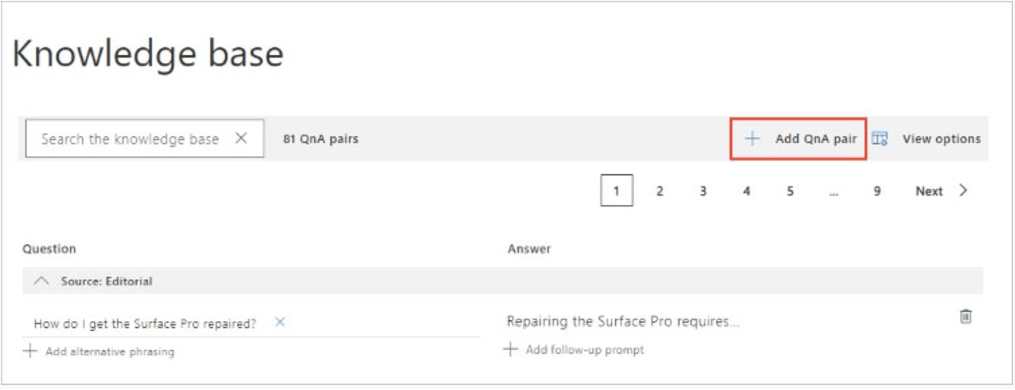
Question: What will be the next version of Windows?
Step 4: Select Save and train to see predictions including the new QnA pair.
You have an Azure subscription that contains an Azure OpenAI resource named OpenAI1 and a user named User1.
You need to ensure that User1 can upload datasets to OpenAI1 and finetune the existing models. The solution must follow the principle of least privilege.
Which role should you assign to User1?
- A. Cognitive Services OpenAI Contributor
- B. Cognitive Services Contributor
- C. Cognitive Services OpenAI User
- D. Contributor
ou need to build a solution that will use optical character recognition (OCR) to scan sensitive documents by using the Computer Vision API. The solution must
NOT be deployed to the public cloud.
What should you do?
- A. Build an on-premises web app to query the Computer Vision endpoint.
- B. Host the Computer Vision endpoint in a container on an on-premises server.
- C. Host an exported Open Neural Network Exchange (ONNX) model on an on-premises server.
- D. Build an Azure web app to query the Computer Vision endpoint.
You are training a Language Understanding model for a user support system.
You create the first intent named GetContactDetails and add 200 examples.
You need to decrease the likelihood of a false positive.
What should you do?
- A. Enable active learning.
- B. Add a machine learned entity.
- C. Add additional examples to the GetContactDetails intent.
- D. Add examples to the None intent.
HOTSPOT
–
You have an Azure subscription.
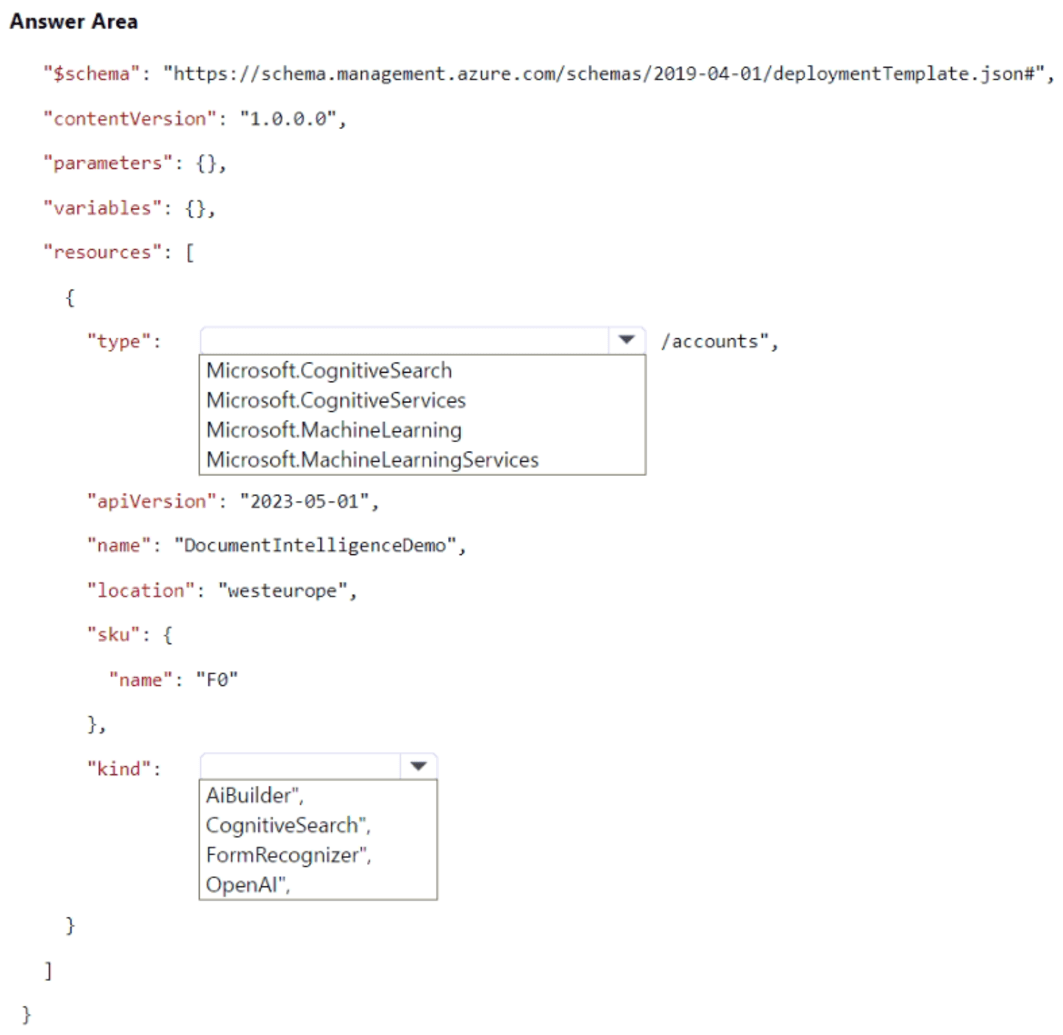
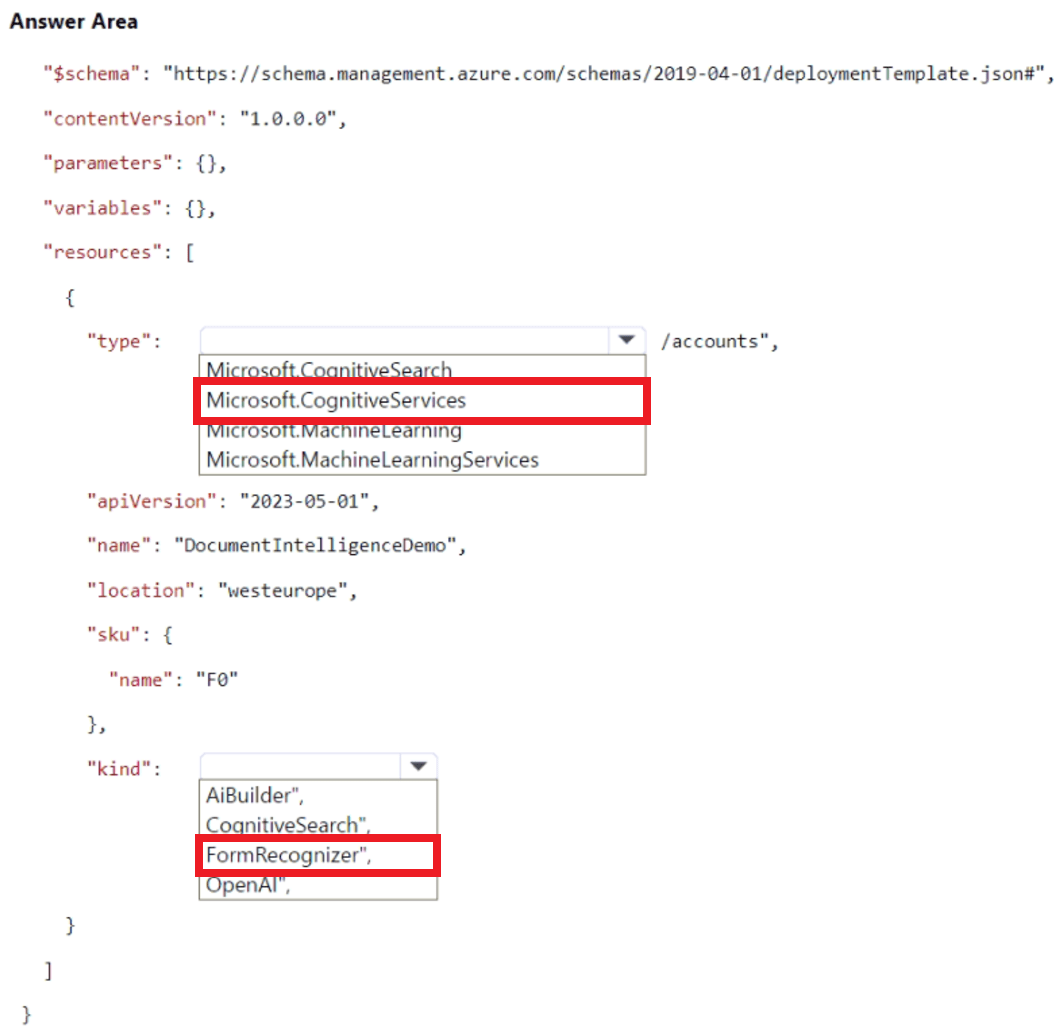
You need to deploy an Azure AI Document Intelligence resource.
How should you complete the Azure Resource Manager (ARM) template? To answer, select the appropriate options in the answer area.
NOTE: Each correct selection is worth one point.
You have an Azure subscription and 10,000 ASCII files.
You need to identify files that contain specific phrases. The solution must use cosine similarity.
Which Azure OpenAI model should you use?
- A. text-embedding-ada-002
- B. GPT-4
- C. GPT-35 Turbo
- D. GPT-4-32k
You have an Azure Cognitive Search solution and a collection of handwritten letters stored as JPEG files.
You plan to index the collection. The solution must ensure that queries can be performed on the contents of the letters.
You need to create an indexer that has a skillset.
Which skill should you include?
- A. image analysis
- B. optical character recognition (OCR)
- C. key phrase extraction
- D. document extraction
DRAG DROP –
You are building a Language Understanding model for purchasing tickets.
You have the following utterance for an intent named PurchaseAndSendTickets.
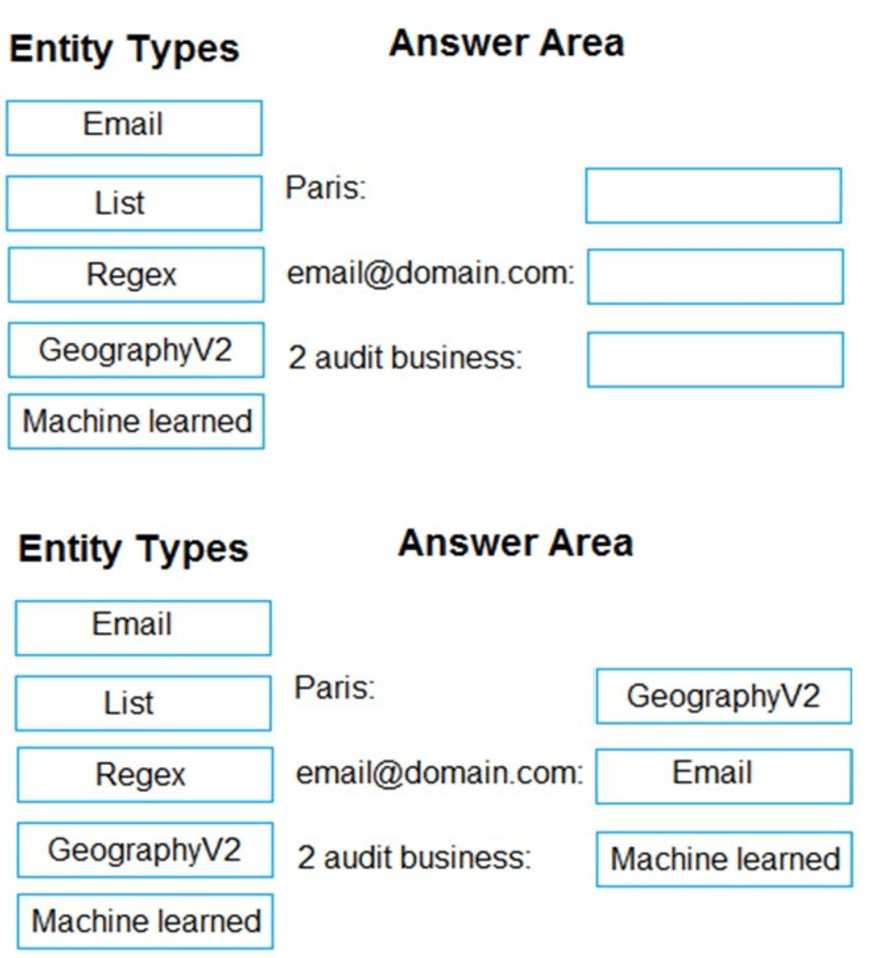
Purchase [2 audit business] tickets to [Paris] [next Monday] and send tickets to [email@domain.com]
You need to select the entity types. The solution must use built-in entity types to minimize training data whenever possible.
Which entity type should you use for each label? To answer, drag the appropriate entity types to the correct labels. Each entity type may be used once, more than once, or not at all.
You may need to drag the split bar between panes or scroll to view content.
Select and Place:
You are building an app named App1 that will use Azure AI Document Intelligence to extract the following data from scanned documents:
• Shipping address
• Billing address
• Customer ID
• Amount due
• Due date
• Total tax
• Subtotal
You need to identify which model to use for App1. The solution must minimize development effort.
Which model should you use?
- A. custom extraction model
- B. contract
- C. invoice
- D. general document
IMULATION –
Use the following login credentials as needed:
To enter your username, place your cursor in the Sign in box and click on the username below.
To enter your password, place your cursor in the Enter password box and click on the password below.
Azure Username: admin@abc.com –
Azure Password: XXXXXXXXXXXX –
The following information is for technical support purposes only:
Lab Instance: 12345678 –
Task –
You have a bot that was developed by using the Microsoft Bot Framework SDK. The bot is available at an endpoint of https://bot.contoso.com/api/messages.
You need to create an Azure Bot named bot12345678 that connects to the bet.
To complete this task, sign in to the Azure portal.
Answer:
Create the resource –
Create the Azure Bot resource, which will allow you to register your bot with the Azure Bot Service.
1. Go to the Azure portal.
2. In the right pane, select Create a resource.
3. In the search box enter bot, then press Enter.
4. Select the Azure Bot card.
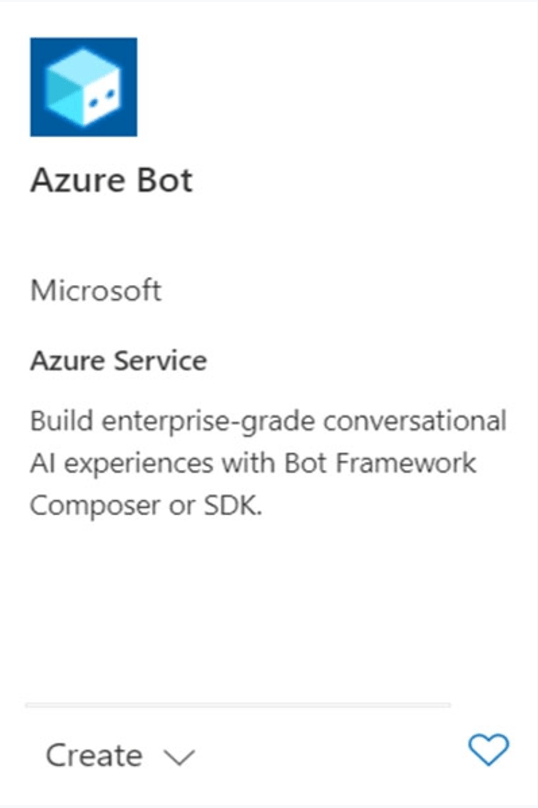
5. Select Create.
6. Enter values in the required fields. Choose which type of app to create and whether to use existing or create new identity information.
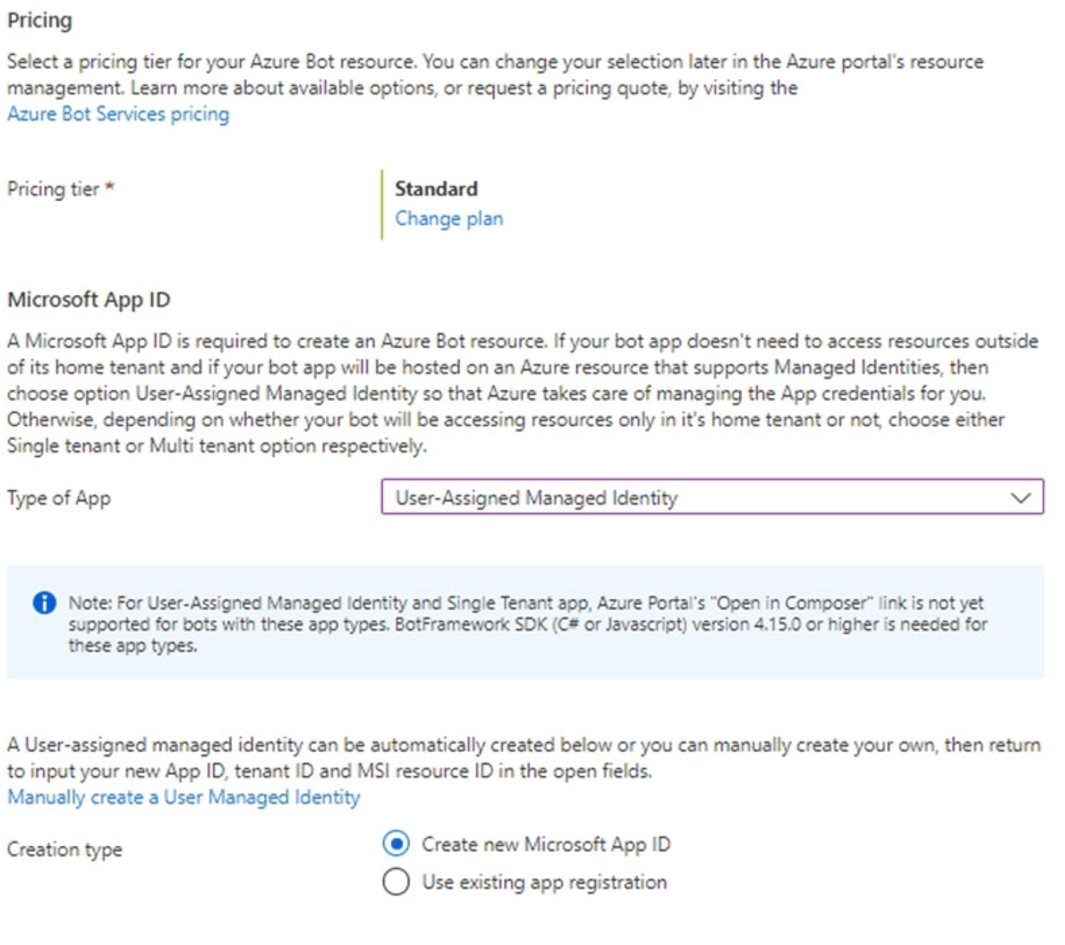
7. Select Review + create.
8. If the validation passes, select Create.
9. Once the deployment completes, select Go to resource. You should see the bot and related resources listed in the resource group you selected.
10.Enter the endpoint of the Bot Framework SDK: https://bot.contoso.com/api/messages