

Pass Microsoft AI-102 in Just 3 Days – Stress-Free, No Study Needed!
Have questions? Contact us directly on WhatsApp for quick support!
SIMULATION –
Use the following login credentials as needed:
To enter your username, place your cursor in the Sign in box and click on the username below.
To enter your password, place your cursor in the Enter password box and click on the password below.
Azure Username: admin@abc.com –
Azure Password: XXXXXXXXXXXX –
The following information is for technical support purposes only:
Lab Instance: 12345678 –
Task –
You need to get insights from a video file located in the C:\Resources\Video\Media.mp4 folder.
Save the insights to the C:\Resources\Video\Insights.json folder.
To complete this task, sign in to the Azure Video Analyzer for Media at https://www.videoindexer.ai/ by using admin@abc.com
Answer:
Step 1: Login –
Browse to the Azure Video Indexer website and sign in.
URL: https://www.videoindexer.ai/
Login admin@abc.com –
Step 2: Create a project from your video
You can create a new project directly from a video in your account.
1. Go to the Library tab of the Azure Video Indexer website.
2. Open the video that you want to use to create your project. On the insights and timeline page, select the Video editor button.
Folder: C:\Resources\Video\Media.mp4
This takes you to the same page that you used to create a new project. Unlike the new project, you see the timestamped insights segments of the video, that you had started editing previously.
Step 3: Save the insights to the C:\Resources\Video\Insights.json folder.
Reference:
https://docs.microsoft.com/en-us/azure/azure-video-indexer/use-editor-create-project
SIMULATION –
Use the following login credentials as needed:
To enter your username, place your cursor in the Sign in box and click on the username below.
To enter your password, place your cursor in the Enter password box and click on the password below.
Azure Username: admin@abc.com –
Azure Password: XXXXXXXXXXXX –
The following information is for technical support purposes only:
Lab Instance: 12345678 –
Task –
You plan to analyze stock photography and automatically generate captions for the images.
You need to create a service in Azure to analyze the images. The service must be named caption12345678 and must be in the East US Azure region. The solution must use the Free pricing tier.
In the C:\Resources\Caption\Params.json folder, enter the value for Key 1 and the endpoint for the new service.
To complete this task, sign in to the Azure portal.
Answer:
Step 1: Provision a Cognitive Services resource
If you don’t already have one in your subscription, you’ll need to provision a Cognitive Services resource.
1. Open the Azure portal at https://portal.azure.com, and sign in using the Microsoft account associated with your Azure subscription.
2. Select the Create a resource button, search for cognitive services, and create a Cognitive Services resource with the following settings:
Subscription: Your Azure subscription
Resource group: Choose or create a resource group (if you are using a restricted subscription, you may not have permission to create a new resource group – use the one provided)
Region: East US Azure region –
Name: caption12345678 –
Pricing tier: Free F0 –
3. Select the required checkboxes and create the resource.
Wait for deployment to complete, and then view the deployment details.
4. When the resource has been deployed, go to it and view its Keys and Endpoint page. You will need the endpoint and one of the keys from this page in the next procedure.
Step 2: Save Key and Endpoint values in Params.json
Open the configuration file, C:\Resources\Caption\Params.json. and update the configuration values it contains to reflect the endpoint and an authentication key for your cognitive services resource. Save your changes.
Reference:
https://microsoftlearning.github.io/AI-102-AIEngineer/Instructions/15-computer-vision.html
SIMULATION –
Use the following login credentials as needed:
To enter your username, place your cursor in the Sign in box and click on the username below.
To enter your password, place your cursor in the Enter password box and click on the password below.
Azure Username: admin@abc.com –
Azure Password: XXXXXXXXXXXX –
The following information is for technical support purposes only:
Lab Instance: 12345678 –
Task –
You plan to build an application that will use caption12345678. The application will be deployed to a virtual network named VNet1.
You need to ensure that only virtual machines on VNet1 can access caption12345678.
To complete this task, sign in to the Azure portal.
Answer:
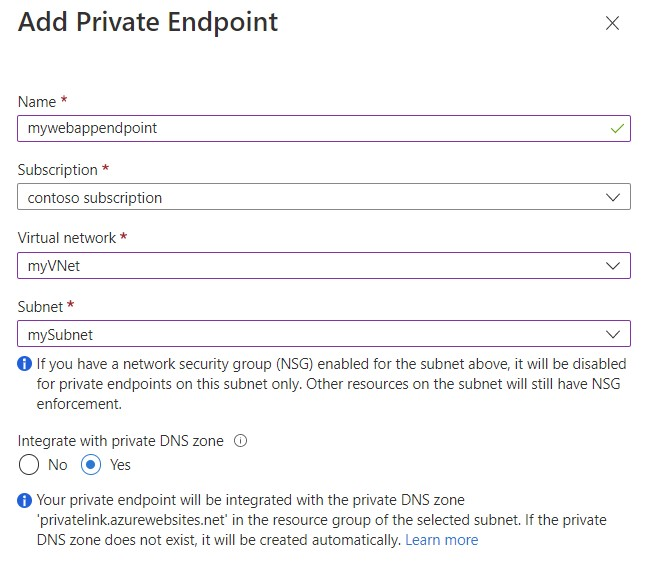
Step 1: Create private endpoint for your web app
1. In the left-hand menu, select All Resources > caption12345678 – the name of your web app.
2. In the web app overview, select Settings > Networking.
3. In Networking, select Private endpoints.
4. Select + Add in the Private Endpoint connections page.
5. Enter or select the following information in the Add Private Endpoint page:
Name: Enter caption12345678.
Subscription Select your Azure subscription.
Virtual network Select VNet1.
Subnet: –
Integrate with private DNS zone: Select Yes.
6. Select OK.
Reference:
https://docs.microsoft.com/en-us/azure/private-link/tutorial-private-endpoint-webapp-portal
SIMULATION –
Use the following login credentials as needed:
To enter your username, place your cursor in the Sign in box and click on the username below.
To enter your password, place your cursor in the Enter password box and click on the password below.
Azure Username: admin@abc.com –
Azure Password: XXXXXXXXXXXX –
The following information is for technical support purposes only:
Lab Instance: 12345678 –
Task –
You need to ensure that a user named admin@abc.com can regenerate the subscription keys of AAA12345678. The solution must use the principle of least privilege.
To complete this task, sign in to the Azure portal.
Answer:
Manually rotate subscription keys
1. (Update your application code to reference the secondary key for the Azure account and deploy.)
2. In the Azure portal, navigate to your Azure account.
3. Under Settings, select Authentication.
4. To regenerate the primary key for your Azure account, select the Regenerate button next to the primary key.
5. (Update your application code to reference the new primary key and deploy.)
6. Regenerate the secondary key in the same manner.
Reference:
https://github.com/MicrosoftDocs/azure-docs/blob/main/articles/azure-maps/how-to-manage-authentication.md
You have an Azure IoT hub that receives sensor data from machinery.
You need to build an app that will perform the following actions:
• Perform anomaly detection across multiple correlated sensors.
• Identify the root cause of process stops.
• Send incident alerts.
The solution must minimize development time.
Which Azure service should you use?
- A. Azure Metrics Advisor
- B. Form Recognizer
- C. Azure Machine Learning
- D. Anomaly Detector
You have an app that analyzes images by using the Computer Vision API.
You need to configure the app to provide an output for users who are vision impaired. The solution must provide the output in complete sentences.
Which API call should you perform?
- A. readInStreamAsync
- B. analyzeImagesByDomainInStreamAsync
- C. tagImageInStreamAsync
- D. describeImageInStreamAsync
DRAG DROP
–
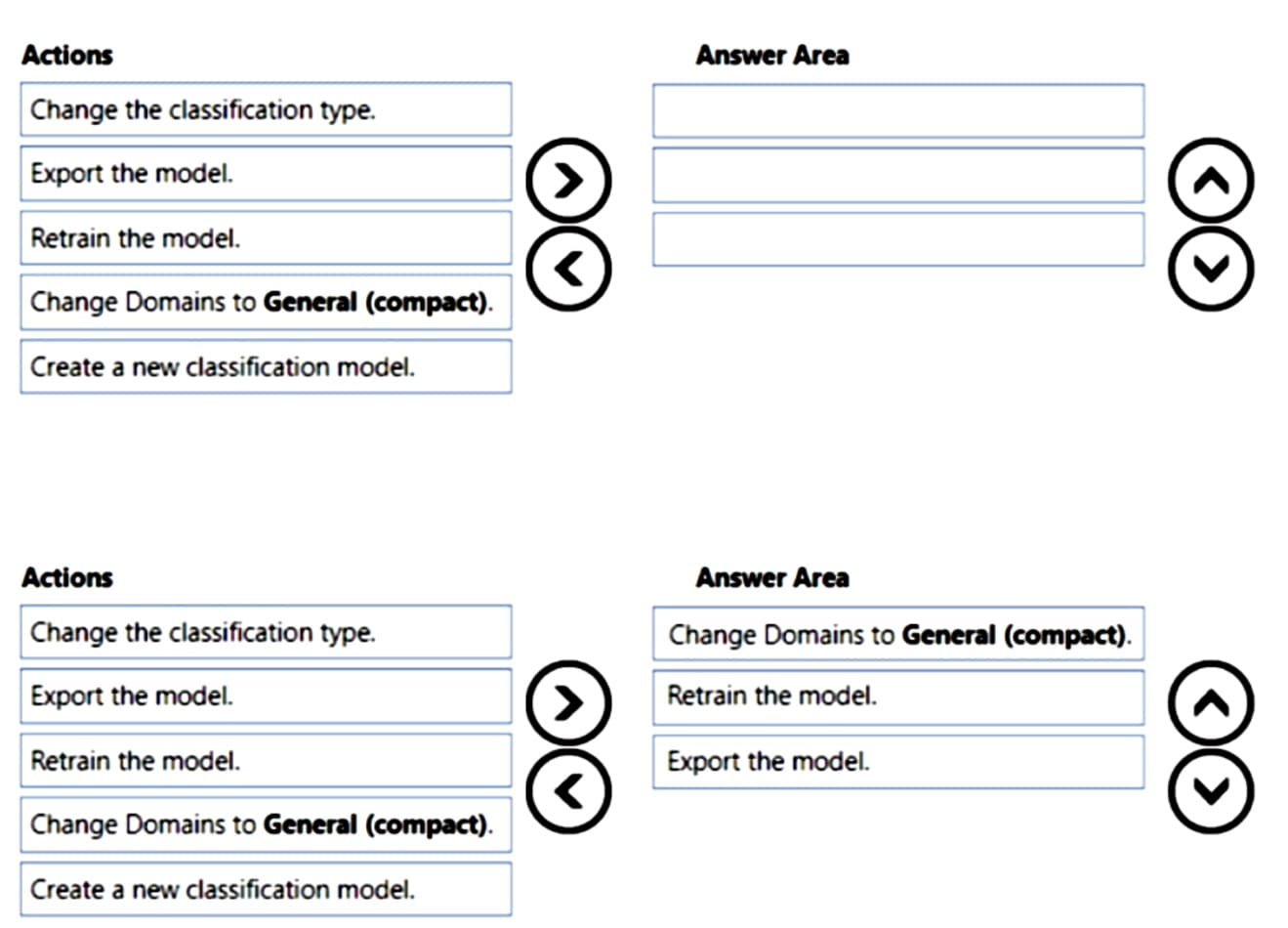
You have a Custom Vision service project that performs object detection. The project uses the General domain for classification and contains a trained model.
You need to export the model for use on a network that is disconnected from the internet.
Which three actions should you perform in sequence? To answer, move the appropriate actions from the list of actions to the answer area and arrange them in the correct order.
You are building an AI solution that will use Sentiment Analysis results from surveys to calculate bonuses for customer service staff.
You need to ensure that the solution meets the Microsoft responsible AI principles.
What should you do?
- A. Add a human review and approval step before making decisions that affect the staff’s financial situation.
- B. Include the Sentiment Analysis results when surveys return a low confidence score.
- C. Use all the surveys, including surveys by customers who requested that their account be deleted and their data be removed.
- D. Publish the raw survey data to a central location and provide the staff with access to the location.
You have an Azure subscription that contains a Language service resource named ta1 and a virtual network named vnet1.
You need to ensure that only resources in vnet1 can access ta1.
What should you configure?
- A. a network security group (NSG) for vnet1
- B. Azure Firewall for vnet1
- C. the virtual network settings for ta1
- D. a Language service container for ta1
You are developing a monitoring system that will analyze engine sensor data, such as rotation speed, angle, temperature, and pressure. The system must generate an alert in response to atypical values.
What should you include in the solution?
- A. Application Insights in Azure Monitor
- B. metric alerts in Azure Monitor
- C. Multivariate Anomaly Detection
- D. Univariate Anomaly Detection