

Pass Microsoft AZ-104 in Just 3 Days – Stress-Free, No Study Needed!
Have questions? Contact us directly on WhatsApp for quick support!
Note: This question is part of a series of questions that present the same scenario. Each question in the series contains a unique solution that might meet the stated goals. Some question sets might have more than one correct solution, while others might not have a correct solution.
After you answer a question in this section, you will NOT be able to return to it. As a result, these questions will not appear in the review screen.
You have an Azure Directory (Azure AD) tenant named Adatum and an Azure Subscription named Subscription1. Adatum contains a group named Developers.
Subscription1 contains a resource group named Dev.
You need to provide the Developers group with the ability to create Azure logic apps in the Dev resource group.
Solution: On Dev, you assign the Logic App Contributor role to the Developers group.
Does this meet the goal?
- A. Yes
- B. No
HOTSPOT –
You have an Azure Load Balancer named LB1.
You assign a user named User1 the roles shown in the following exhibit.
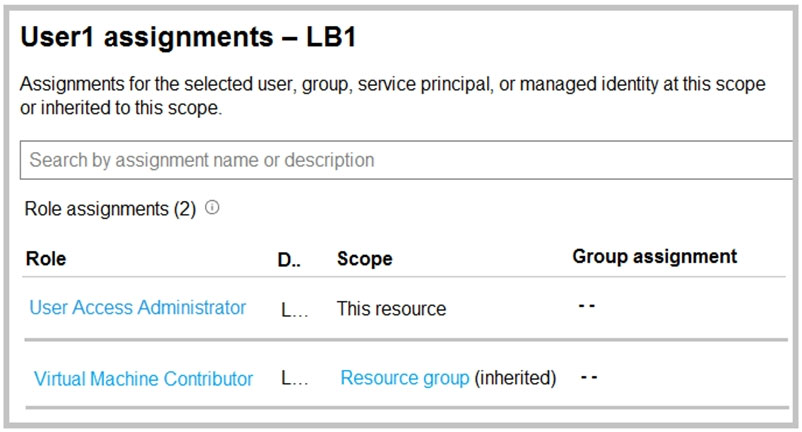
Use the drop-down menus to select the answer choice that completes each statement based on the information presented in the graphic.
NOTE: Each correct selection is worth one point.
Hot Area:
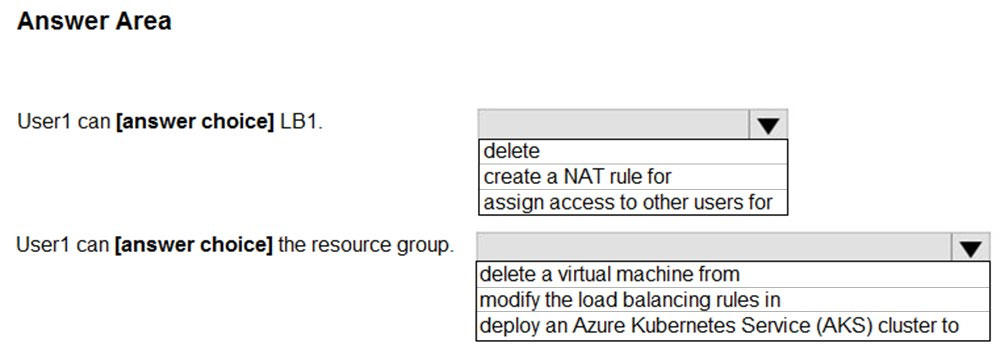
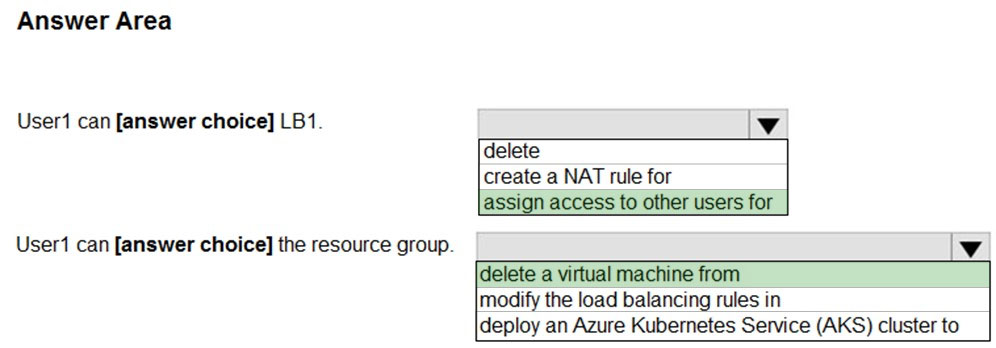
Reference:
https://docs.microsoft.com/en-us/azure/role-based-access-control/built-in-roles#virtual-machine-contributor https://docs.microsoft.com/en-us/azure/role-based-access-control/rbac-and-directory-admin-roles
You have an Azure subscription named Subscription1 that contains a virtual network named VNet1. VNet1 is in a resource group named RG1.
Subscription1 has a user named User1. User1 has the following roles:
– Reader
– Security Admin
– Security Reader
You need to ensure that User1 can assign the Reader role for VNet1 to other users.
What should you do?
- A. Remove User1 from the Security Reader role for Subscription1. Assign User1 the Contributor role for RG1.
- B. Assign User1 the Owner role for VNet1.
- C. Assign User1 the Contributor role for VNet1.
- D. Assign User1 the Network Contributor role for VNet1.
HOTSPOT –
You configure the custom role shown in the following exhibit.

Use the drop-down menus to select the answer choice that completes each statement based on the information presented in the graphic.
NOTE: Each correct selection is worth one point.
Hot Area:
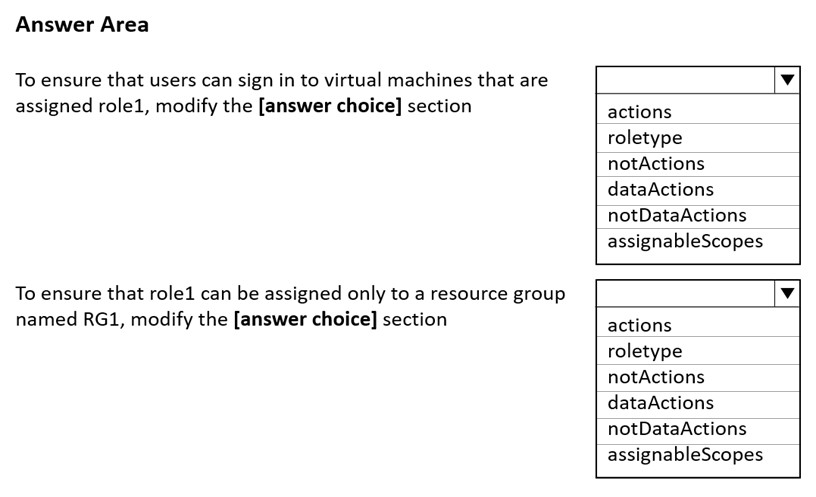
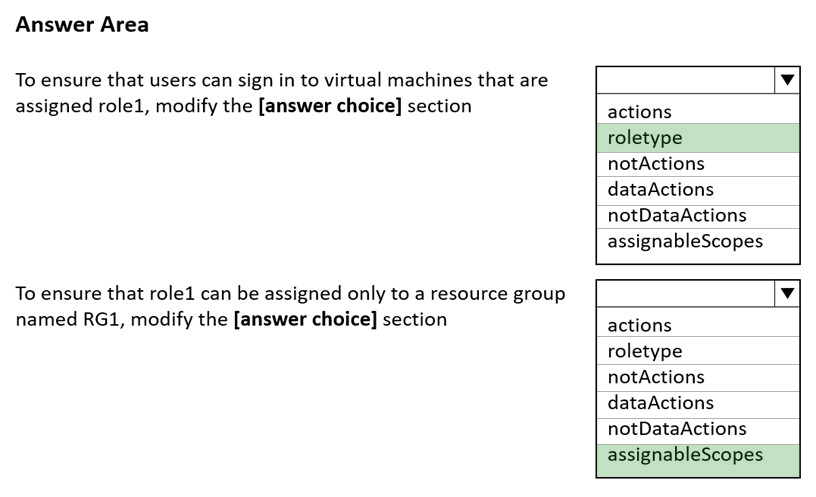
Box 1: roletype –
You need to configure Azure RBAC policy to determine who can log in to the VM. Two Azure roles are used to authorize VM login:
Virtual Machine Administrator Login: Users with this role assigned can log in to an Azure virtual machine with administrator privileges.
Virtual Machine User Login: Users with this role assigned can log in to an Azure virtual machine with regular user privileges.
Note, example roletype:
“roleName”: “Virtual Machine Administrator Login”,
“roleType”: “BuiltInRole”,
“type”: “Microsoft.Authorization/roleDefinitions”
Box 2: assignableScopes –
Azure role-based access control (Azure RBAC) is the authorization system you use to manage access to Azure resources. To grant access, you assign roles to users, groups, service principals, or managed identities at a particular scope.
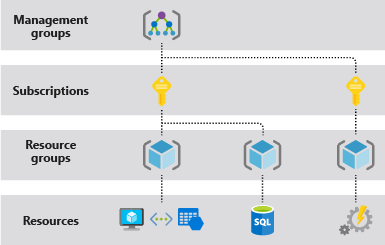
When you assign roles, you must specify a scope. Scope is the set of resources the access applies to. In Azure, you can specify a scope at four levels from broad to narrow: management group, subscription, resource group, and resource.
Reference:
https://docs.microsoft.com/en-us/azure/active-directory/devices/howto-vm-sign-in-azure-ad-windows https://docs.microsoft.com/en-us/azure/role-based-access-control/built-in-roles https://docs.microsoft.com/en-us/azure/role-based-access-control/role-assignments-portal
You have an Azure subscription that contains a storage account named storage1. The storage1 account contains a file share named share1.
The subscription is linked to a hybrid Azure Active Directory (Azure AD) tenant that contains a security group named Group1.
You need to grant Group1 the Storage File Data SMB Share Elevated Contributor role for share1.
What should you do first?
- A. Enable Active Directory Domain Service (AD DS) authentication for storage1.
- B. Grant share-level permissions by using File Explorer.
- C. Mount share1 by using File Explorer.
- D. Create a private endpoint.
You have 15 Azure subscriptions.
You have an Azure Active Directory (Azure AD) tenant that contains a security group named Group1.
You plan to purchase additional Azure subscription.
You need to ensure that Group1 can manage role assignments for the existing subscriptions and the planned subscriptions. The solution must meet the following requirements:
✑ Use the principle of least privilege.
✑ Minimize administrative effort.
What should you do?
- A. Assign Group1 the Owner role for the root management group.
- B. Assign Group1 the User Access Administrator role for the root management group.
- C. Create a new management group and assign Group1 the User Access Administrator role for the group.
- D. Create a new management group and assign Group1 the Owner role for the group.
HOTSPOT –
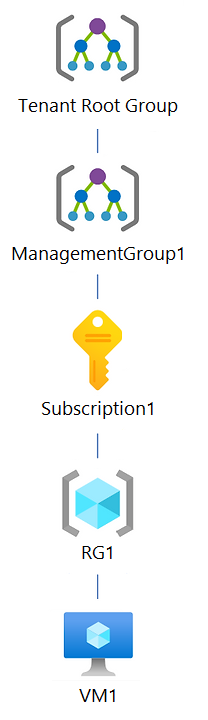
You have an Azure subscription that contains the hierarchy shown in the following exhibit.
You create an Azure Policy definition named Policy1.
To which Azure resources can you assign Policy1 and which Azure resources can you specify as exclusions from Policy1? To answer, select the appropriate options in the answer area.
NOTE: Each correct selection is worth one point.
Hot Area:
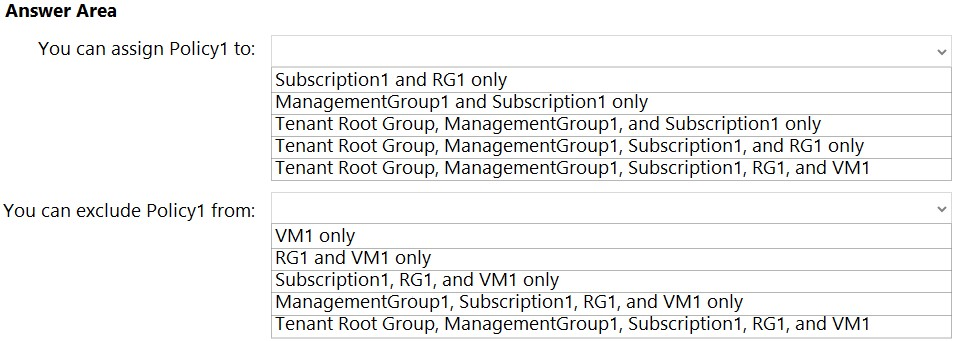
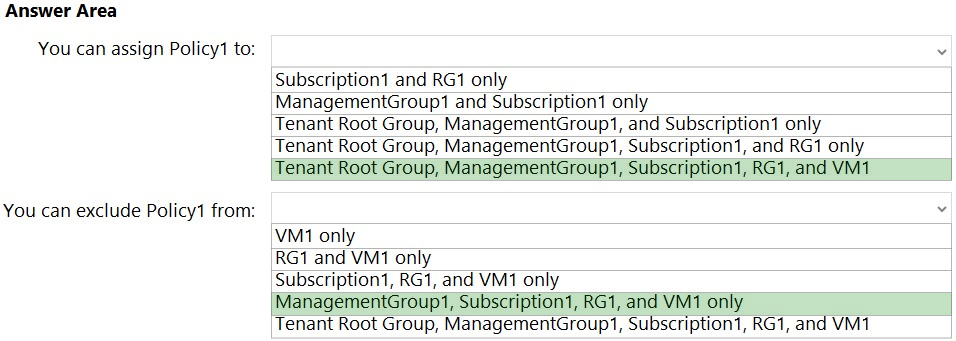
Box 1: Tenant Root Group, ManagementGroup1, Subscription1, RG1, and VM1
Once your business rules have been formed, the policy definition or initiative is assigned to any scope of resources that Azure supports, such as management groups, subscriptions, resource groups, or individual resources.
Note: Azure provides four levels of scope: management groups, subscriptions, resource groups, and resources. The following image shows an example of these layers.
Box 2: ManagementGroup1, Subscription1, RG1, and VM1
You can exclude a subscope from the assignment.
Reference:
https://docs.microsoft.com/en-us/azure/azure-resource-manager/management/overview
Note: This question is part of a series of questions that present the same scenario. Each question in the series contains a unique solution that might meet the stated goals. Some question sets might have more than one correct solution, while others might not have a correct solution.
After you answer a question in this section, you will NOT be able to return to it. As a result, these questions will not appear in the review screen.
You have an Azure subscription that contains the following users in an Azure Active Directory tenant named contoso.onmicrosoft.com:
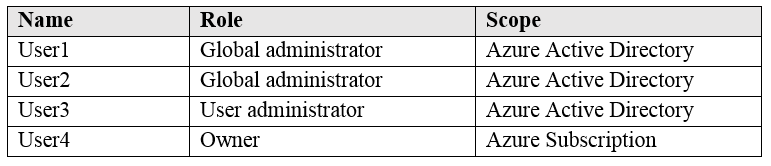
User1 creates a new Azure Active Directory tenant named external.contoso.onmicrosoft.com.
You need to create new user accounts in external.contoso.onmicrosoft.com.
Solution: You instruct User2 to create the user accounts.
Does that meet the goal?
- A. Yes
- B. No
Note: This question is part of a series of questions that present the same scenario. Each question in the series contains a unique solution that might meet the stated goals. Some question sets might have more than one correct solution, while others might not have a correct solution.
After you answer a question in this section, you will NOT be able to return to it. As a result, these questions will not appear in the review screen.
You have an Azure subscription that contains the following users in an Azure Active Directory tenant named contoso.onmicrosoft.com:
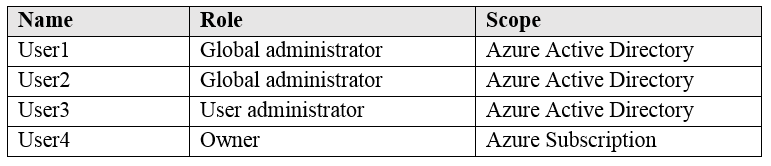
User1 creates a new Azure Active Directory tenant named external.contoso.onmicrosoft.com.
You need to create new user accounts in external.contoso.onmicrosoft.com.
Solution: You instruct User4 to create the user accounts.
Does that meet the goal?
- A. Yes
- B. No
Note: This question is part of a series of questions that present the same scenario. Each question in the series contains a unique solution that might meet the stated goals. Some question sets might have more than one correct solution, while others might not have a correct solution.
After you answer a question in this section, you will NOT be able to return to it. As a result, these questions will not appear in the review screen.
You have an Azure subscription that contains the following users in an Azure Active Directory tenant named contoso.onmicrosoft.com:
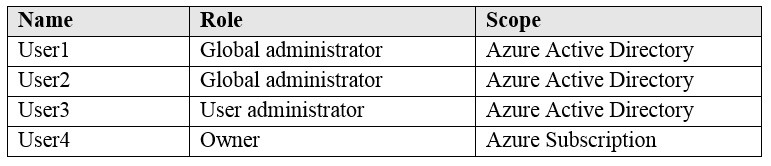
User1 creates a new Azure Active Directory tenant named external.contoso.onmicrosoft.com.
You need to create new user accounts in external.contoso.onmicrosoft.com.
Solution: You instruct User3 to create the user accounts.
Does that meet the goal?
- A. Yes
- B. No