

Pass Microsoft AZ-104 in Just 3 Days – Stress-Free, No Study Needed!
Have questions? Contact us directly on WhatsApp for quick support!
HOTSPOT –
You have an Azure virtual network named VNet1 that connects to your on-premises network by using a site-to-site VPN. VNet1 contains one subnet named
Sunet1.
Subnet1 is associated to a network security group (NSG) named NSG1. Subnet1 contains a basic internal load balancer named ILB1. ILB1 has three Azure virtual machines in the backend pool.
You need to collect data about the IP addresses that connects to ILB1. You must be able to run interactive queries from the Azure portal against the collected data.
What should you do? To answer, select the appropriate options in the answer area.
NOTE: Each correct selection is worth one point.
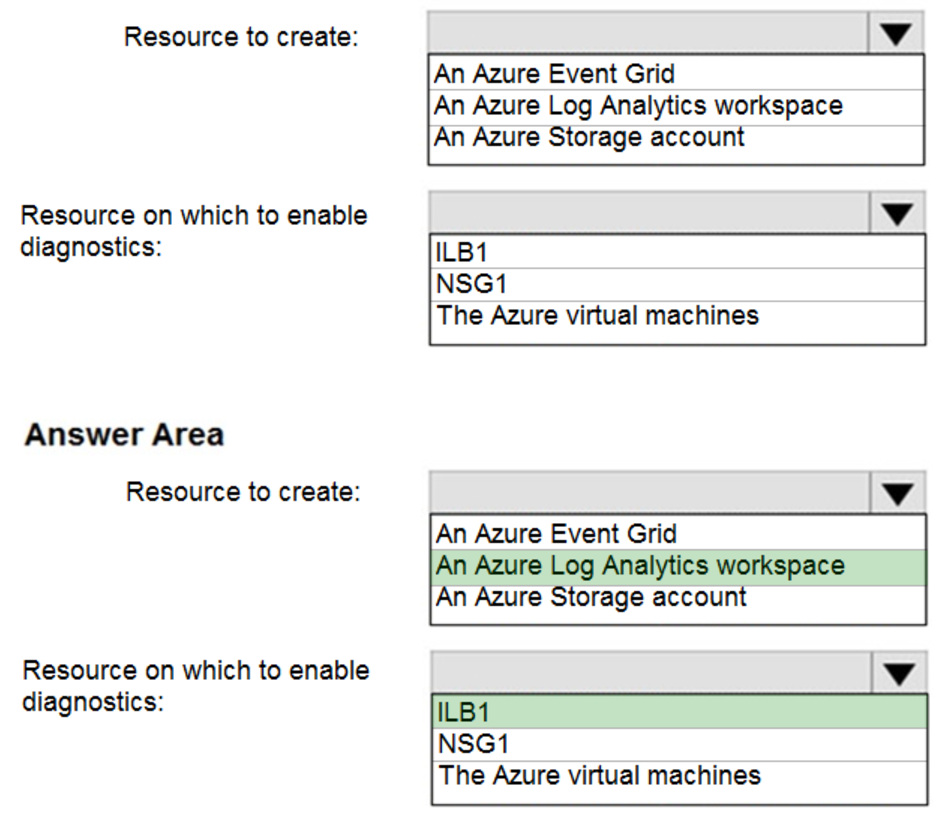
Box 1: An Azure Log Analytics workspace
In the Azure portal you can set up a Log Analytics workspace, which is a unique Log Analytics environment with its own data repository, data sources, and solutions
Box 2: ILB1 –
Reference:
https://docs.microsoft.com/en-us/azure/log-analytics/log-analytics-quick-create-workspace https://docs.microsoft.com/en-us/azure/load-balancer/load-balancer-standard-diagnostics
HOTSPOT –
You have an Azure virtual machine named VM1 and a Recovery Services vault named Vault1.
You create a backup policy named Policy1 as shown in the exhibit. (Click the Exhibit tab.)
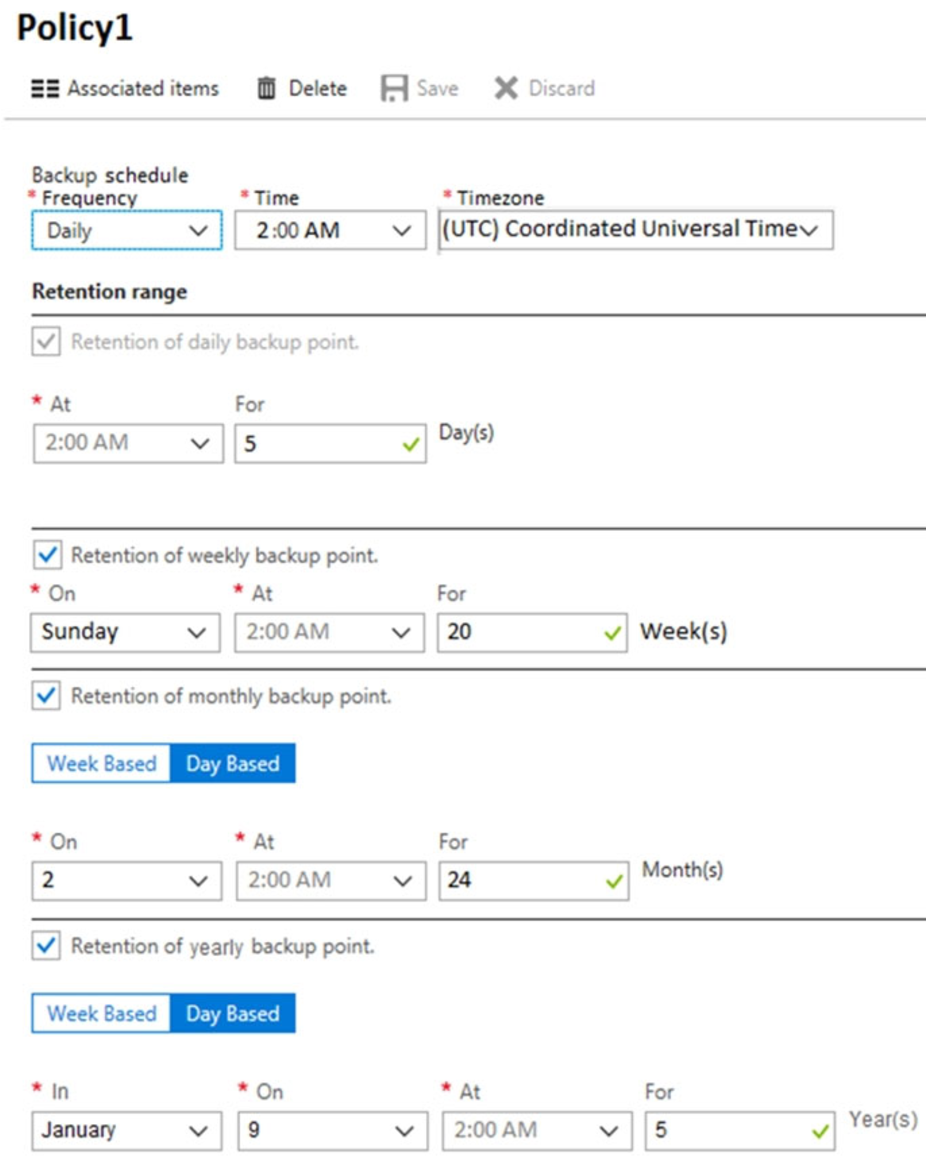
You configure the backup of VM1 to use Policy1 on Thursday, January 1 at 1:00 AM.
You need to identify the number of available recovery points for VM1.
How many recovery points are available on January 8 and January 15? To answer, select the appropriate options in the answer area.
NOTE: Each correct selection is worth one point.
Hot Area:
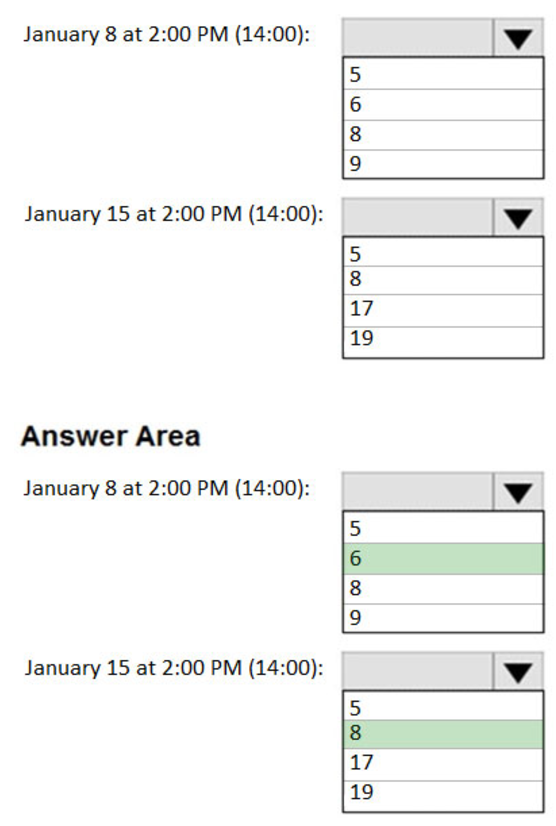
Box 1: 6 –
5 latest daily recovery points, which includes the weekly backup from the previous Sunday, plus the monthly recovery point.
Box 2: 8 –
5 latest daily recovery points, plus two weekly backups, plus the monthly recovery point.
Reference:
https://social.technet.microsoft.com/Forums/en-US/854ab6ae-79aa-4bad-ac65-471c4d422e94/daily-monthly-yearly-recovery-points-and-storage-used? forum=windowsazureonlinebackup
HOTSPOT –
You have an Azure subscription that contains the resources shown in the following table:

You assign a policy to RG6 as shown in the following table:
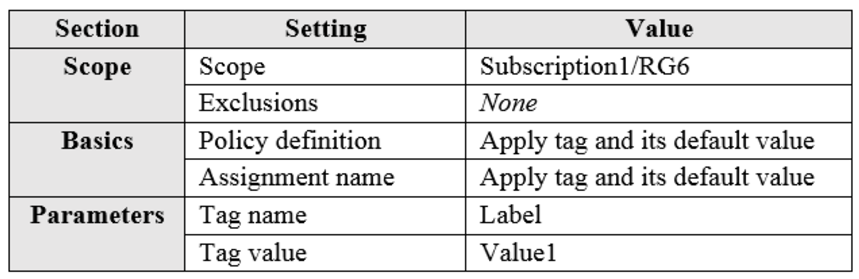
To RG6, you apply the tag: RGroup: RG6.
You deploy a virtual network named VNET2 to RG6.
Which tags apply to VNET1 and VNET2? To answer, select the appropriate options in the answer area.
NOTE: Each correct selection is worth one point.
Hot Area:
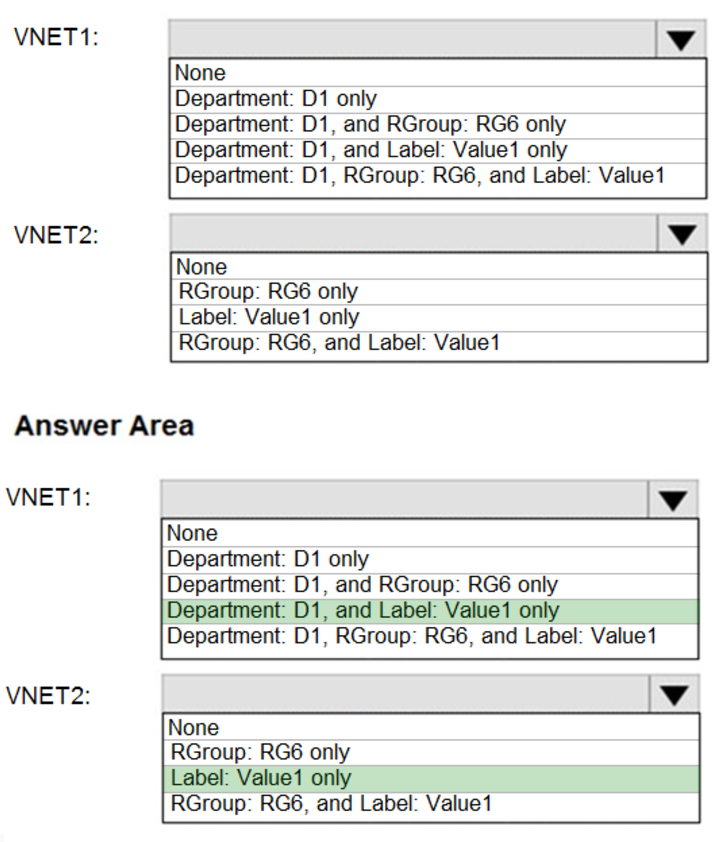
VNET1: Department: D1, and Label:Value1 only.
Tags applied to the resource group or subscription are not inherited by the resources.
Note: Azure Policy allows you to use either built-in or custom-defined policy definitions and assign them to either a specific resource group or across a whole
Azure subscription.
VNET2: Label:Value1 only.
Incorrect Answers:
RGROUP: RG6 –
Tags applied to the resource group or subscription are not inherited by the resources.
Reference:
https://docs.microsoft.com/en-us/azure/azure-resource-manager/management/tag-policies
HOTSPOT –
You have an Azure subscription that contains the resources shown in the following table.
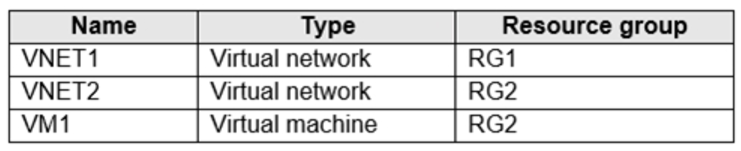
The status of VM1 is Running.
You assign an Azure policy as shown in the exhibit. (Click the Exhibit tab.)
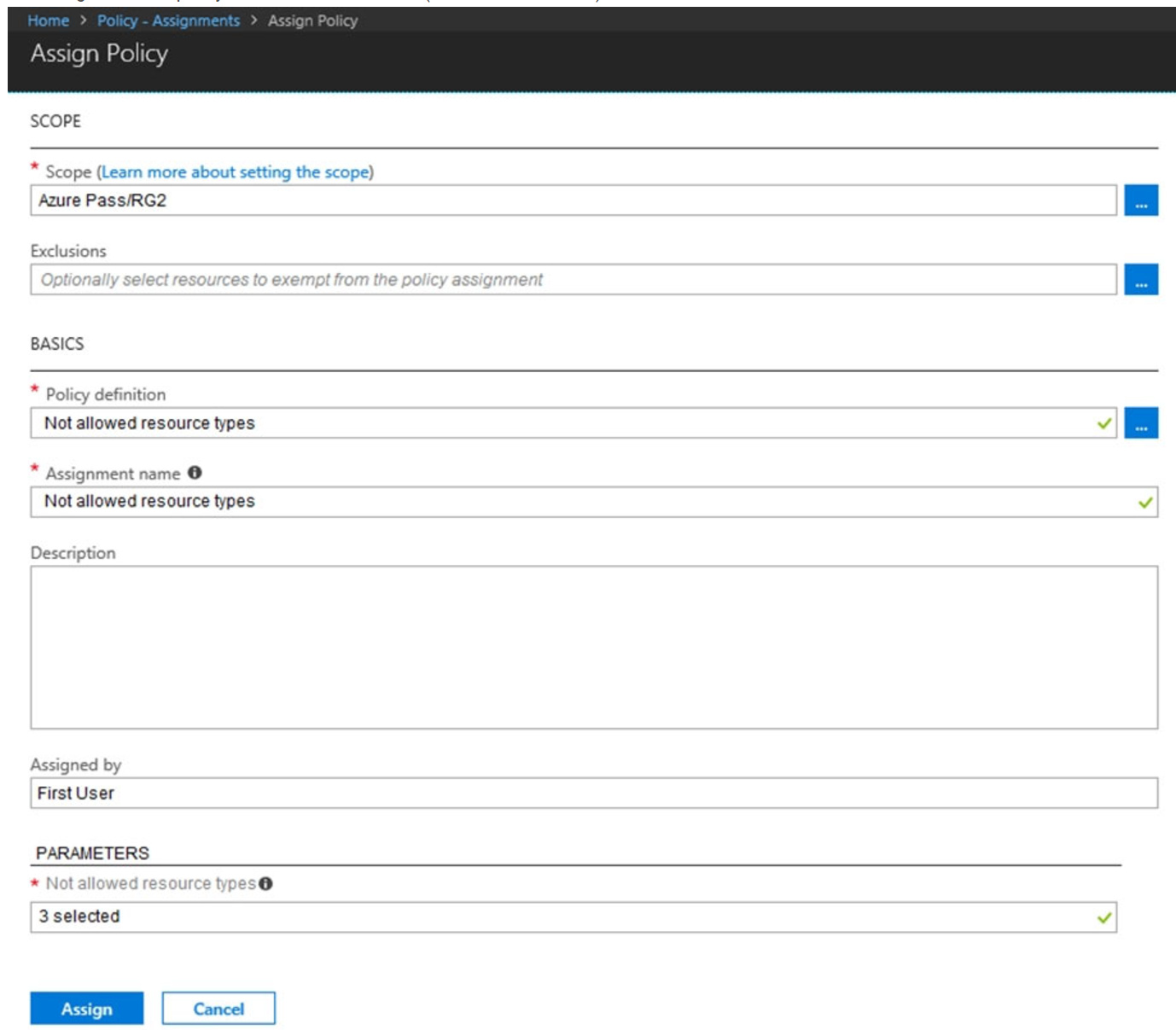
You assign the policy by using the following parameters:
Microsoft.ClassicNetwork/virtualNetworks
Microsoft.Network/virtualNetworks
Microsoft.Compute/virtualMachines
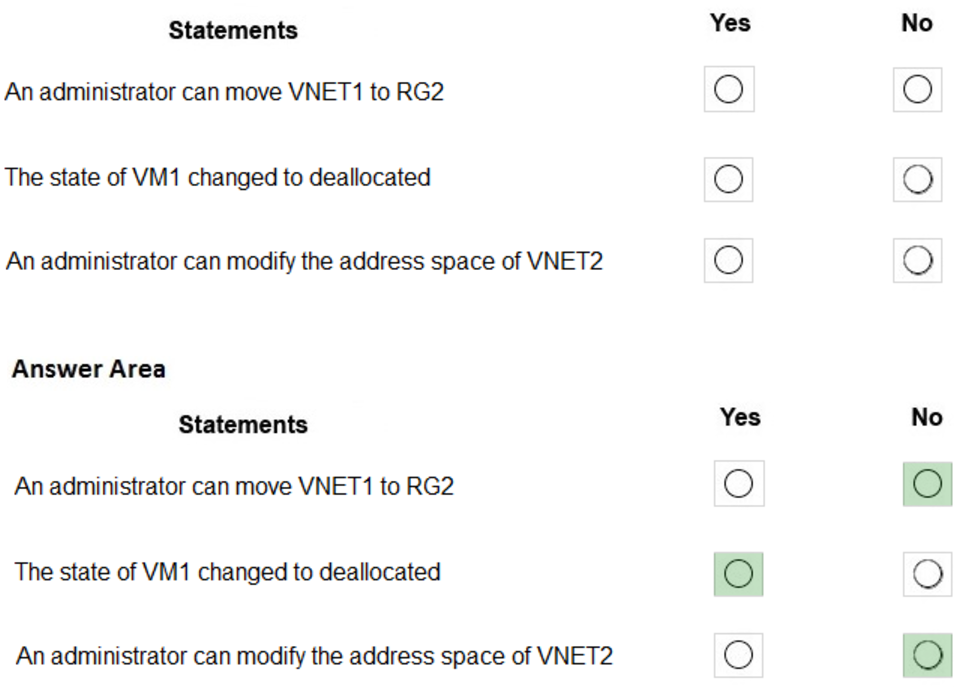
For each of the following statements, select Yes if the statement is true. Otherwise, select No.
NOTE: Each correct selection is worth one point.
Hot Area:
HOTSPOT –
You have the App Service plans shown in the following table.

You plan to create the Azure web apps shown in the following table.

You need to identify which App Service plans can be used for the web apps.
What should you identify? To answer, select the appropriate options in the answer area.
NOTE: Each correct selection is worth one point.
Hot Area:
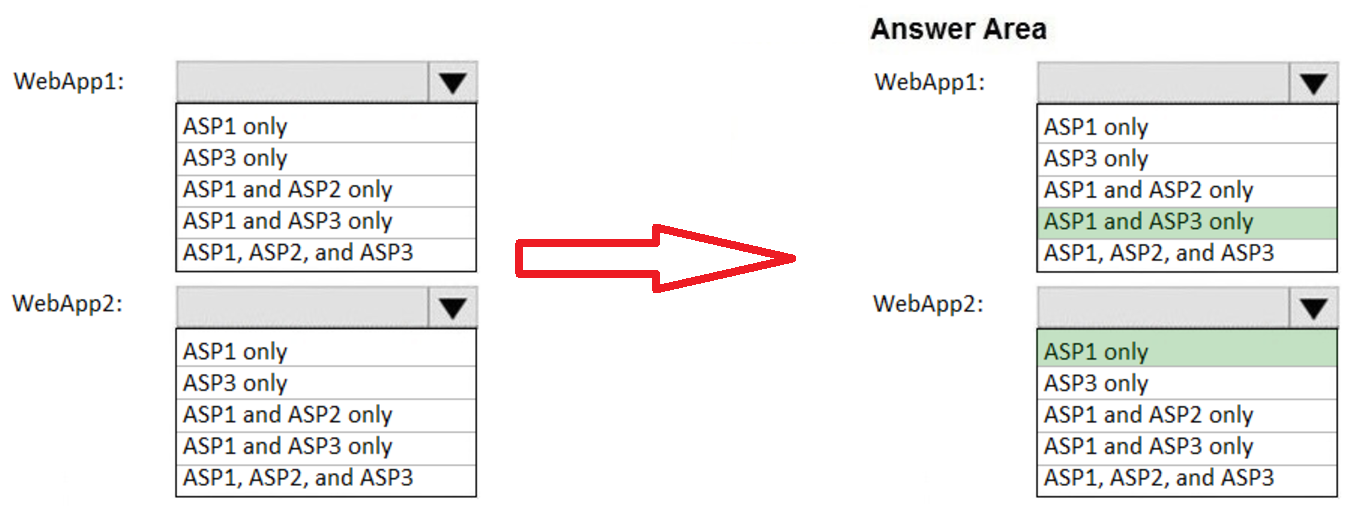
Box 1: ASP1 ASP3 –
Asp1, ASP3: ASP.NET Core apps can be hosted both on Windows or Linux.
Not ASP2: The region in which your app runs is the region of the App Service plan it’s in.
Box 2: ASP1 –
ASP.NET apps can be hosted on Windows only.
Reference:
https://docs.microsoft.com/en-us/azure/app-service/quickstart-dotnetcore?pivots=platform-linux https://docs.microsoft.com/en-us/azure/app-service/app-service-plan-manage#
HOTSPOT –
You have the web apps shown in the following table.
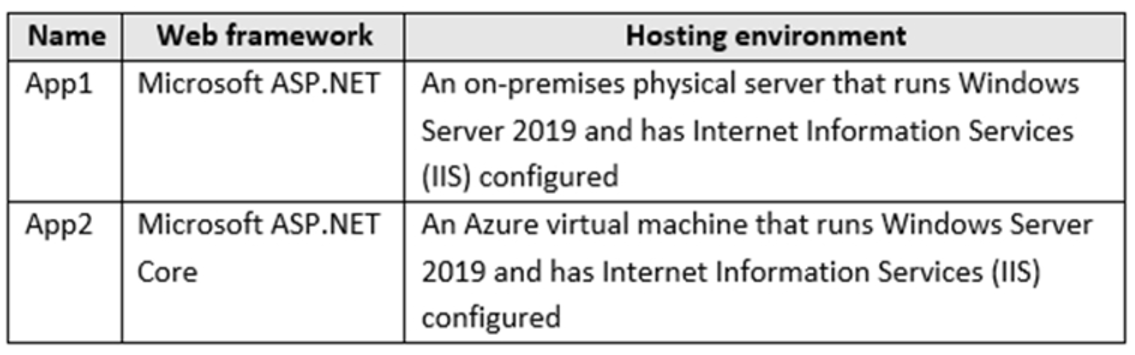
You need to monitor the performance and usage of the apps by using Azure Application Insights. The solution must minimize modifications to the application code.
What should you do on each app? To answer, select the appropriate options in the answer area.
NOTE: Each correct selection is worth one point.
Hot Area:
DRAG DROP –
You have an Azure subscription that contains a storage account.
You have an on-premises server named Server1 that runs Windows Server 2016. Server1 has 2 TB of data.
You need to transfer the data to the storage account by using the Azure Import/Export service.
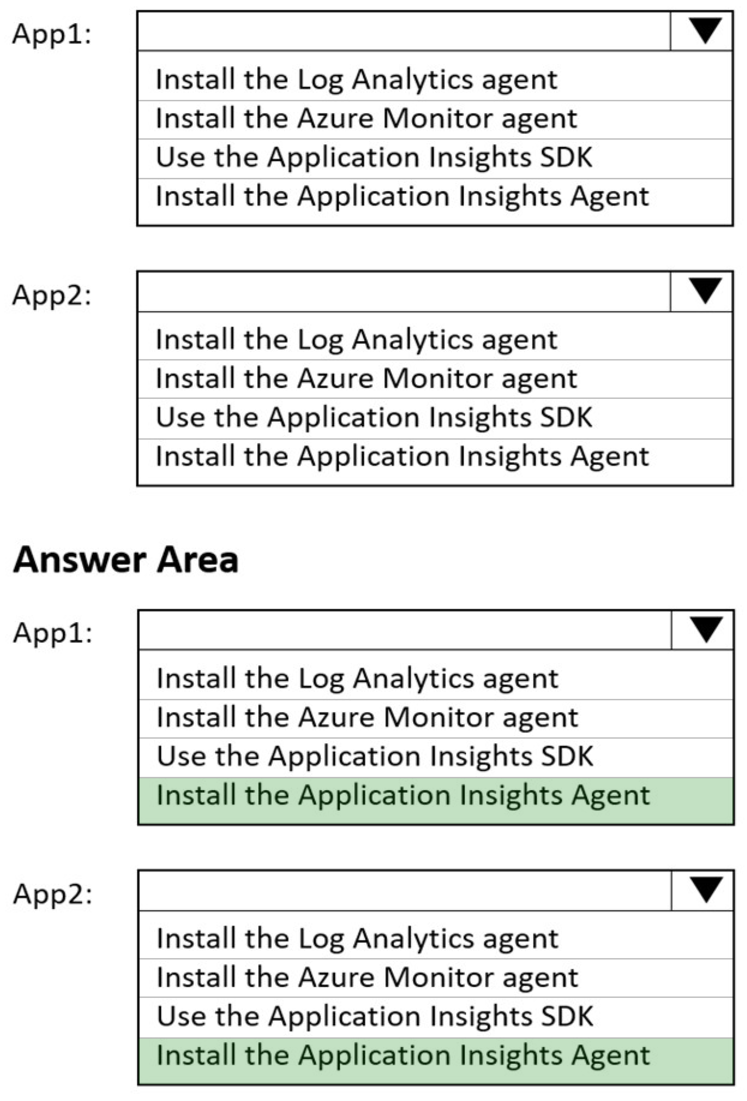
In which order should you perform the actions? To answer, move all actions from the list of actions to the answer area and arrange them in the correct order.
NOTE: More than one order of answer choices is correct. You will receive credit for any of the correct orders you select.
Select and Place:
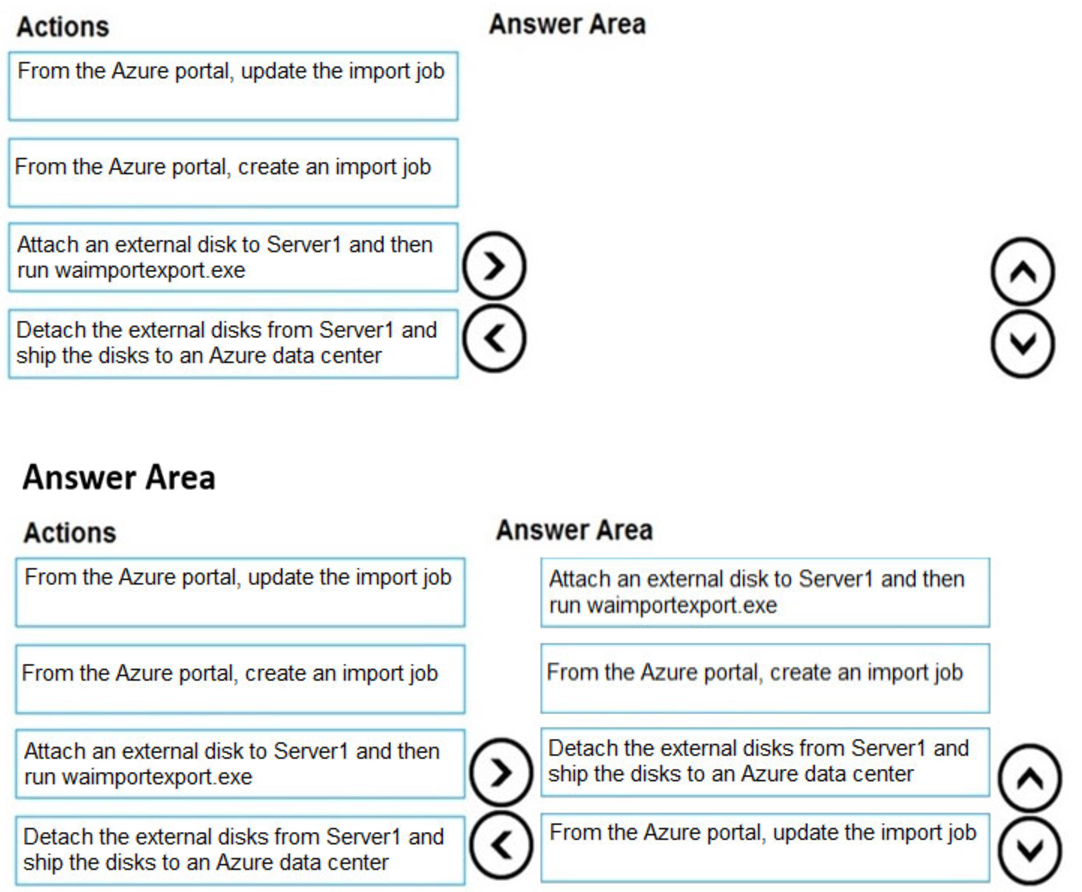
At a high level, an import job involves the following steps:
Step 1: Attach an external disk to Server1 and then run waimportexport.exe
Determine data to be imported, number of drives you need, destination blob location for your data in Azure storage.
Use the WAImportExport tool to copy data to disk drives. Encrypt the disk drives with BitLocker.
Step 2: From the Azure portal, create an import job.
Create an import job in your target storage account in Azure portal. Upload the drive journal files.
Step 3: Detach the external disks from Server1 and ship the disks to an Azure data center.
Provide the return address and carrier account number for shipping the drives back to you.
Ship the disk drives to the shipping address provided during job creation.
Step 4: From the Azure portal, update the import job
Update the delivery tracking number in the import job details and submit the import job.
The drives are received and processed at the Azure data center.
The drives are shipped using your carrier account to the return address provided in the import job.
Reference:
https://docs.microsoft.com/en-us/azure/storage/common/storage-import-export-service
HOTSPOT –
You create a virtual machine scale set named Scale1. Scale1 is configured as shown in the following exhibit.
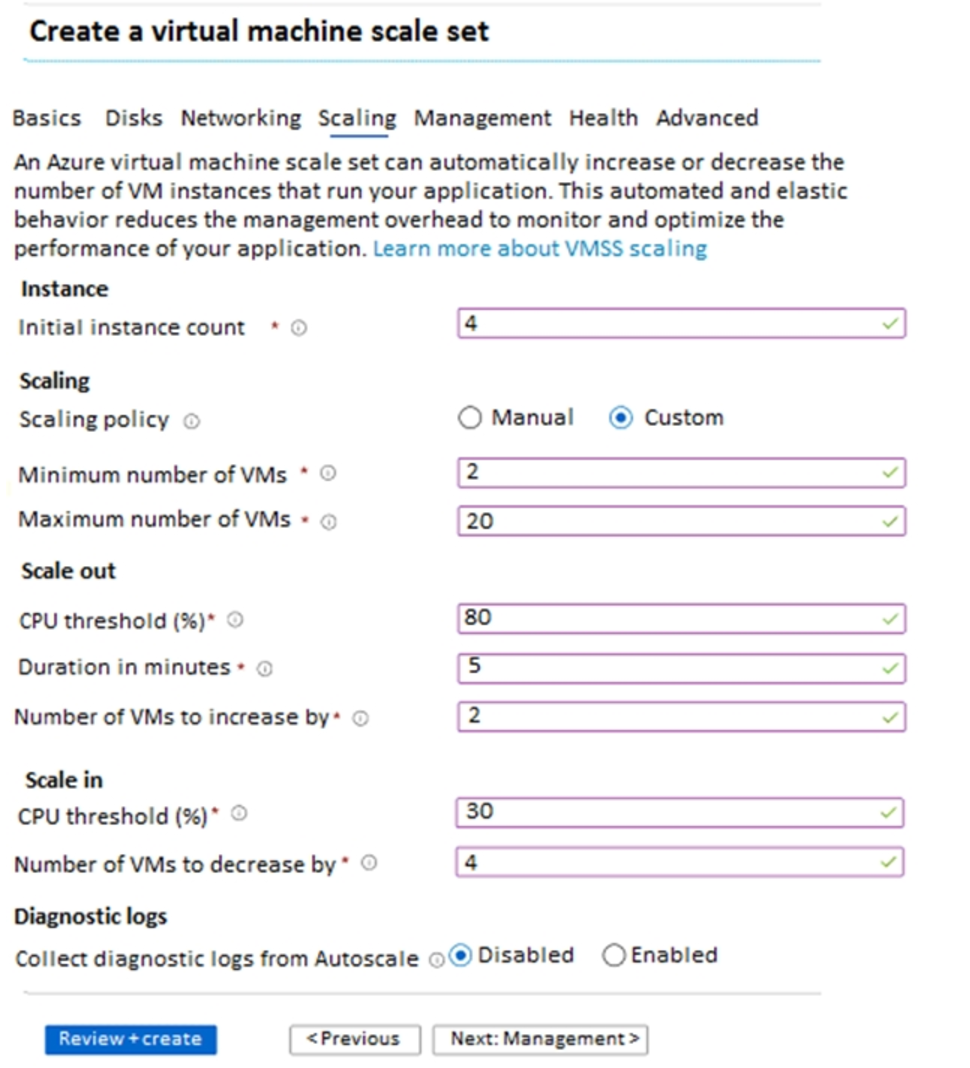
Use the drop-down menus to select the answer choice that completes each statement based on the information presented in the graphic.
NOTE: Each correct selection is worth one point.
Hot Area:
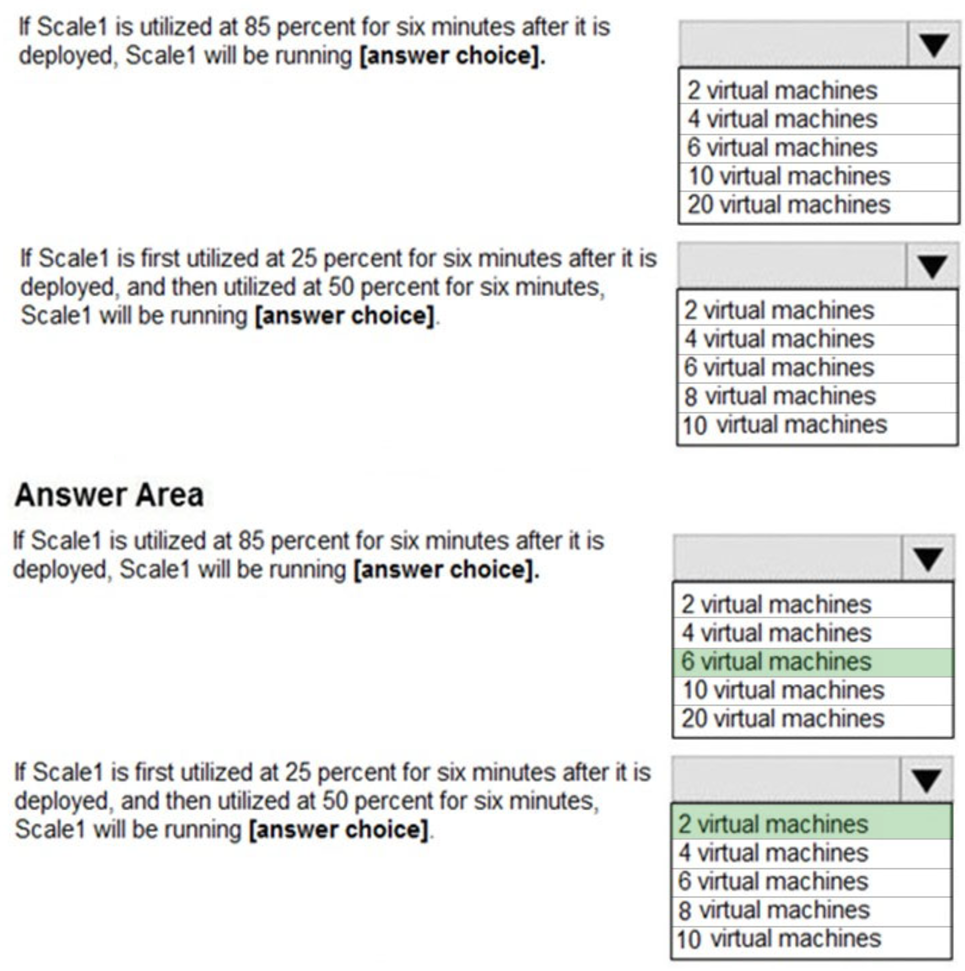
Box 1: 6 virtual machines –
The Autoscale scale out rule increases the number of VMs by 2 if the CPU threshold is 80% or higher. The initial instance count is 4 and rises to 6 when the 2 extra instances of VMs are added.
Box 2: 2 virtual machnes –
The Autoscale scale in rule decreases the number of VMs by 4 if the CPU threshold is 30% or lower. The initial instance count is 4 and thus cannot be reduced to
0 as the minimum instances is set to 2. Instances are only added when the CPU threshold reaches 80%.
Reference:
https://docs.microsoft.com/en-us/azure/azure-monitor/platform/autoscale-overview https://docs.microsoft.com/en-us/azure/azure-monitor/platform/autoscale-best-practices https://docs.microsoft.com/en-us/azure/azure-monitor/platform/autoscale-common-scale-patterns
You have an Azure subscription that contains a virtual network named VNet1. VNet1 contains four subnets named Gateway, Perimeter, NVA, and Production.
The NVA subnet contains two network virtual appliances (NVAs) that will perform network traffic inspection between the Perimeter subnet and the Production subnet.
You need to implement an Azure load balancer for the NVAs. The solution must meet the following requirements:
✑ The NVAs must run in an active-active configuration that uses automatic failover.
✑ The load balancer must load balance traffic to two services on the Production subnet. The services have different IP addresses.
Which three actions should you perform? Each correct answer presents part of the solution.
NOTE: Each correct selection is worth one point.
- A. Deploy a basic load balancer
- B. Deploy a standard load balancer
- C. Add two load balancing rules that have HA Ports and Floating IP enabled
- D. Add two load balancing rules that have HA Ports enabled and Floating IP disabled
- E. Add a frontend IP configuration, a backend pool, and a health probe
- F. Add a frontend IP configuration, two backend pools, and a health probe
You have an Azure virtual machine named VM1.
You use Azure Backup to create a backup of VM1 named Backup1.
After creating Backup1, you perform the following changes to VM1:
– Modify the size of VM1.
– Copy a file named Budget.xls to a folder named Data.
– Reset the password for the built-in administrator account.
– Add a data disk to VM1.
An administrator uses the Replace existing option to restore VM1 from Backup1.
You need to ensure that all the changes to VM1 are restored.
Which change should you perform again?
- A. Modify the size of VM1.
- B. Reset the password for the built-in administrator account.
- C. Add a data disk.
- D. Copy Budget.xls to Data.