Pass Microsoft AZ-104 in Just 3 Days – Stress-Free, No Study Needed!
Have questions? Contact us directly on WhatsApp for quick support!
You recently created a new Azure subscription that contains a user named Admin1.
Admin1 attempts to deploy an Azure Marketplace resource by using an Azure Resource Manager template. Admin1 deploys the template by using Azure
PowerShell and receives the following error message: `User failed validation to purchase resources. Error message: `Legal terms have not been accepted for this item on this subscription. To accept legal terms, please go to the Azure portal (http://go.microsoft.com/fwlink/?LinkId=534873) and configure programmatic deployment for the Marketplace item or create it there for the first time.`
You need to ensure that Admin1 can deploy the Marketplace resource successfully.
What should you do?
- A. From Azure PowerShell, run the Set-AzApiManagementSubscription cmdlet
- B. From the Azure portal, register the Microsoft.Marketplace resource provider
- C. From Azure PowerShell, run the Set-AzMarketplaceTerms cmdlet
- D. From the Azure portal, assign the Billing administrator role to Admin1
HOTSPOT –
You have Azure subscription that includes following Azure file shares:

You have the following on-premises servers:
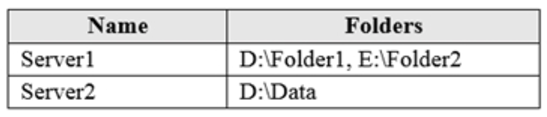
You create a Storage Sync Service named Sync1 and an Azure File Sync group named Group1. Group1 uses share1 as a cloud endpoint.
You register Server1 and Server2 in Sync1. You add D:\Folder1 on Server1 as a server endpoint of Group1.
For each of the following statements, select Yes if the statement is true. Otherwise, select No.
NOTE: Each correct selection is worth one point.
Hot Area:
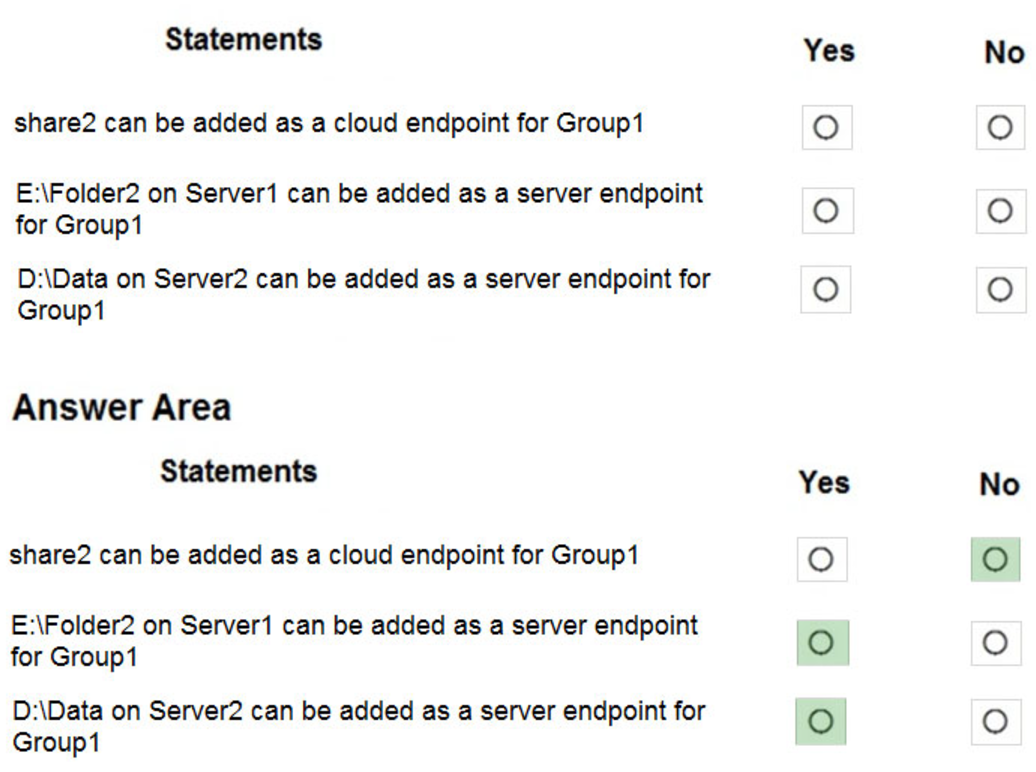
Box 1: No –
Group1 already has a cloud endpoint named Share1.
A sync group must contain one cloud endpoint, which represents an Azure file share and one or more server endpoints.
Box 2: Yes –
Yes, one or more server endpoints can be added to the sync group.
Box 3: Yes –
Yes, one or more server endpoints can be added to the sync group.
Reference:
https://docs.microsoft.com/en-us/azure/storage/files/storage-sync-files-deployment-guide
You plan to automate the deployment of a virtual machine scale set that uses the Windows Server 2016 Datacenter image.
You need to ensure that when the scale set virtual machines are provisioned, they have web server components installed.
Which two actions should you perform? Each correct answer presents part of the solution.
NOTE: Each correct selection is worth one point.
- A. Upload a configuration script
- B. Create an automation account
- C. Create an Azure policy
- D. Modify the extension Profile section of the Azure Resource Manager template
- E. Create a new virtual machine scale set in the Azure portal
You have an Azure subscription named Subscription1 that contains two Azure virtual networks named VNet1 and VNet2. VNet1 contains a VPN gateway named
VPNGW1 that uses static routing. There is a site-to-site VPN connection between your on-premises network and VNet1.
On a computer named Client1 that runs Windows 10, you configure a point-to-site VPN connection to VNet1.
You configure virtual network peering between VNet1 and VNet2. You verify that you can connect to VNet2 from the on-premises network. Client1 is unable to connect to VNet2.
You need to ensure that you can connect Client1 to VNet2.
What should you do?
- A. Download and re-install the VPN client configuration package on Client1.
- B. Select Allow gateway transit on VNet1.
- C. Select Allow gateway transit on VNet2.
- D. Enable BGP on VPNGW1
HOTSPOT –
You have an Azure Active Directory (Azure AD) tenant named contoso.onmicrosoft.com that contains the users shown in the following table.

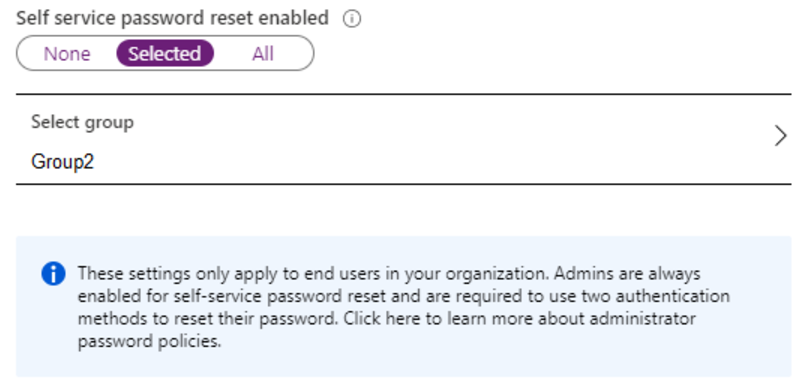
You enable password reset for contoso.onmicrosoft.com as shown in the Password Reset exhibit. (Click the Password Reset tab.)
You configure the authentication methods for password reset as shown in the Authentication Methods exhibit. (Click the Authentication Methods tab.)
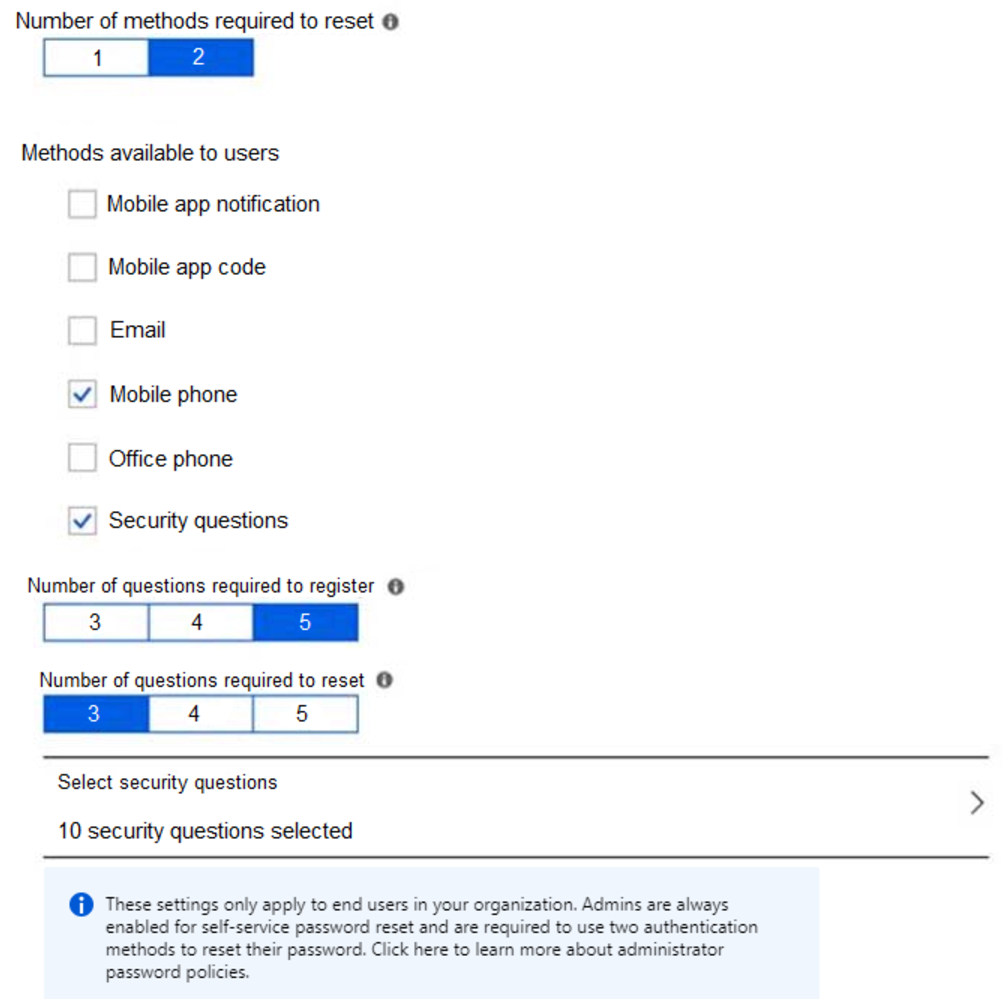
For each of the following statements, select Yes if the statement is true. Otherwise, select No.
NOTE: Each correct selection is worth one point.
Hot Area:
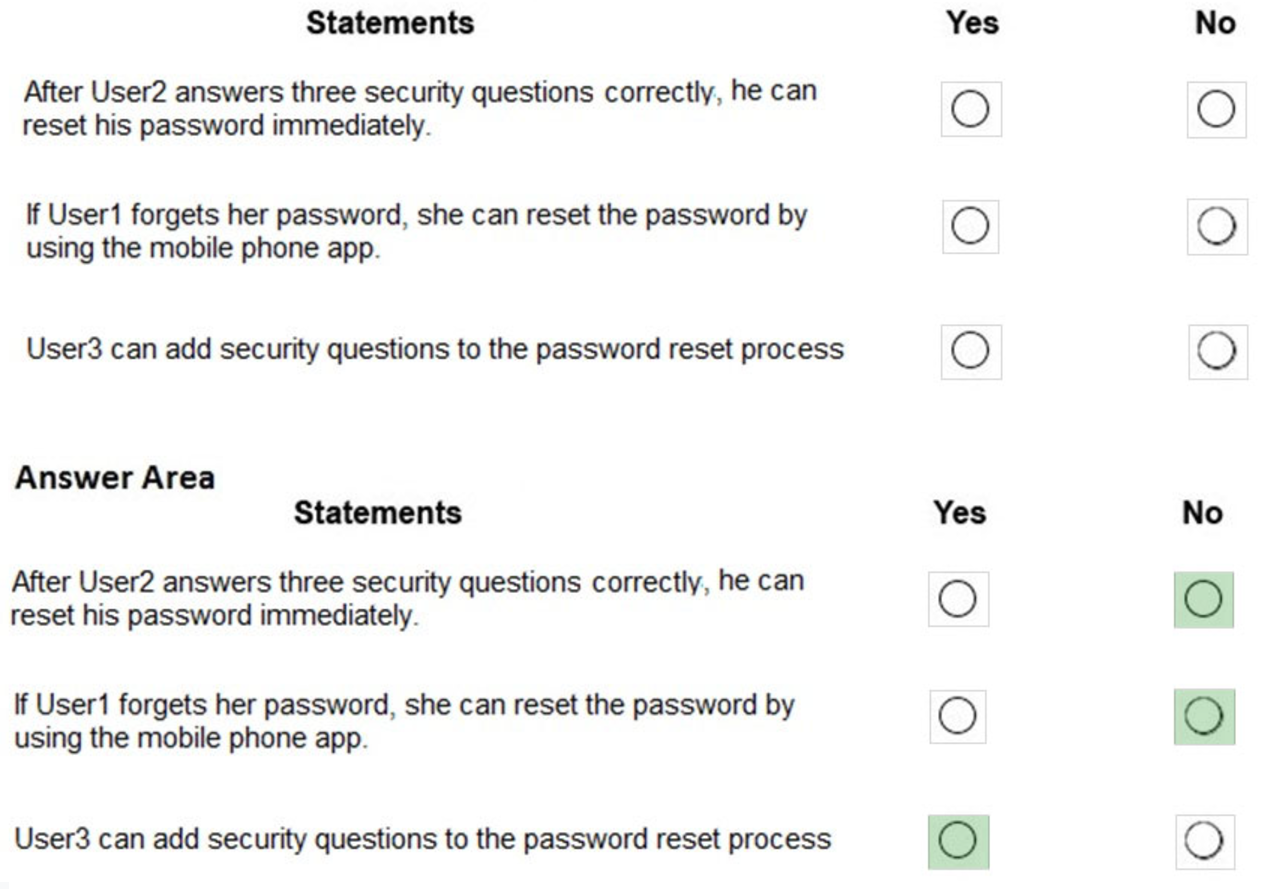
Box 1: No –
Two methods are required.
Box 2: No –
Self-service password reset is only enabled for Group2, and User1 is not a member of Group2.
Box 3: Yes –
As a User Administrator, User3 can add security questions to the reset process.
Reference:
https://docs.microsoft.com/en-us/azure/active-directory/authentication/quickstart-sspr https://docs.microsoft.com/en-us/azure/active-directory/authentication/active-directory-passwords-faq
DRAG DROP –
You have an Azure subscription named Subscription1.
You create an Azure Storage account named contosostorage, and then you create a file share named data.
Which UNC path should you include in a script that references files from the data file share? To answer, drag the appropriate values to the correct targets. Each value may be used once, more than once or not at all. You may need to drag the split bar between panes or scroll to view content.
NOTE: Each correct selection is worth one point.
Select and Place:
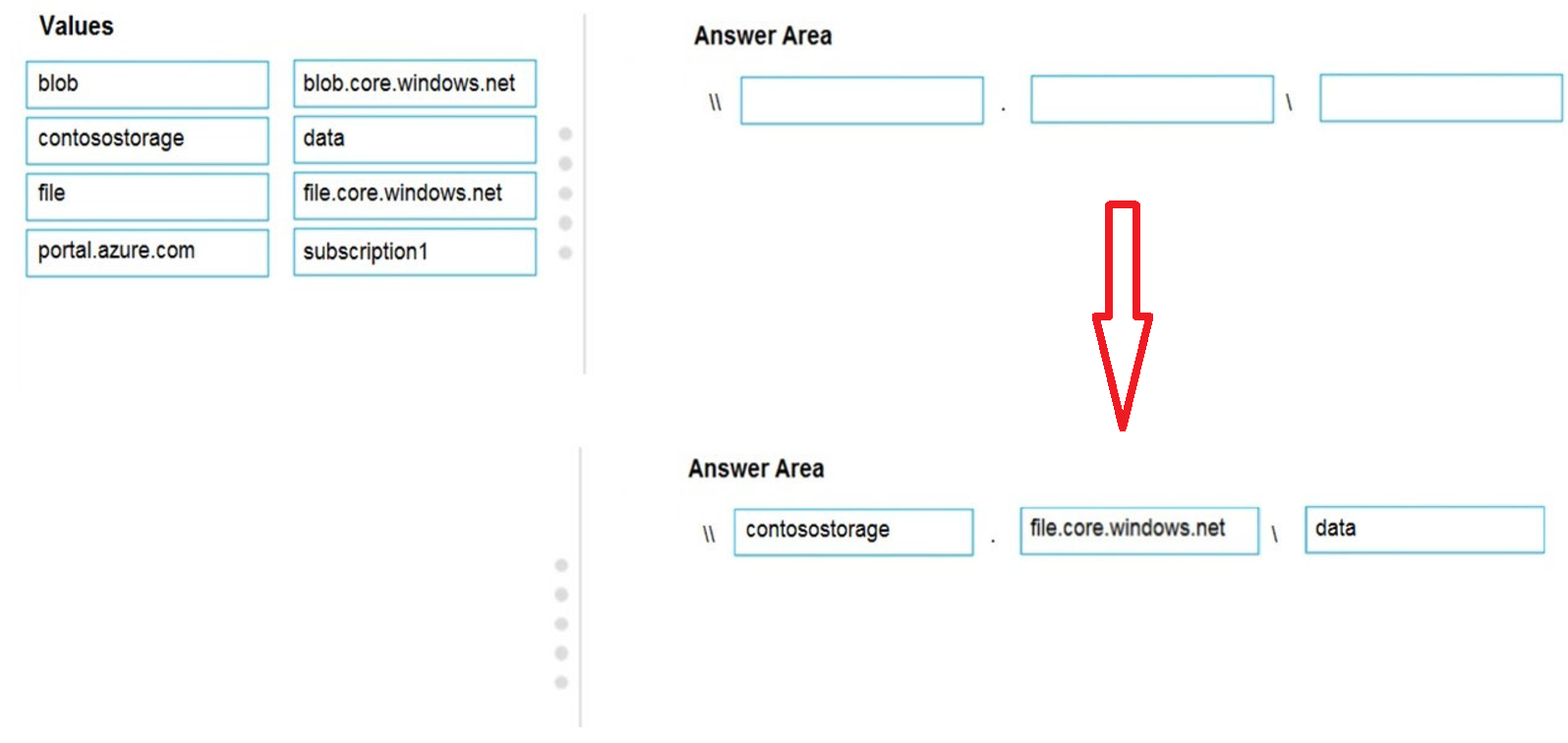
Box 1: contosostorage –
The name of account –
Box 2: file.core.windows.net –
Box 3: data –
The name of the file share is data.
HOTSPOT –
You have an Azure Kubernetes Service (AKS) cluster named AKS1 and a computer named Computer1 that runs Windows 10. Computer1 that has the Azure CLI installed.
You need to install the kubectl client on Computer1.
Which command should you run? To answer, select the appropriate options in the answer area.
NOTE: Each correct selection is worth one point.
Hot Area:
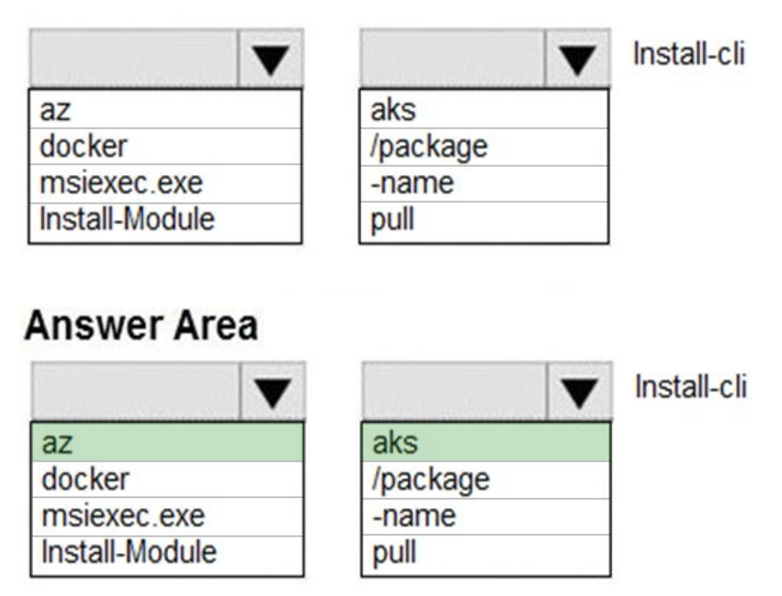
To install kubectl locally, use the az aks install-cli command: az aks install-cli
Reference:
https://docs.microsoft.com/en-us/azure/aks/kubernetes-walkthrough
HOTSPOT –
You have an Azure subscription. The subscription contains virtual machines that run Windows Server 2016 and are configured as shown in the following table.
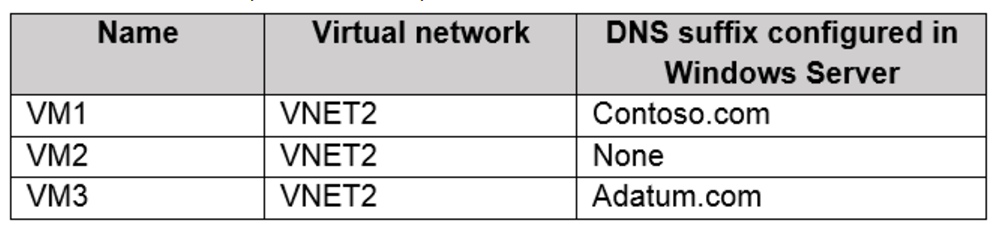
You create a public Azure DNS zone named adatum.com and a private Azure DNS zone named contoso.com.
You create a virtual network link for contoso.com as shown in the following exhibit.
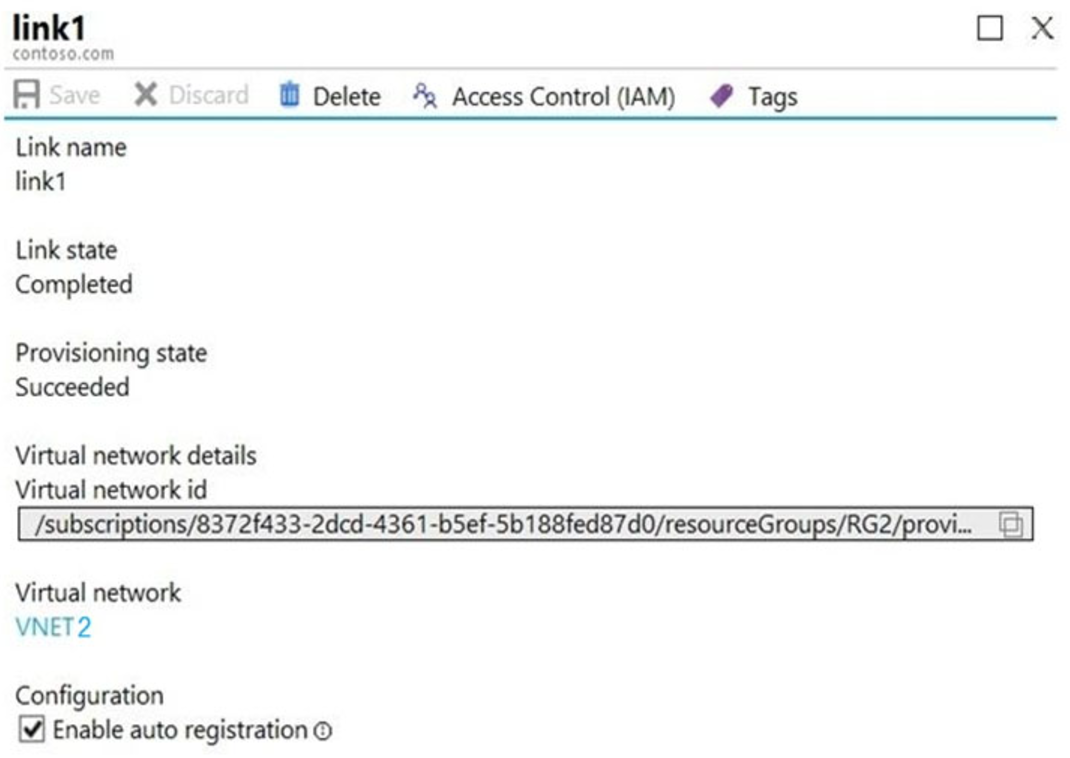
For each of the following statements, select Yes if the statement is true. Otherwise, select No.
NOTE: Each correct selection is worth one point.
Hot Area:
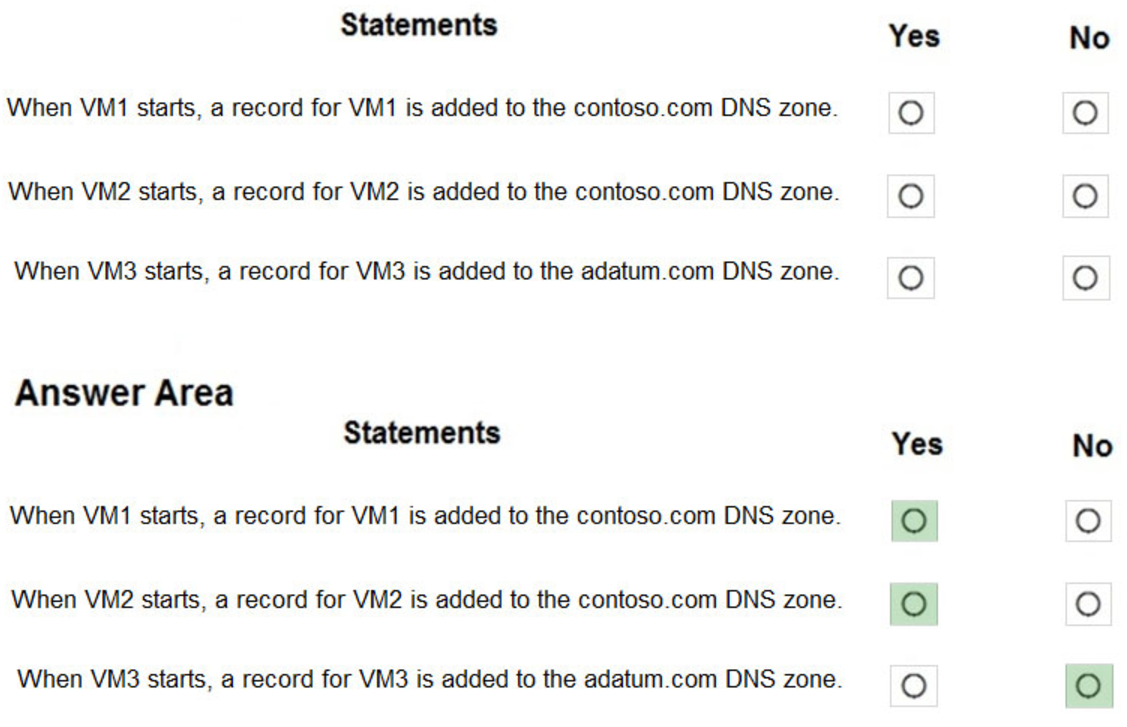
Reference:
https://docs.microsoft.com/en-us/azure/virtual-network/virtual-networks-name-resolution-for-vms-and-role-instances https://docs.microsoft.com/en-us/azure/dns/private-dns-autoregistration
Your company has a main office in London that contains 100 client computers.
Three years ago, you migrated to Azure Active Directory (Azure AD).
The company’s security policy states that all personal devices and corporate-owned devices must be registered or joined to Azure AD.
A remote user named User1 is unable to join a personal device to Azure AD from a home network.
You verify that User1 was able to join devices to Azure AD in the past.
You need to ensure that User1 can join the device to Azure AD.
What should you do?
- A. Assign the User administrator role to User1.
- B. From the Device settings blade, modify the Maximum number of devices per user setting.
- C. Create a point-to-site VPN from the home network of User1 to Azure.
- D. From the Device settings blade, modify the Users may join devices to Azure AD setting.
HOTSPOT –
You have an Azure subscription that contains an Azure Storage account.
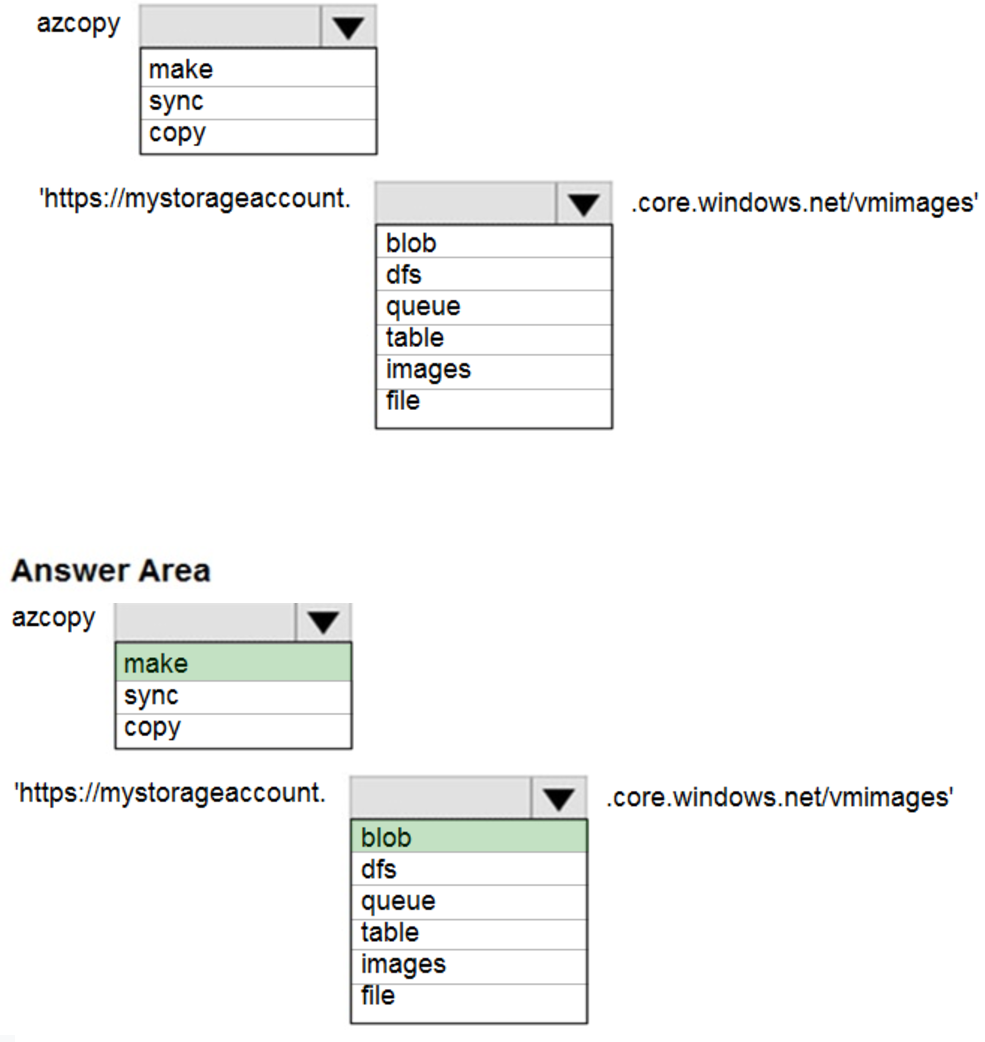
You plan to copy an on-premises virtual machine image to a container named vmimages.
You need to create the container for the planned image.
Which command should you run? To answer, select the appropriate options in the answer area.
NOTE: Each correct selection is worth one point.
Hot Area: