

Pass Microsoft AZ-104 in Just 3 Days – Stress-Free, No Study Needed!
Have questions? Contact us directly on WhatsApp for quick support!
DRAG DROP –
You onboard 10 Azure virtual machines to Azure Automation State Configuration.
You need to use Azure Automation State Configuration to manage the ongoing consistency of the virtual machine configurations.
Which three actions should you perform in sequence? To answer, move the appropriate actions from the list of actions to the answer area and arrange them in the correct order.
NOTE: More than one order of answer choices is correct. You will receive credit for any of the correct orders you select.
Select and Place:
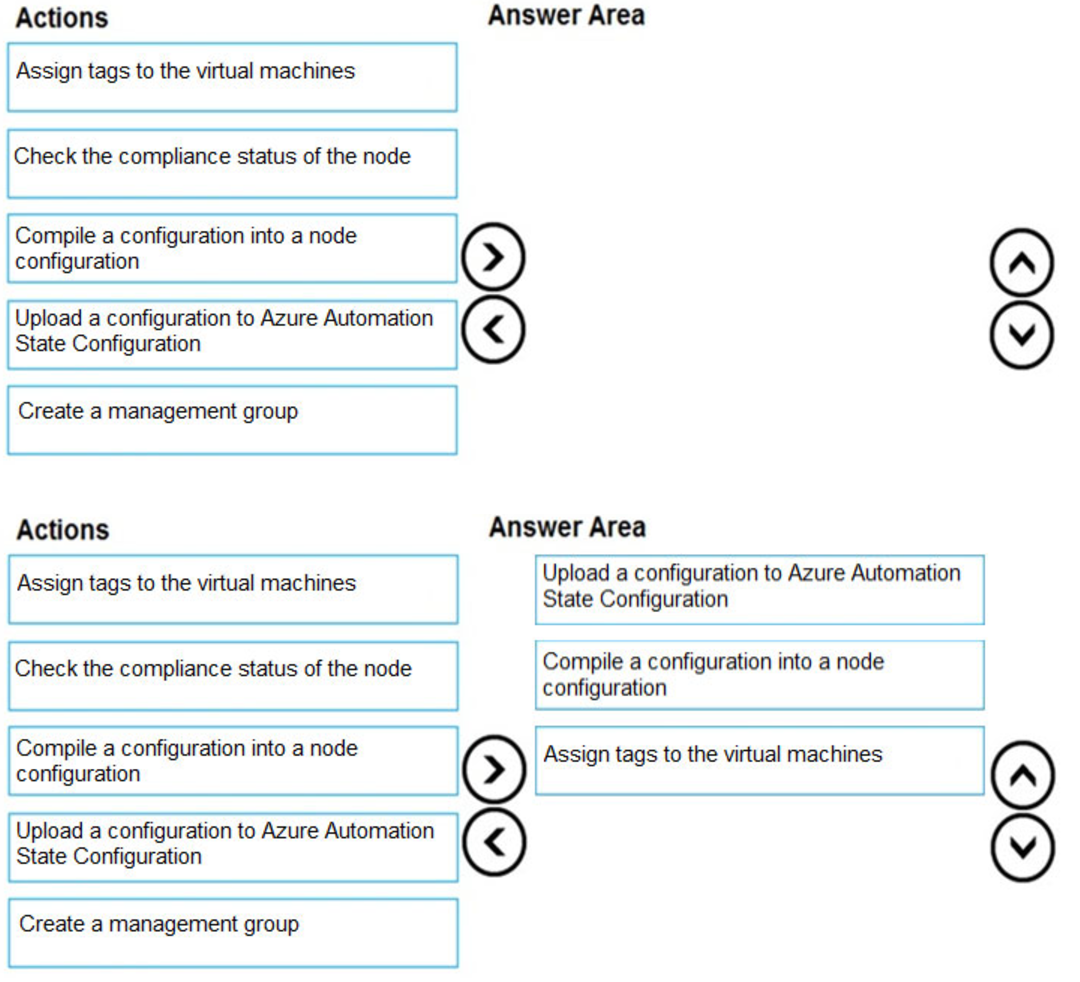
Step 1: Upload a configuration to Azure Automation State Configuration.
Import the configuration into the Automation account.
Step 2: Compile a configuration into a node configuration.
A DSC configuration defining that state must be compiled into one or more node configurations (MOF document), and placed on the Automation DSC Pull Server.
Step 3: Assign the node configuration
Then: Check the compliance status of the node
Each time Azure Automation State Configuration performs a consistency check on a managed node, the node sends a status report back to the pull server. You can view these reports on the page for that node.
On the blade for an individual report, you can see the following status information for the corresponding consistency check:
The report status ג€” whether the node is “Compliant”, the configuration “Failed”, or the node is “Not Compliant”
Reference:
https://docs.microsoft.com/en-us/azure/automation/automation-dsc-getting-started
You have an Azure subscription that contains the resources in the following table.

To which subnets can you apply NSG1?
- A. the subnets on VNet1 only
- B. the subnets on VNet2 and VNet3 only
- C. the subnets on VNet2 only
- D. the subnets on VNet3 only
- E. the subnets on VNet1, VNet2, and VNet3
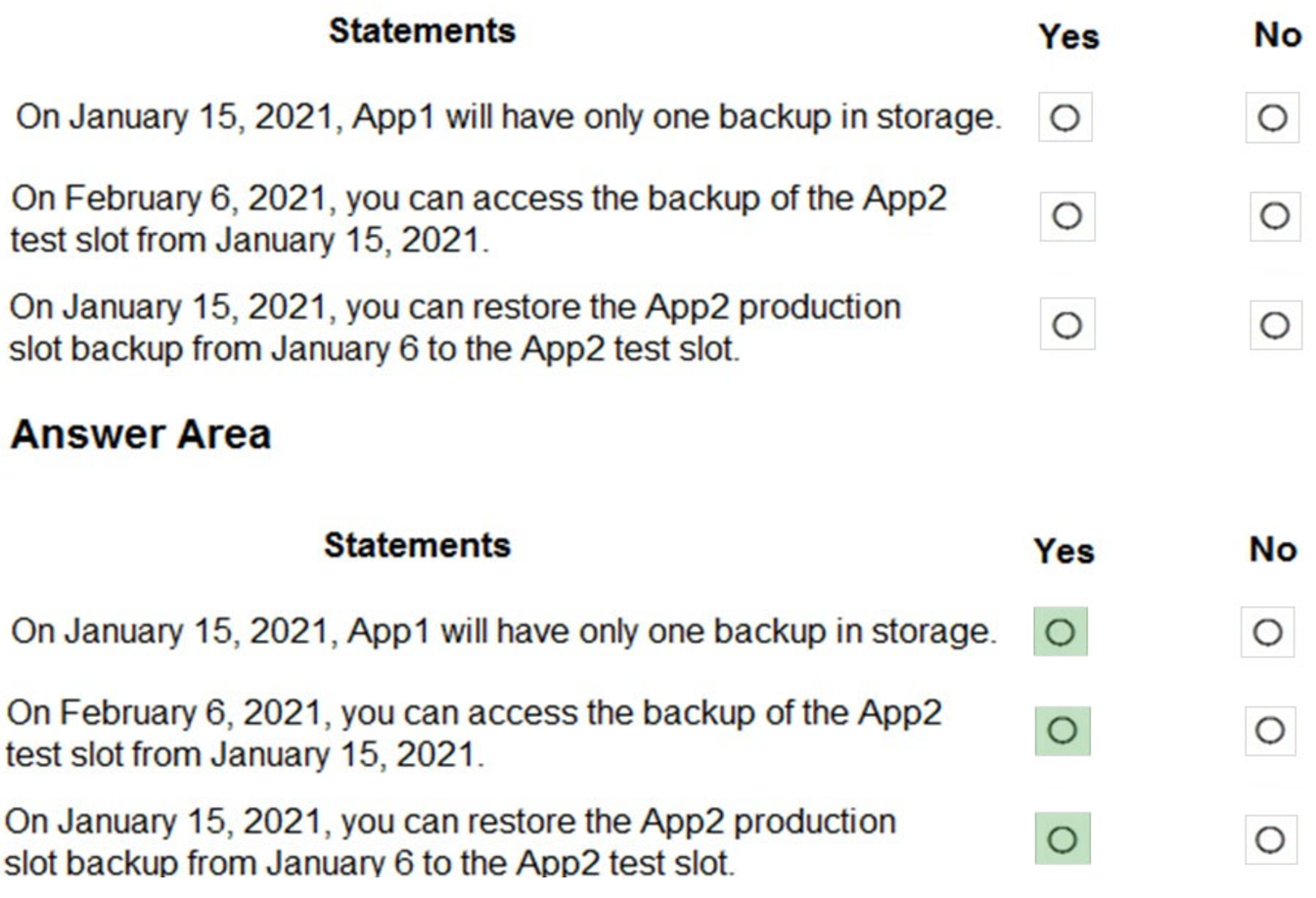
You have two Azure App Service app named App1 and App2. Each app has a production deployment slot and a test deployment slot.
The Backup Configuration settings for the production slots are shown in the following table.

NOTE: Each correct selection is worth one point.
Hot Area:
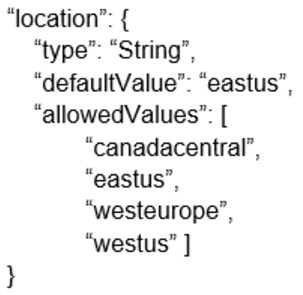
Template1 contains the following text:
“location”: “westeurope”
The resources section in Template1 contains the following text:
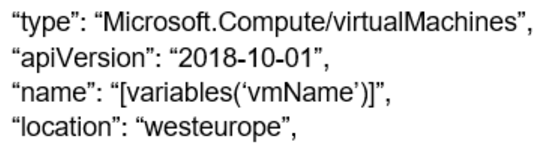
You need to deploy the virtual machine to the West US location by using Template1.
What should you do?
- A. Modify the location in the resources section to westus
- B. Select West US during the deployment
- C. Modify the location in the variables section to westus
You have an Azure subscription that contains an Azure Active Directory (Azure AD) tenant named contoso.com. The tenant is synced to the on-premises Active
Directory domain. The domain contains the users shown in the following table.
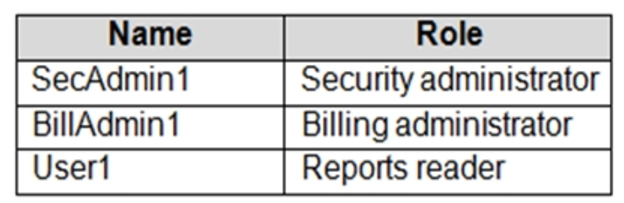
– Number of methods required to reset: 2
– Methods available to users: Mobile phone, Security questions
– Number of questions required to register: 3
– Number of questions required to reset: 3
You select the following security questions:
– What is your favorite food?
– In what city was your first job?
– What was the name of your first pet?
For each of the following statements, select Yes if the statement is true. Otherwise, select No.
NOTE: Each correct selection is worth one point.
Hot Area:
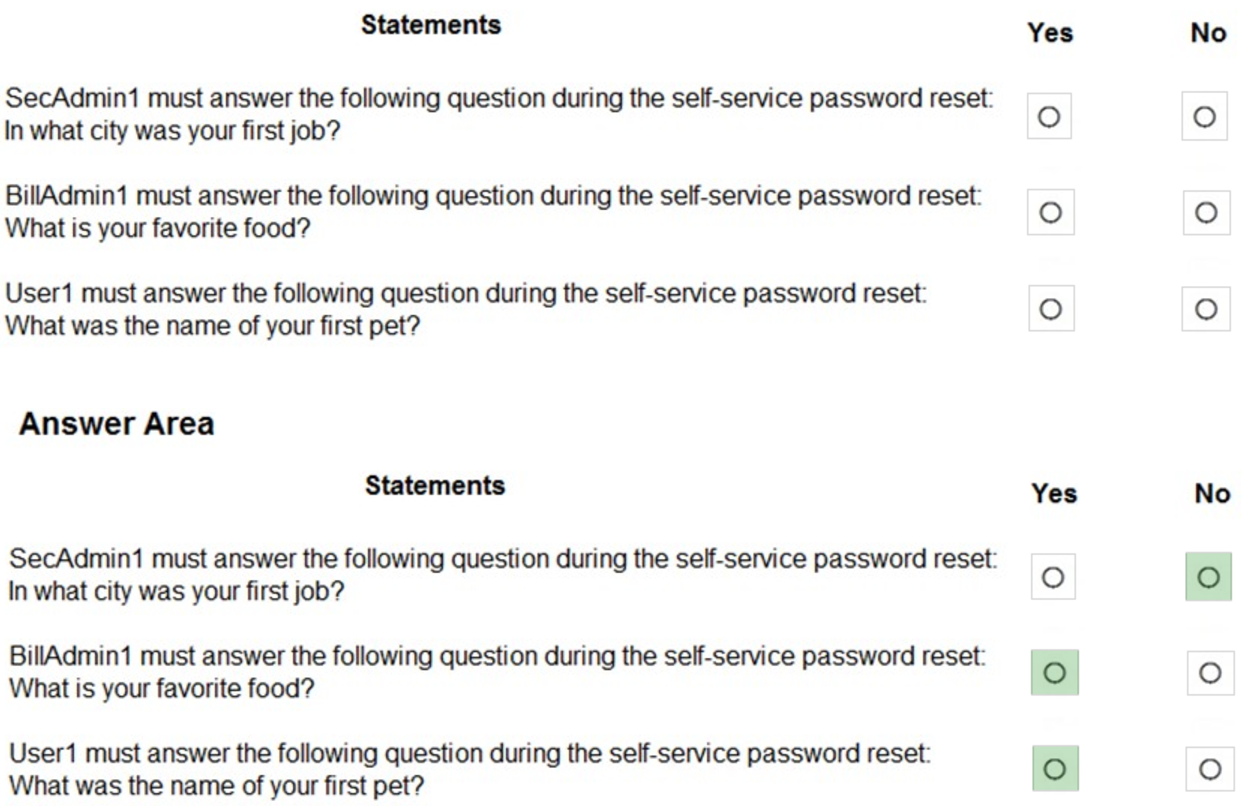
Administrator accounts are special accounts with elevated permissions. To secure them, the following restrictions apply to changing passwords of administrators:
On-premises enterprise administrators or domain administrators cannot reset their password through Self-service password reset (SSPR). They can only change their password in their on-premises environment. Thus, we recommend not syncing on-prem AD admin accounts to Azure AD. An administrator cannot use secret
Questions & Answers as a method to reset password.Box 2: Yes –
Self-service password reset (SSPR) is an Azure Active Directory feature that enables employees to reset their passwords without needing to contact IT staff.Box 3: Yes –
Reference:
https://docs.microsoft.com/en-us/azure/active-directory/authentication/howto-sspr-deployment
You have several Azure virtual machines on a virtual network named VNet1.
You configure an Azure Storage account as shown in the following exhibit.
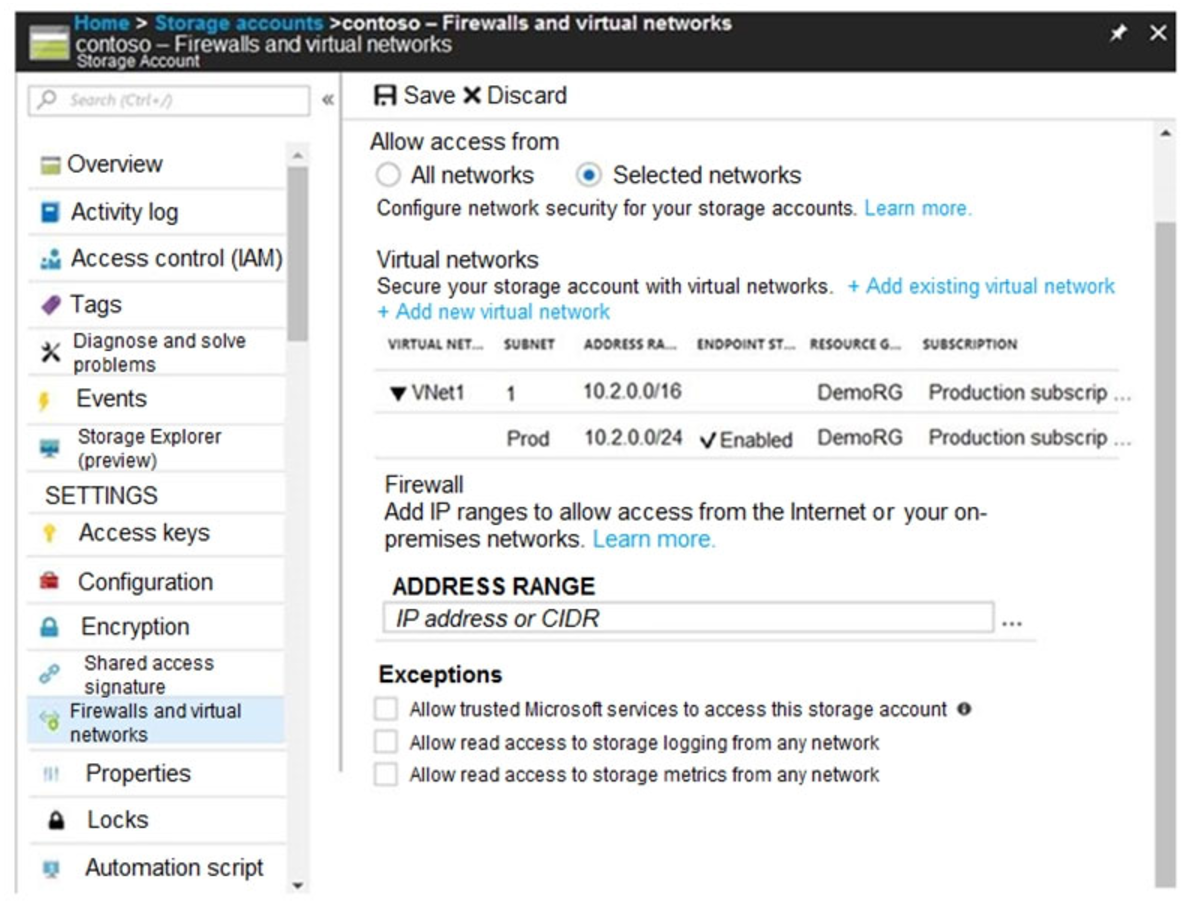
NOTE: Each correct selection is worth one point.
Hot Area:
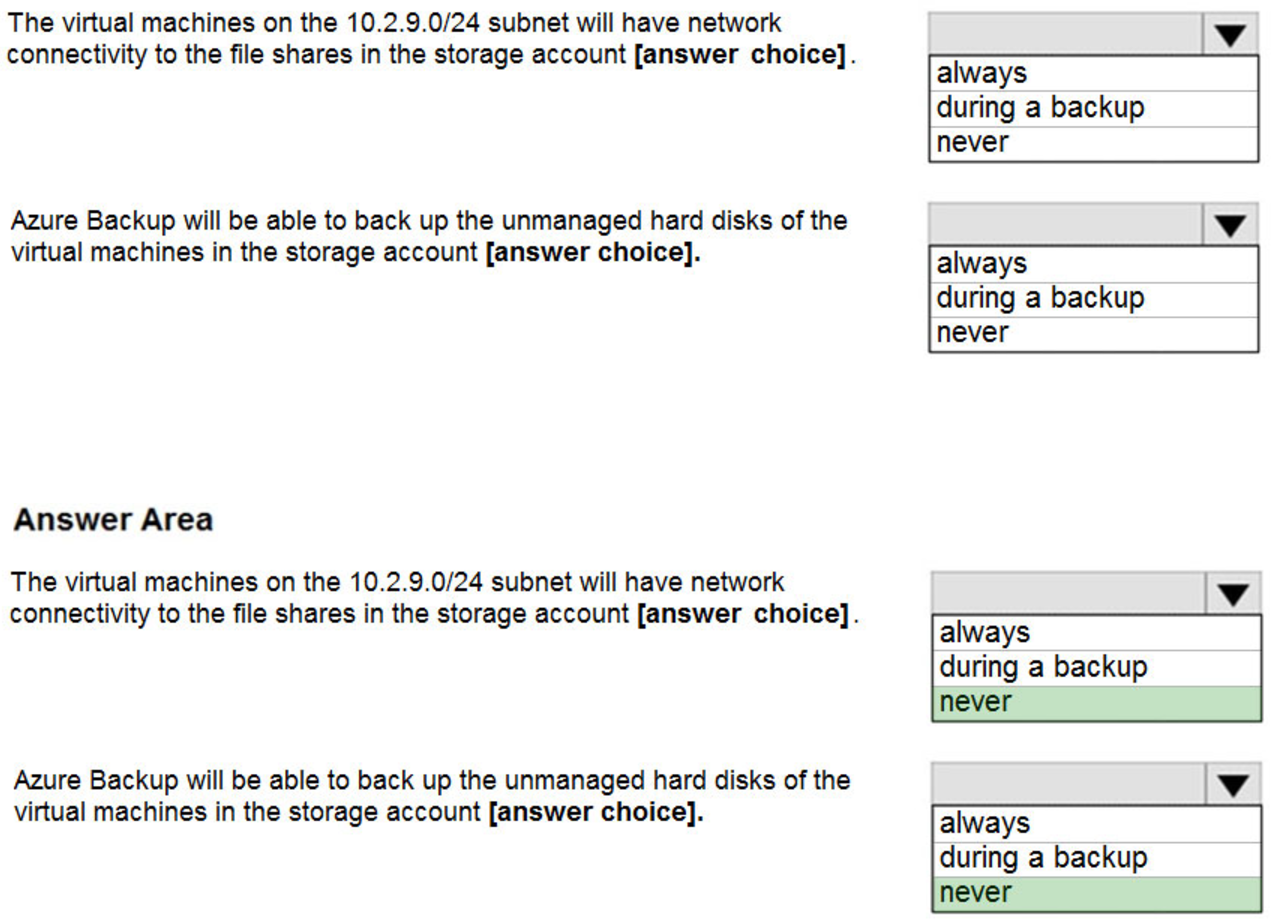
The 10.2.9.0/24 subnet is not whitelisted.Box 2: never –
After you configure firewall and virtual network settings for your storage account, select Allow trusted Microsoft services to access this storage account as an exception to enable Azure Backup service to access the network restricted storage account.
https://docs.microsoft.com/en-us/azure/storage/files/storage-how-to-use-files-windows https://azure.microsoft.com/en-us/blog/azure-backup-now-supports-storage-accounts-secured-with-azure-storage-firewalls-and-virtual-networks/
You create an App Service plan named Plan1 and an Azure web app named webapp1.
You discover that the option to create a staging slot is unavailable.
You need to create a staging slot for Plan1.
What should you do first?
- A. From Plan1, scale up the App Service plan
- B. From webapp1, modify the Application settings
- C. From webapp1, add a custom domain
- D. From Plan1, scale out the App Service plan
You have an Azure subscription that contains the resource groups shown in the following table.

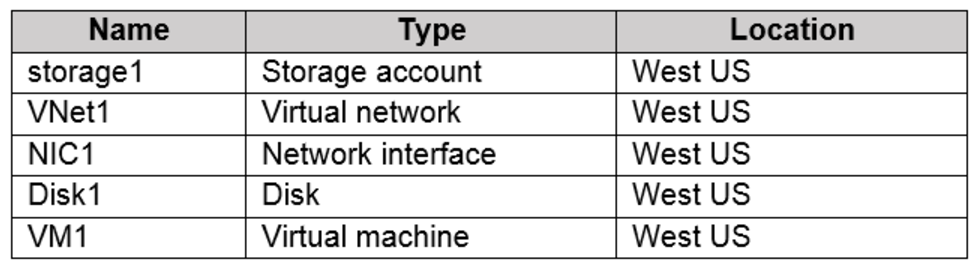
RG2 contains a public IP address named IP2 that is in the East US location. IP2 is not assigned to a virtual machine.
For each of the following statements, select Yes if the statement is true. Otherwise, select No.
NOTE: Each correct selection is worth one point.
Hot Area:
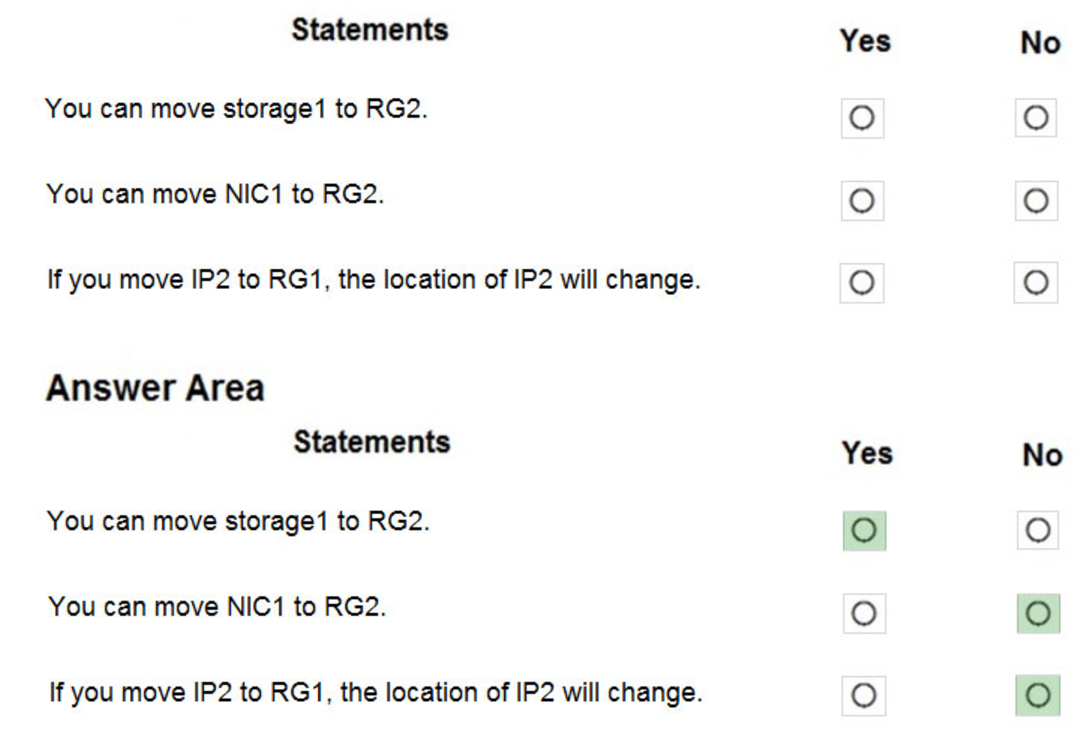
Box 1: Yes –
You can move storage –
Box 2: No –
You can’t move to a new resource group a NIC that is attached to a virtual machine.
Box 3: No –
Azure Public IPs are region specific and can’t be moved from one region to another.
Reference:
https://docs.microsoft.com/en-us/azure/azure-resource-manager/management/move-support-resources https://docs.microsoft.com/en-us/azure/virtual-network/move-across-regions-publicip-powershell
After you answer a question in this section, you will NOT be able to return to it. As a result, these questions will not appear in the review screen.
You have an Azure subscription that contains the following users in an Azure Active Directory tenant named contoso.onmicrosoft.com:
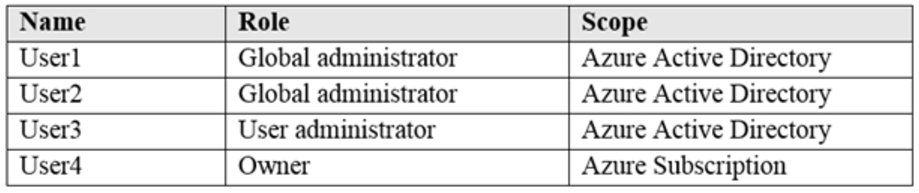
User1 creates a new Azure Active Directory tenant named external.contoso.onmicrosoft.com.
You need to create new user accounts in external.contoso.onmicrosoft.com.
Solution: You instruct User1 to create the user accounts.
Does that meet the goal?
- A. Yes
- B. No
You have a sync group named Sync1 that has a cloud endpoint. The cloud endpoint includes a file named File1.txt.
Your on-premises network contains servers that run Windows Server 2016. The servers are configured as shown in the following table.

For each of the following statements, select Yes if the statement is true. Otherwise, select No.
NOTE: Each correct selection is worth one point.
Hot Area:
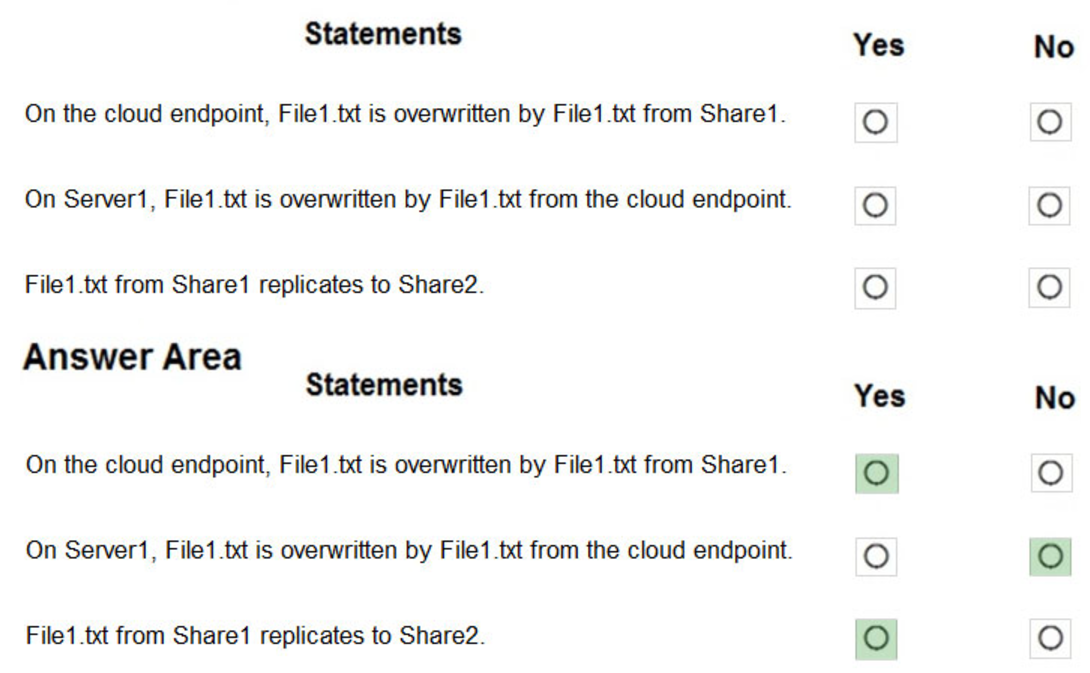
If you add an Azure file share that has an existing set of files as a cloud endpoint to a sync group, the existing files are merged with any other files that are already on other endpoints in the sync group.Box 2: No -Box 3: Yes –
Reference:
https://docs.microsoft.com/en-us/azure/storage/files/storage-sync-files-planning