Pass Microsoft AZ-104 in Just 3 Days – Stress-Free, No Study Needed!
Have questions? Contact us directly on WhatsApp for quick support!
HOTSPOT –
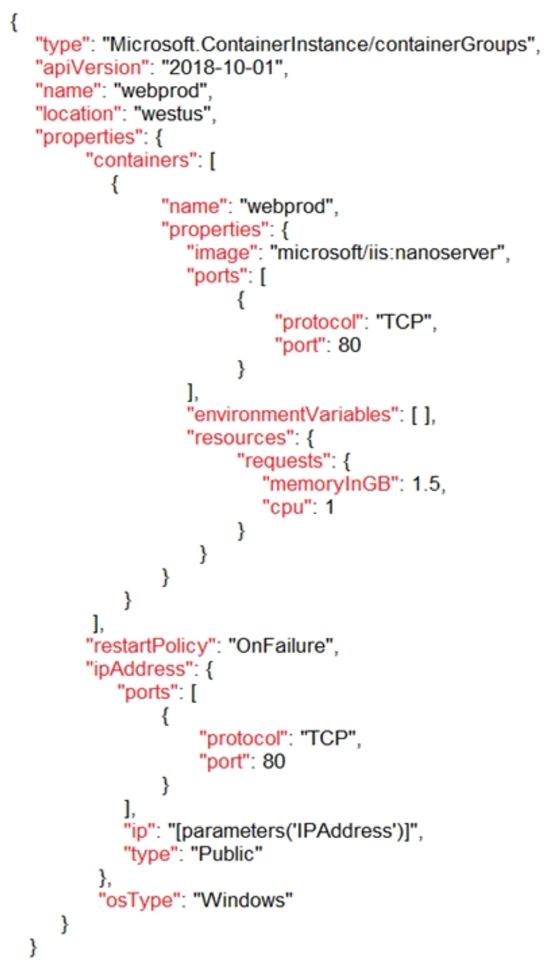
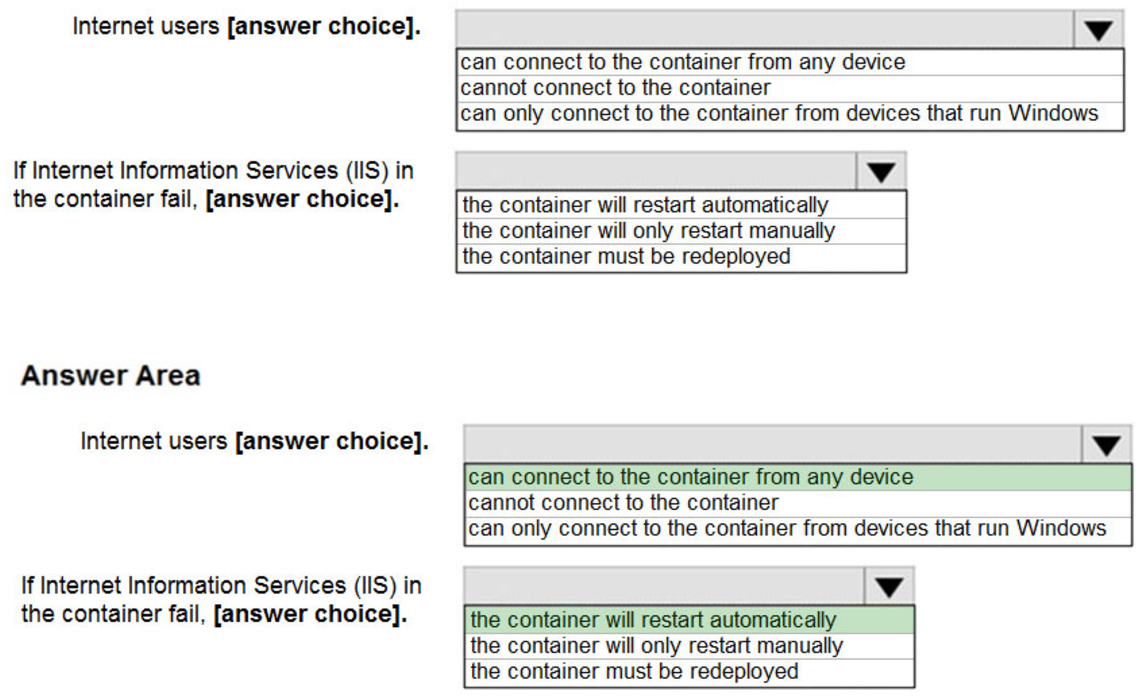
You plan to deploy an Azure container instance by using the following Azure Resource Manager template.
DRAG DROP –
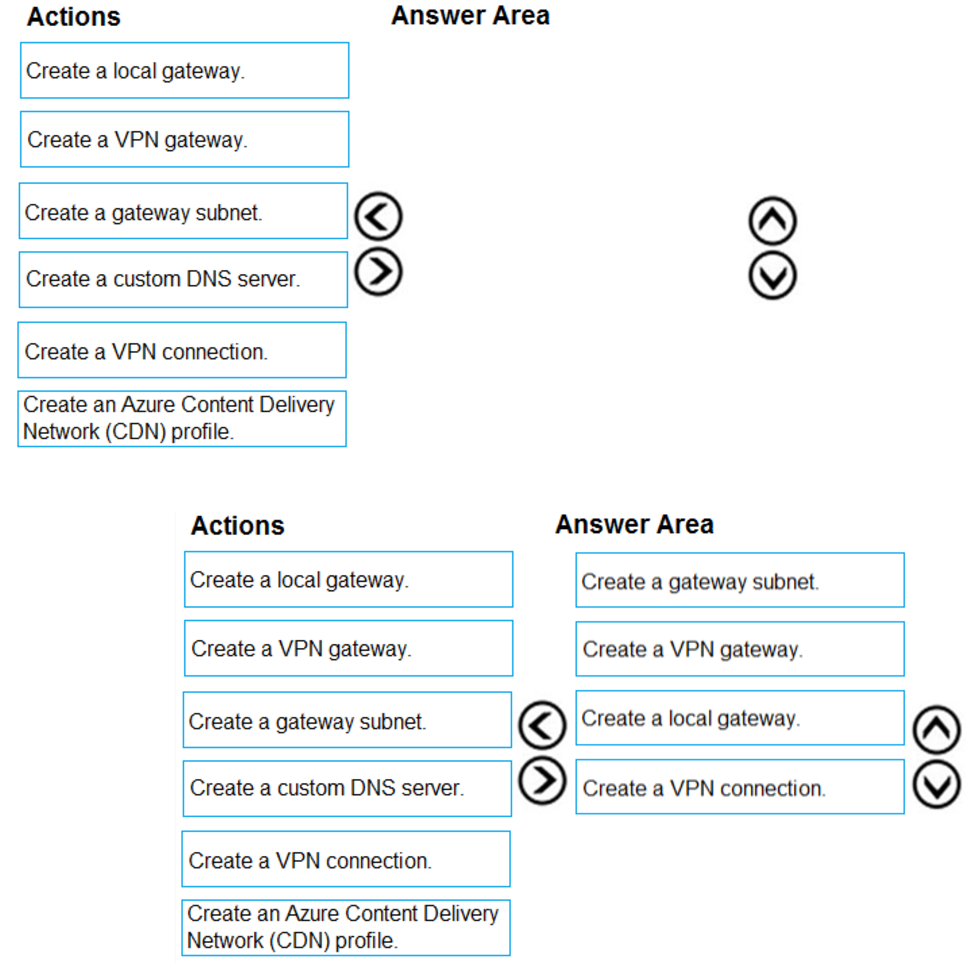
You have an on-premises network that you plan to connect to Azure by using a site-so-site VPN.
In Azure, you have an Azure virtual network named VNet1 that uses an address space of 10.0.0.0/16 VNet1 contains a subnet named Subnet1 that uses an address space of 10.0.0.0/24.
You need to create a site-to-site VPN to Azure.
Which four actions should you perform in sequence? To answer, move the appropriate actions from the list of actions to the answer area and arrange them in the correct order.
NOTE: More than one order of answer choice is correct. You will receive credit for any of the correct orders you select.
Select and Place:
HOTSPOT –
You have an Azure subscription that contains the resources shown in the following table.
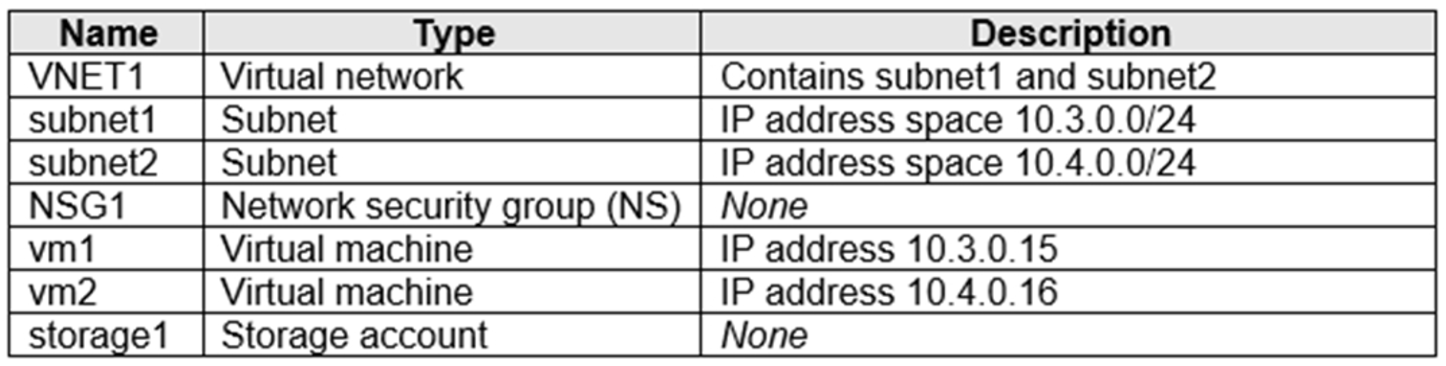
NSG1 is configured as shown in the following exhibit.
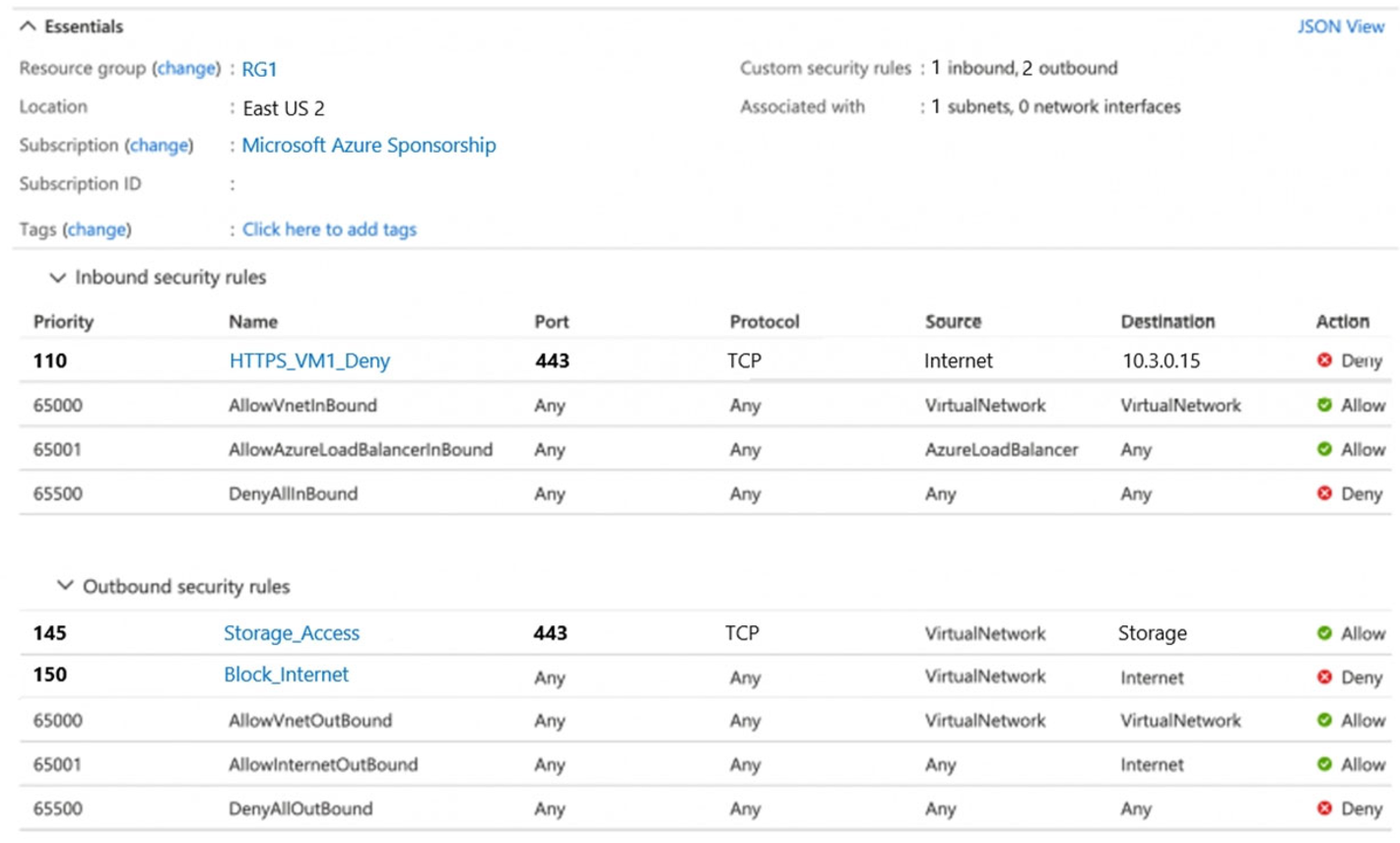
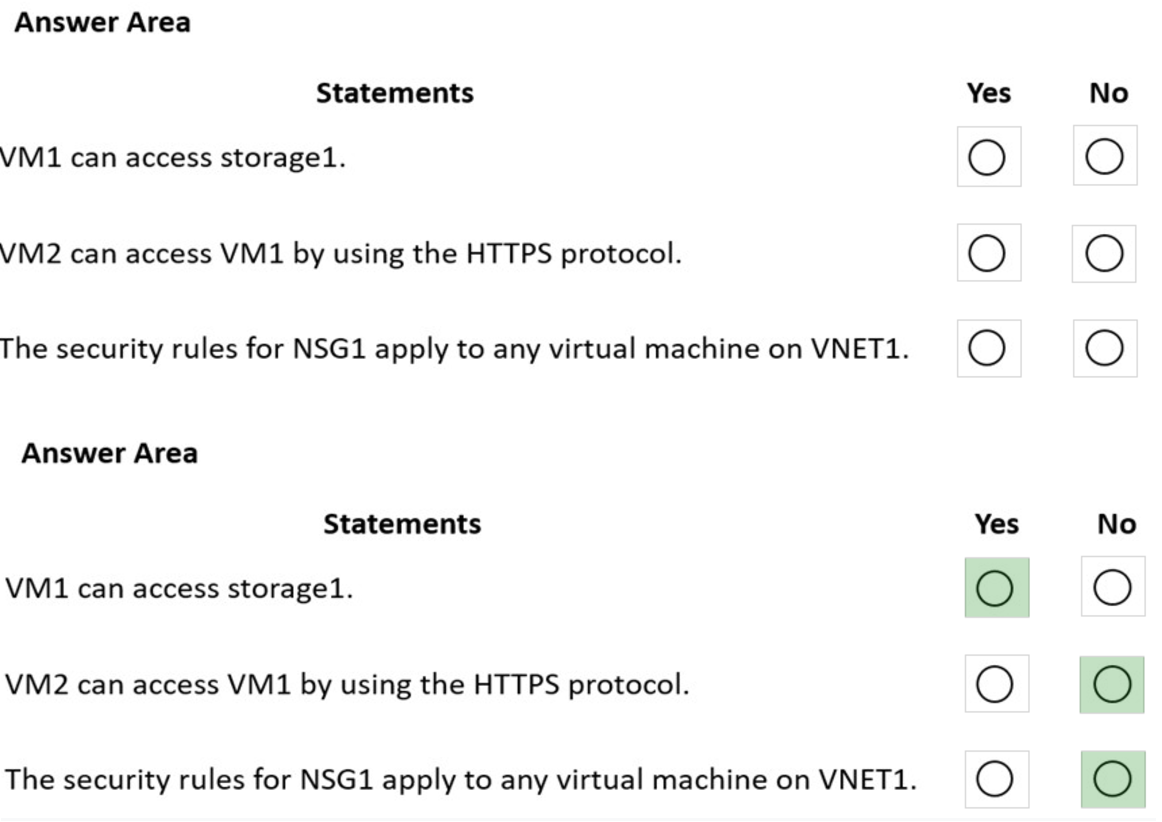
For each of the following statements, select Yes if the statement is true. Otherwise, select No.
NOTE: Each correct selection is worth one point.
Hot Area:
You have an Azure subscription named Subscription1.
You have 5 TB of data that you need to transfer to Subscription1.
You plan to use an Azure Import/Export job.
What can you use as the destination of the imported data?
- A. an Azure Cosmos DB database
- B. Azure Blob storage
- C. Azure Data Lake Store
- D. the Azure File Sync Storage Sync Service
You have an Azure subscription that contains a virtual machine named VM1. VM1 hosts a line-of-business application that is available 24 hours a day. VM1 has one network interface and one managed disk. VM1 uses the D4s v3 size.
You plan to make the following changes to VM1:
– Change the size to D8s v3.
– Add a 500-GB managed disk.
– Add the Puppet Agent extension.
– Enable Desired State Configuration Management.
Which change will cause downtime for VM1?
- A. Enable Desired State Configuration Management
- B. Add a 500-GB managed disk
- C. Change the size to D8s v3
- D. Add the Puppet Agent extension
You have an Azure subscription that contains the resources in the following table.
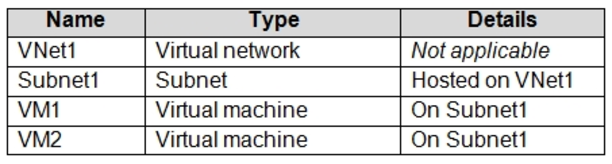
VM1 and VM2 are deployed from the same template and host line-of-business applications.
You configure the network security group (NSG) shown in the exhibit. (Click the Exhibit tab.)
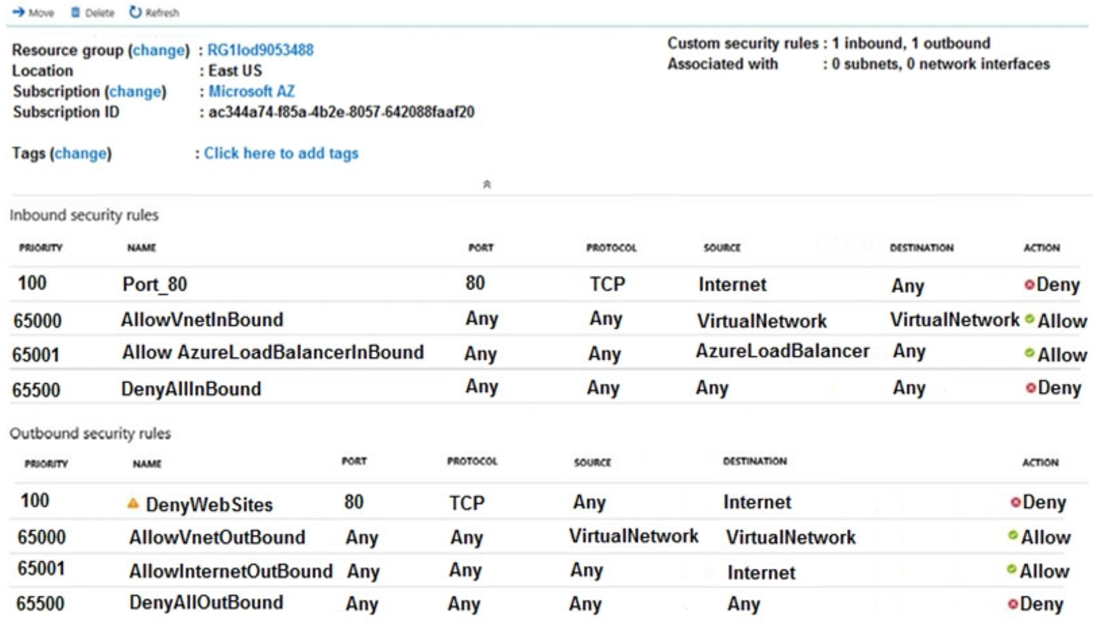
You need to prevent users of VM1 and VM2 from accessing websites on the Internet over TCP port 80.
What should you do?
- A. Disassociate the NSG from a network interface
- B. Change the Port_80 inbound security rule.
- C. Associate the NSG to Subnet1.
- D. Change the DenyWebSites outbound security rule.
You have an Azure subscription named Subscription1 that contains two Azure virtual networks named VNet1 and VNet2. VNet1 contains a VPN gateway named
VPNGW1 that uses static routing. There is a site-to-site VPN connection between your on-premises network and VNet1.
On a computer named Client1 that runs Windows 10, you configure a point-to-site VPN connection to VNet1.
You configure virtual network peering between VNet1 and VNet2. You verify that you can connect to VNet2 from the on-premises network. Client1 is unable to connect to VNet2.
You need to ensure that you can connect Client1 to VNet2.
What should you do?
- A. Select Use the remote virtual network’s gateway or Route Server on VNet1 to VNet2 peering.
- B. Select Use the remote virtual network s gateway or Route Server on VNet2 to VNet1 peering.
- C. Download and re-install the VPN client configuration package on Client1.
- D. Enable BGP on VPNGW1.
DRAG DROP –
You have an Azure subscription that contains an Azure file share.
You have an on-premises server named Server1 that runs Windows Server 2016.
You plan to set up Azure File Sync between Server1 and the Azure file share.
You need to prepare the subscription for the planned Azure File Sync.
Which two actions should you perform in the Azure subscription? To answer, drag the appropriate actions to the correct targets. Each action may be used once, more than once, or not at all. You may need to drag the split bar between panes or scroll to view content.
NOTE: Each correct selection is worth one point.
Select and Place:
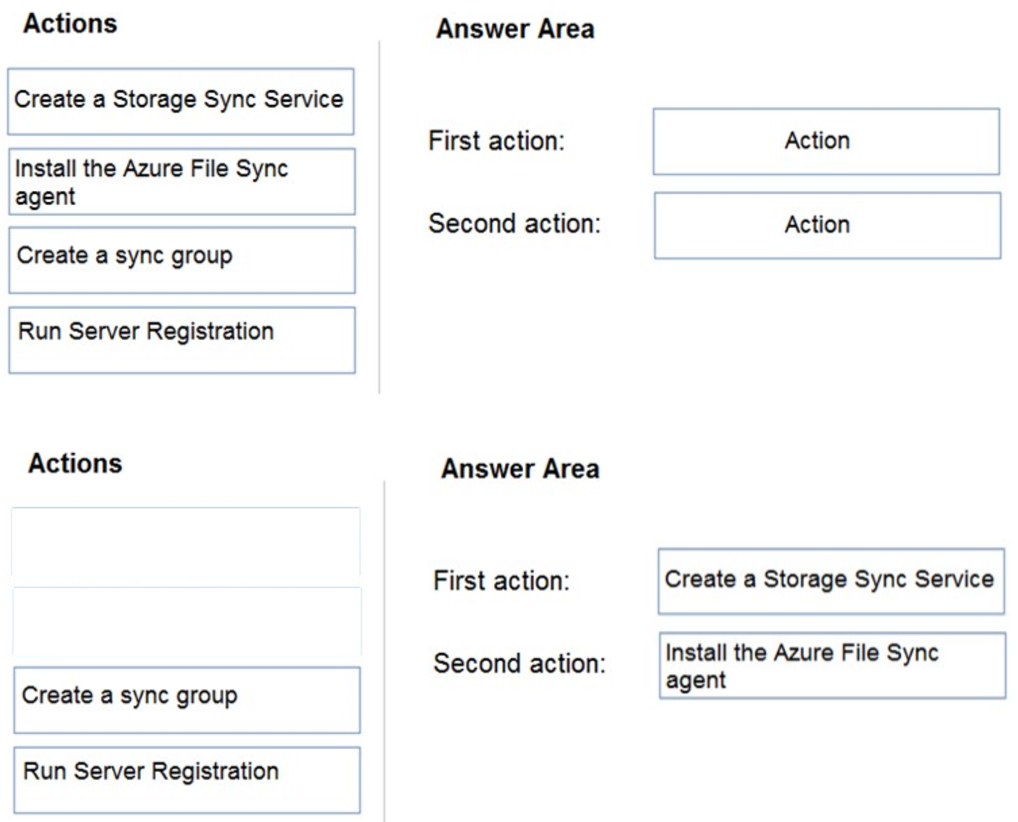
First action: Create a Storage Sync Service
The deployment of Azure File Sync starts with placing a Storage Sync Service resource into a resource group of your selected subscription.
Second action: Install the Azure File Sync agent
The Azure File Sync agent is a downloadable package that enables Windows Server to be synced with an Azure file share.
Reference:
https://docs.microsoft.com/en-us/azure/storage/files/storage-sync-files-deployment-guide
You have two subscriptions named Subscription1 and Subscription2. Each subscription is associated to a different Azure AD tenant.
Subscription1 contains a virtual network named VNet1. VNet1 contains an Azure virtual machine named VM1 and has an IP address space of 10.0.0.0/16.
Subscription2 contains a virtual network named VNet2. VNet2 contains an Azure virtual machine named VM2 and has an IP address space of 10.10.0.0/24.
You need to connect VNet1 to VNet2.
What should you do first?
- A. Move VM1 to Subscription2.
- B. Move VNet1 to Subscription2.
- C. Modify the IP address space of VNet2.
- D. Provision virtual network gateways.
HOTSPOT –
You have two Azure subscriptions named Sub1 and Sub2. Sub1 is in a management group named MG1. Sub2 is in a management group named MG2.
You have the resource groups shown in the following table.
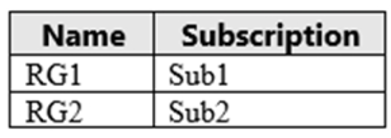
You have the virtual machines shown in the following table.
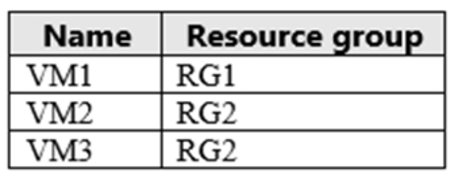
You assign roles to users as shown in the following table.
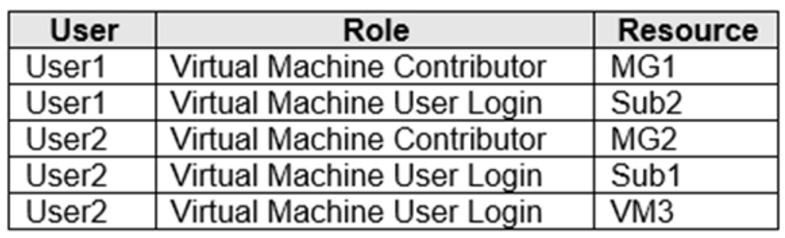
For each of the following statements, select Yes if the statement is true. Otherwise, select No.
NOTE: Each correct selection is worth one point.
Hot Area: