Pass Microsoft AZ-104 in Just 3 Days – Stress-Free, No Study Needed!
Have questions? Contact us directly on WhatsApp for quick support!
You have an Azure subscription linked to an Azure Active Directory tenant. The tenant includes a user account named User1.
You need to ensure that User1 can assign a policy to the tenant root management group.
What should you do?
- A. Assign the Owner role for the Azure Subscription to User1, and then modify the default conditional access policies.
- B. Assign the Owner role for the Azure subscription to User1, and then instruct User1 to configure access management for Azure resources.
- C. Assign the Global administrator role to User1, and then instruct User1 to configure access management for Azure resources.
- D. Create a new management group and delegate User1 as the owner of the new management group.
HOTSPOT –
You have an Azure subscription that contains the file shares shown in the following table.
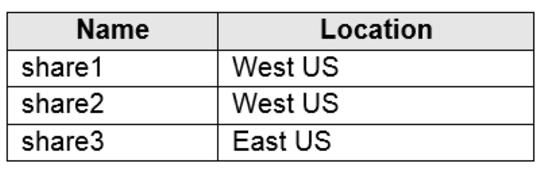
You have the on-premises file shares shown in the following table.
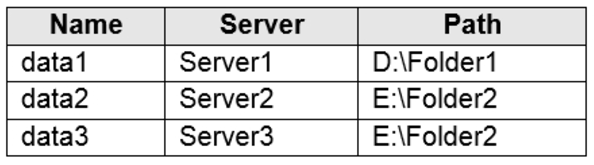
You create an Azure file sync group named Sync1 and perform the following actions:
– Add share1 as the cloud endpoint for Sync1.
– Add data1 as a server endpoint for Sync1.
– Register Server1 and Server2 to Sync1.
For each of the following statements, select Yes if the statement is true. Otherwise, select No.
NOTE: Each correct selection is worth one point.
Hot Area:
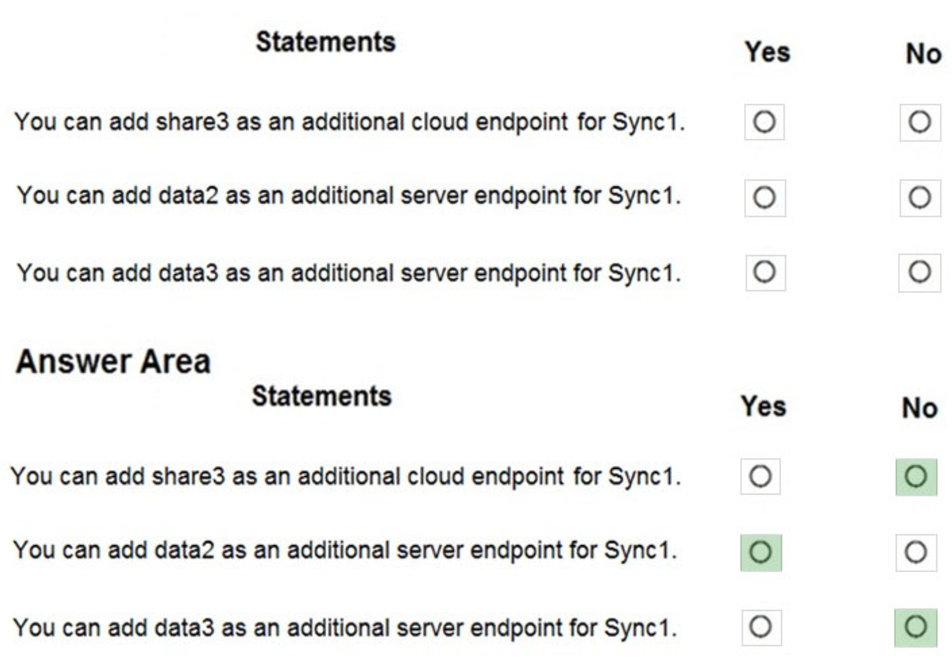
Box 1: No –
A sync group must contain one cloud endpoint, which represents an Azure file share and one or more server endpoints.
Box 2: Yes –
Data2 is located on Server2 which is registered to Sync1.
Box 3: No –
Data3 is located on Server3 which is not registered to Sync1.
Reference:
https://docs.microsoft.com/en-us/azure/storage/files/storage-sync-files-deployment-guide?tabs=azure-portal%2Cproactive-portal#create-a-sync-group-and-a- cloud-endpoint
You have an Azure subscription named Subscription1 that has the following providers registered:
– Authorization
– Automation
– Resources
– Compute
– KeyVault
– Network
– Storage
– Billing
– Web
Subscription1 contains an Azure virtual machine named VM1 that has the following configurations:
– Private IP address: 10.0.0.4 (dynamic)
– Network security group (NSG): NSG1
– Public IP address: None
– Availability set: AVSet
– Subnet: 10.0.0.0/24
– Managed disks: No
– Location: East US
You need to record all the successful and failed connection attempts to VM1.
Which three actions should you perform? Each correct answer presents part of the solution.
NOTE: Each correct selection is worth one point.
- A. Enable Azure Network Watcher in the East US Azure region.
- B. Add an Azure Network Watcher connection monitor.
- C. Register the MicrosoftLogAnalytics provider.
- D. Create an Azure Storage account.
- E. Register the Microsoft.Insights resource provider.
- F. Enable Azure Network Watcher flow logs.
You plan to create an Azure virtual machine named VM1 that will be configured as shown in the following exhibit.
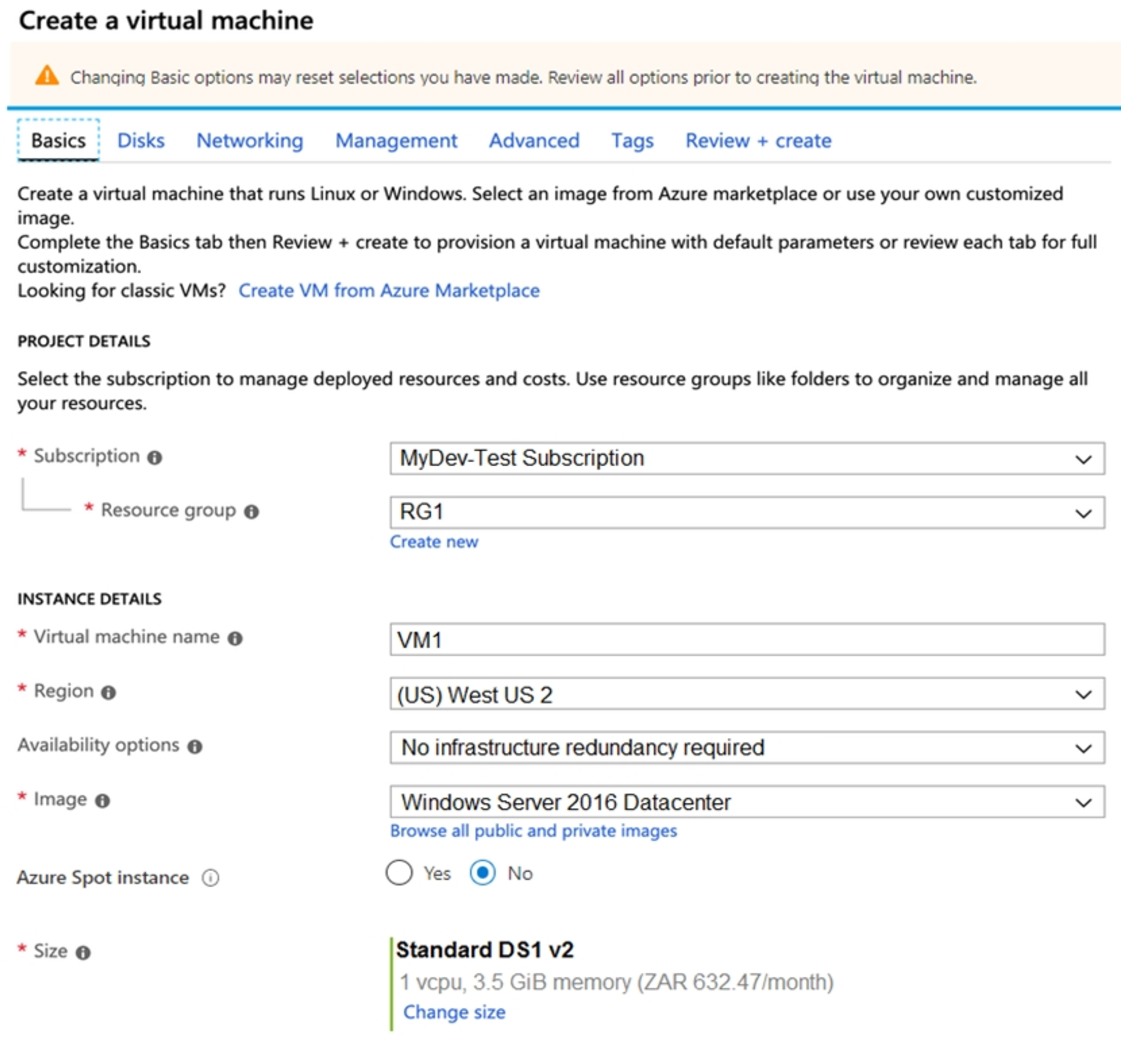
The planned disk configurations for VM1 are shown in the following exhibit.
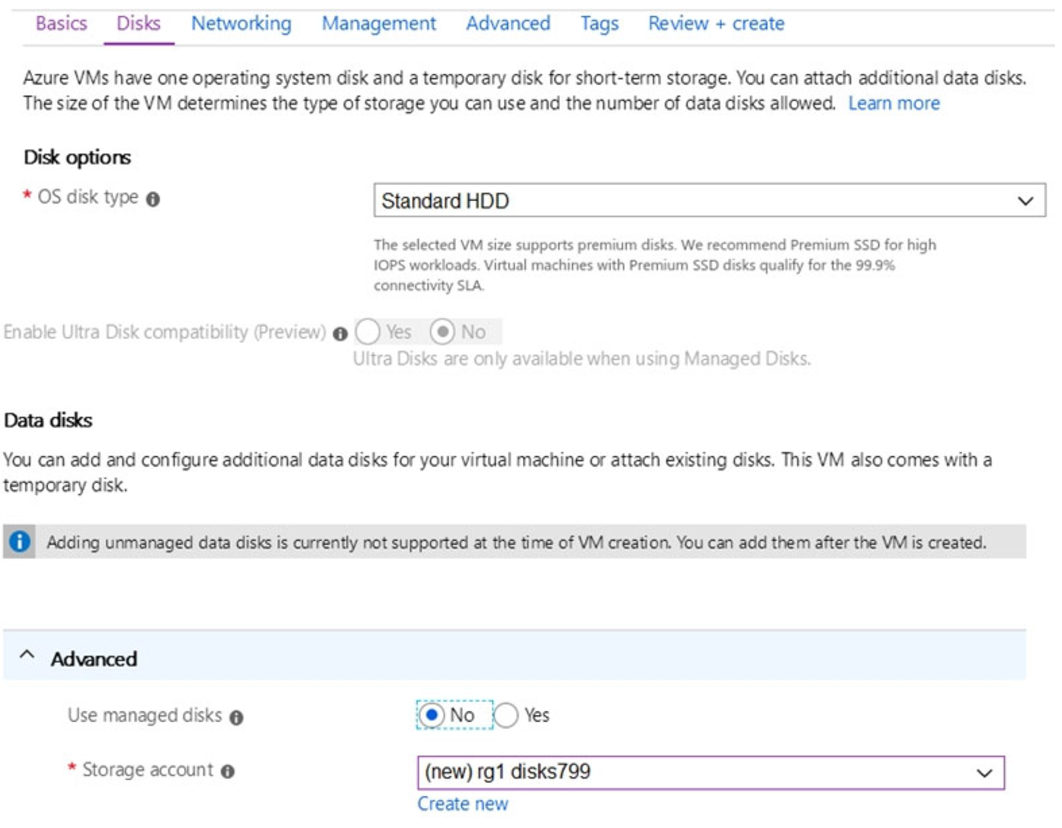
You need to ensure that VM1 can be created in an Availability Zone.
Which two settings should you modify? Each correct answer presents part of the solution.
NOTE: Each correct selection is worth one point.
- A. Use managed disks
- B. OS disk type
- C. Availability options
- D. Size
- E. Image
You have an Azure Active Directory (Azure AD) tenant that is linked to 10 Azure subscriptions.
You need to centrally monitor user activity across all the subscriptions.
What should you use?
- A. Azure Application Insights Profiler
- B. access reviews
- C. Activity log filters
- D. a Log Analytics workspace
HOTSPOT –
You have an Azure Active Directory (Azure AD) tenant named adatum.com. Adatum.com contains the groups in the following table.
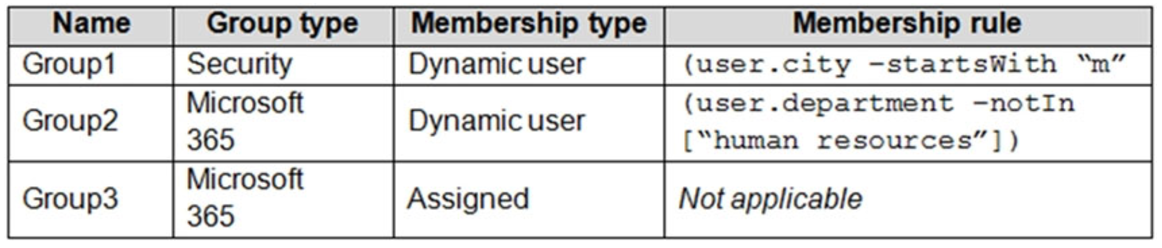
You create two user accounts that are configured as shown in the following table.

Of which groups are User1 and User2 members? To answer, select the appropriate options in the answer area.
NOTE: Each correct selection is worth one point.
Hot Area:
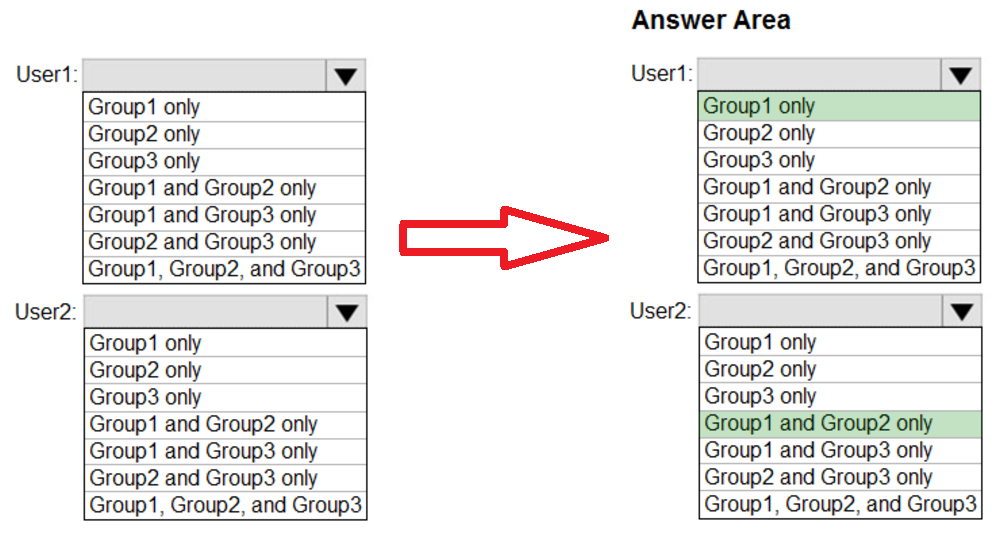
Box 1: Group 1 only –
First rule applies –
Box 2: Group1 and Group2 only –
Both membership rules apply.
Reference:
https://docs.microsoft.com/en-us/sccm/core/clients/manage/collections/create-collections
HOTSPOT –
You have an Azure subscription named Subscription1 that contains the resources shown in the following table:
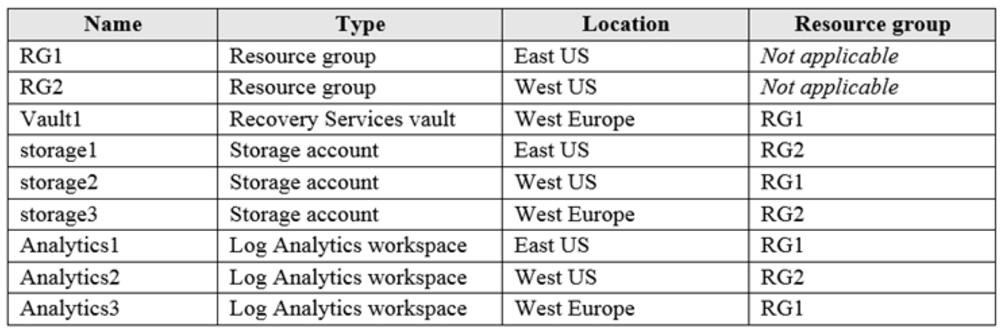
You plan to configure Azure Backup reports for Vault1.
You are configuring the Diagnostics settings for the Azure Backup Reports log.
Which storage accounts and which Log Analytics workspaces can you use for the Azure Backup reports of Vault1? To answer, select the appropriate options in the answer area.
NOTE: Each correct selection is worth one point.
Hot Area:
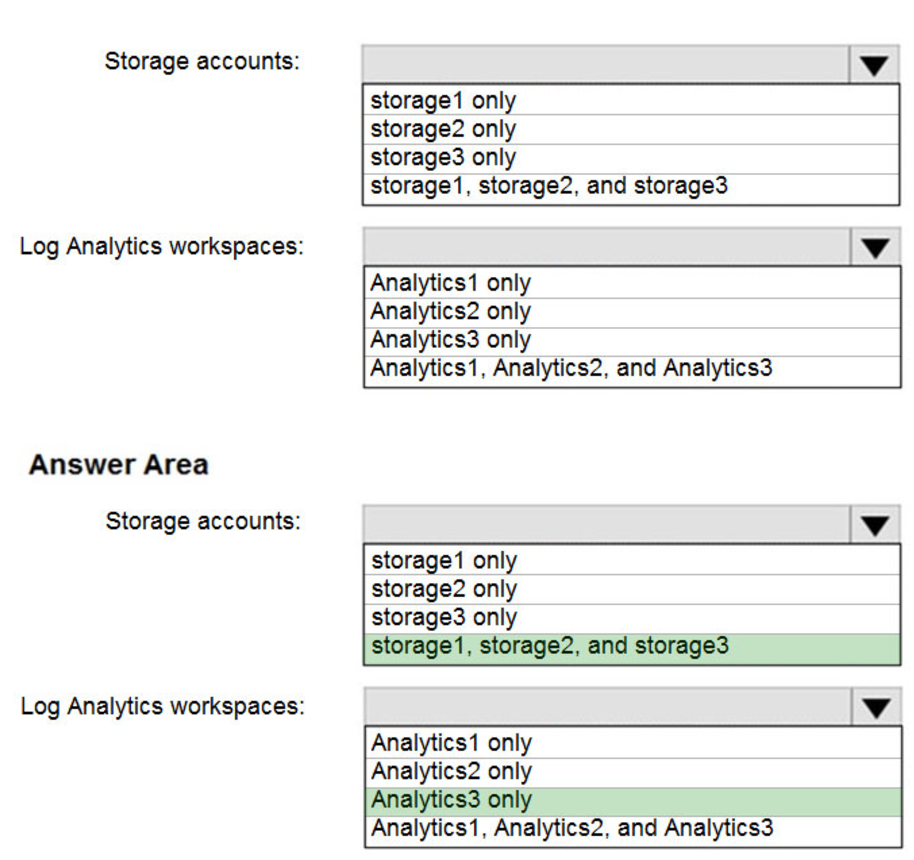
Box 1: storage1, storage2, and storage3
The location and subscription where this Log Analytics workspace can be created is independent of the location and subscription where your vaults exist.
Box 2: Analytics3 –
Vault1 and Analytics3 are both in West Europe.
Reference:
https://docs.microsoft.com/en-us/azure/backup/backup-azure-configure-reports
You need to deploy an Azure virtual machine scale set that contains five instances as quickly as possible.
What should you do?
- A. Deploy five virtual machines. Modify the Availability Zones settings for each virtual machine.
- B. Deploy five virtual machines. Modify the Size setting for each virtual machine.
- C. Deploy one virtual machine scale set that is set to VM (virtual machines) orchestration mode.
- D. Deploy one virtual machine scale set that is set to ScaleSetVM orchestration mode.
HOTSPOT –
You have an Azure subscription that contains the resources shown in the following table.
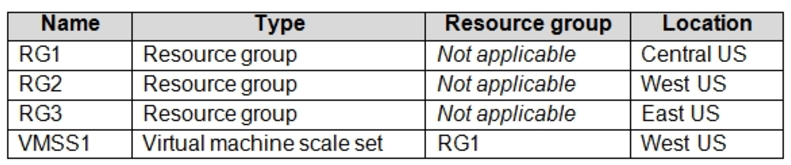
VMSS1 is set to VM (virtual machines) orchestration mode.
You need to deploy a new Azure virtual machine named VM1, and then add VM1 to VMSS1.
Which resource group and location should you use to deploy VM1? To answer, select the appropriate options in the answer area.
NOTE: Each correct selection is worth one point.
Hot Area:
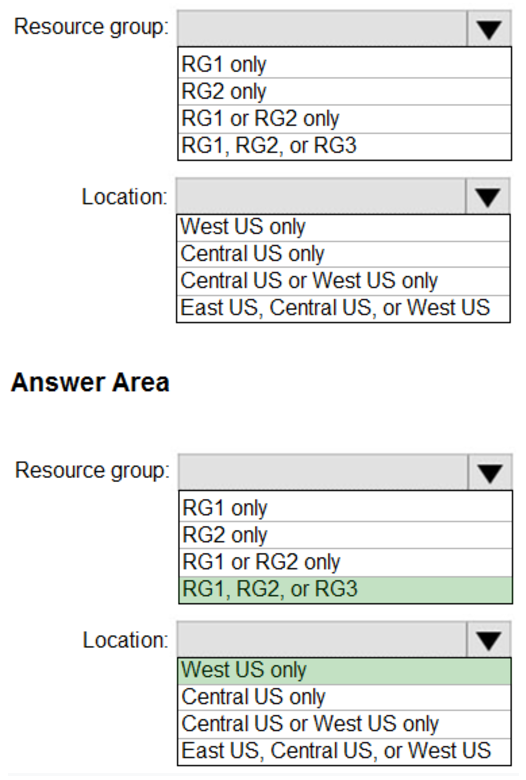
Box 1: RG1, RG2, or RG3 –
The resource group stores metadata about the resources. When you specify a location for the resource group, you’re specifying where that metadata is stored.
Box 2: West US only –
Note: Virtual machine scale sets will support 2 distinct orchestration modes:
ScaleSetVM ג€” Virtual machine instances added to the scale set are based on the scale set configuration model. The virtual machine instance lifecycle – creation, update, deletion – is managed by the scale set.
VM (virtual machines) ג€” Virtual machines created outside of the scale set can be explicitly added to the scaleset.
Reference:
https://docs.microsoft.com/en-us/azure/azure-resource-manager/management/overview
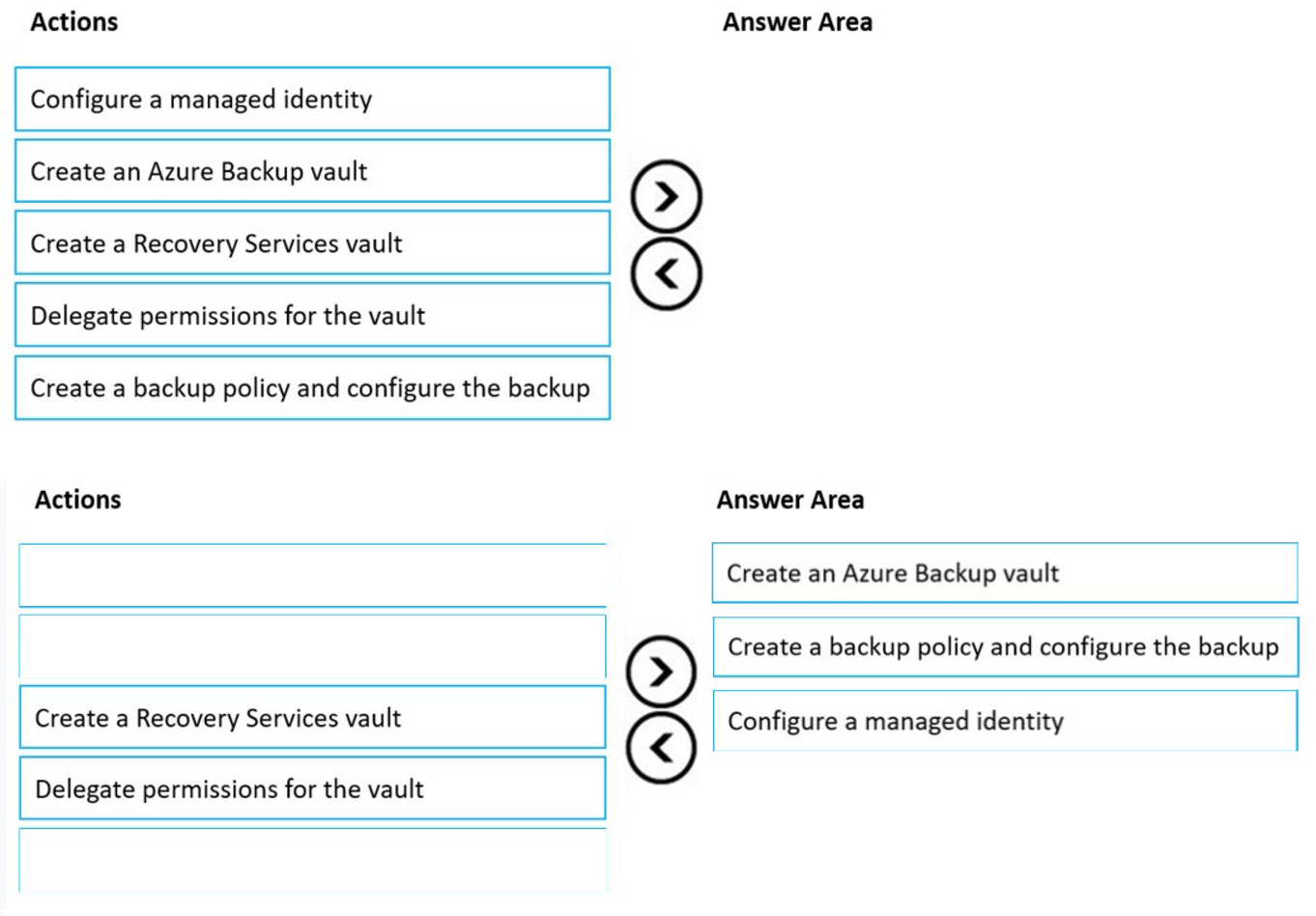
DRAG DROP –
You have an Azure subscription that contains a virtual machine name VM1.
VM1 has an operating system disk named Disk1 and a data disk named Disk2.
You need to back up Disk2 by using Azure Backup.
Which three actions should you perform in sequence? To answer, move the appropriate actions from the list of actions to the answer area and arrange them in the correct order.
Select and Place: