
Pass Microsoft AZ-104 in Just 3 Days – Stress-Free, No Study Needed!
Have questions? Contact us directly on WhatsApp for quick support!
HOTSPOT –
You have an Azure subscription that contains the storage accounts shown in the following exhibit.
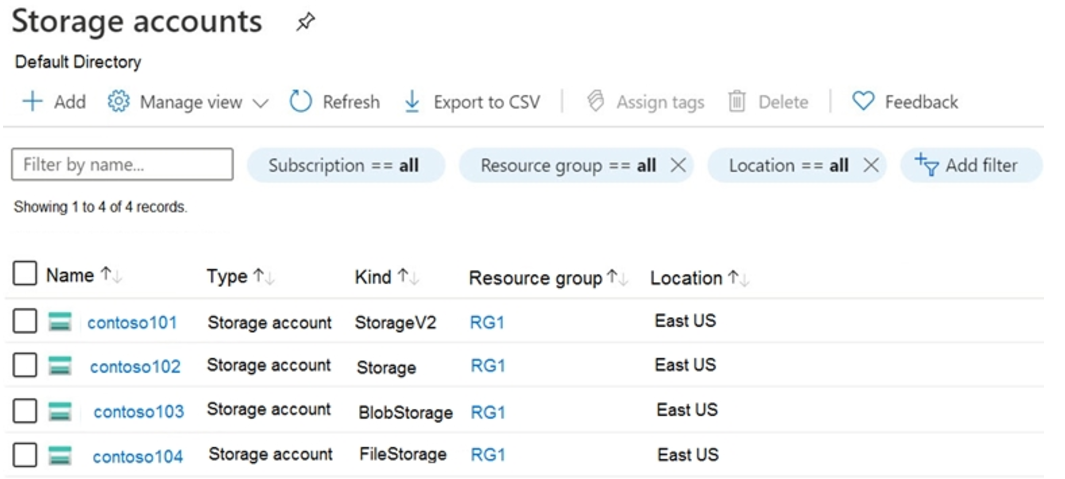
Use the drop-down menus to select the answer choice that completes each statement based on the information presented in the graphic.
NOTE: Each correct selection is worth one point.
Hot Area:
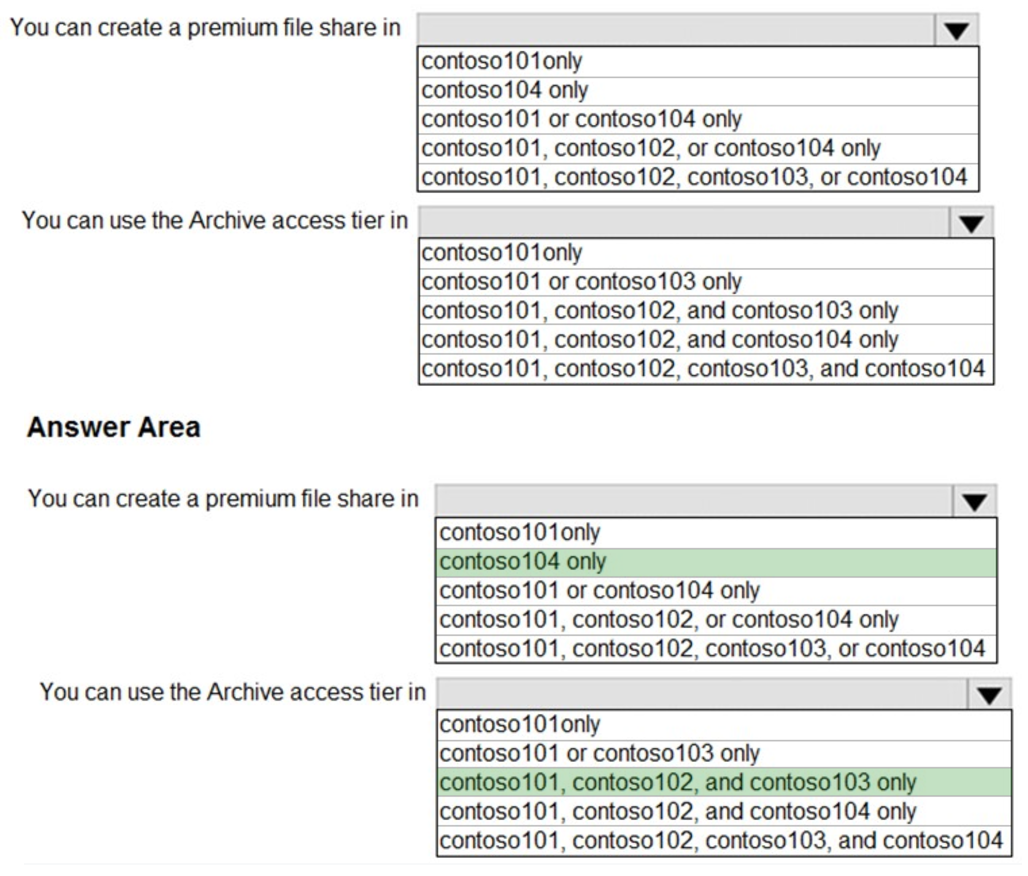
Box 1: contoso104 only –
Premium file shares are hosted in a special purpose storage account kind, called a FileStorage account.
Box 2: contoso101, contoso102, and contos103 only
Reference:
https://docs.microsoft.com/en-us/azure/storage/files/storage-how-to-create-premium-fileshare?tabs=azure-portal https://docs.microsoft.com/en-us/azure/storage/blobs/storage-blob-storage-tiers
You plan to create the Azure web apps shown in the following table.
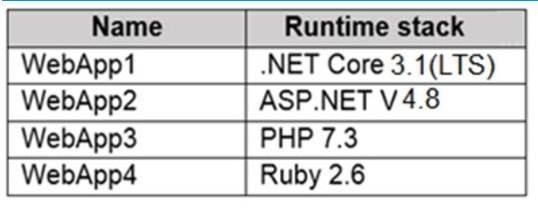
What is the minimum number of App Service plans you should create for the web apps?
- A. 1
- B. 2
- C. 3
- D. 4
HOTSPOT –
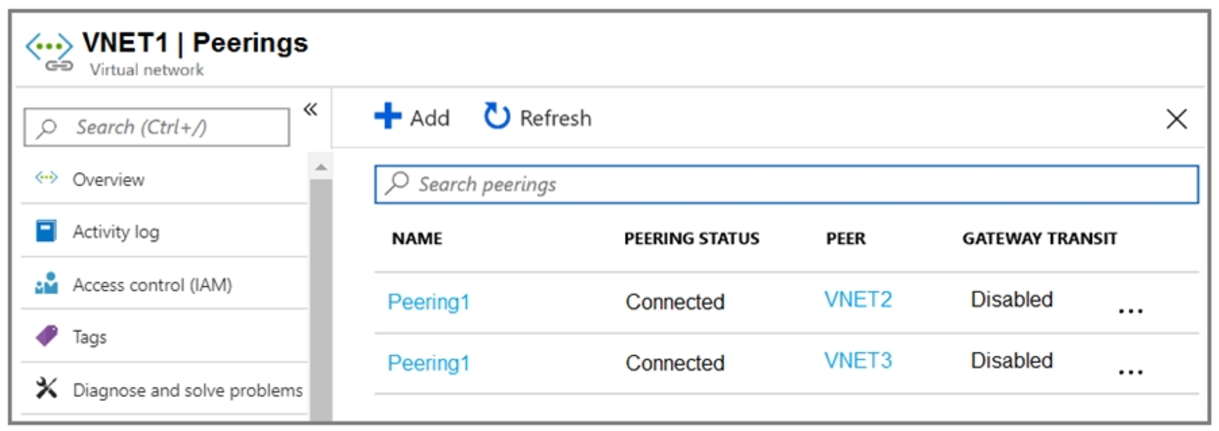
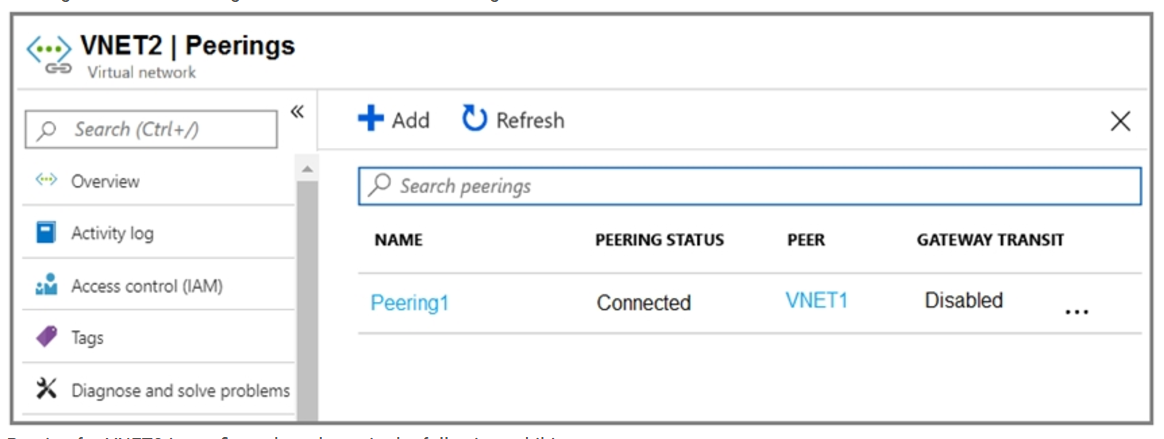
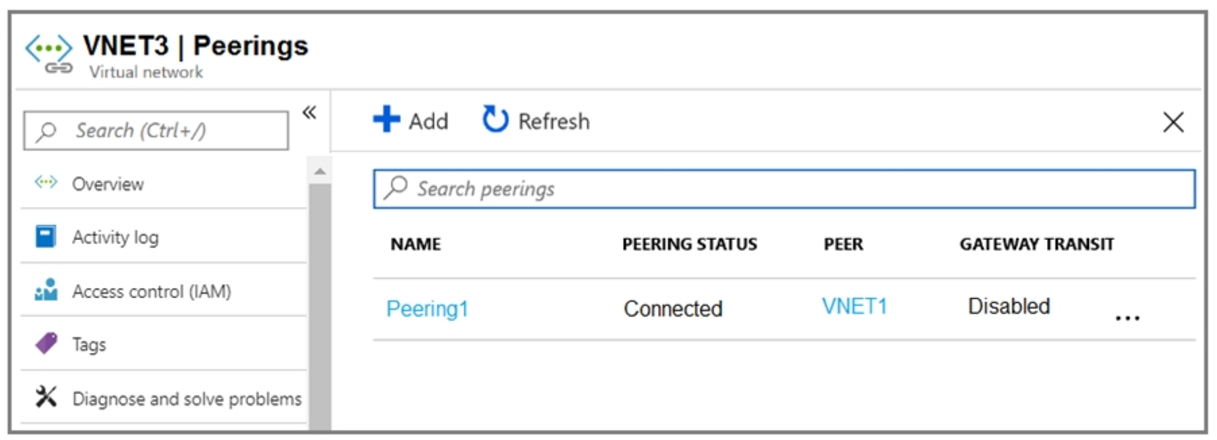
You have an Azure subscription that contains three virtual networks named VNET1, VNET2, and VNET3.
Peering for VNET1 is configured as shown in the following exhibit.
Peering for VNET2 is configured as shown in the following exhibit.
Peering for VNET3 is configured as shown in the following exhibit.
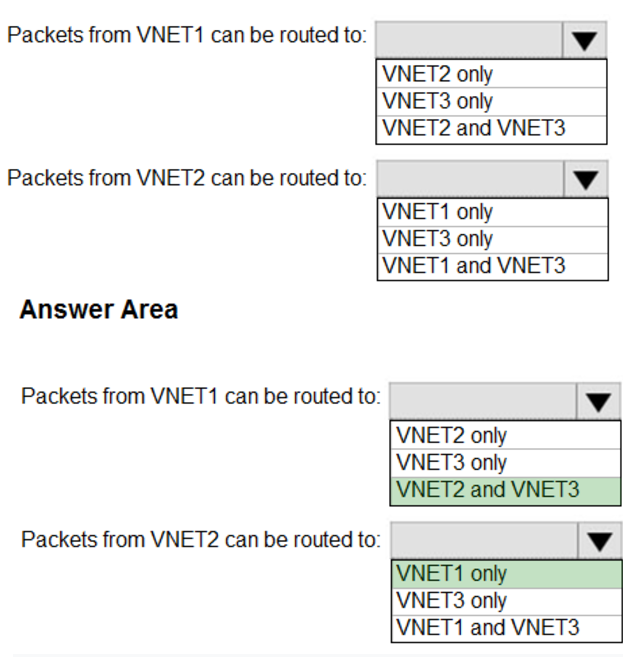
How can packets be routed between the virtual networks? To answer, select the appropriate options in the answer area.
NOTE: Each correct selection is worth one point.
Hot Area:
You have a subnet named Subnet1 that contains Azure virtual machines. A network security group (NSG) named NSG1 is associated to Subnet1. NSG1 only contains the default rules.
You need to create a rule in NSG1 to prevent the hosts on Subnet1 form connecting to the Azure portal. The hosts must be able to connect to other internet hosts.
To what should you set Destination in the rule?
- A. Application security group
- B. IP Addresses
- C. Service Tag
- D. Any
HOTSPOT –
You have an Azure subscription named Subscription1.
In Subscription1, you create an Azure file share named share1.
You create a shared access signature (SAS) named SAS1 as shown in the following exhibit:
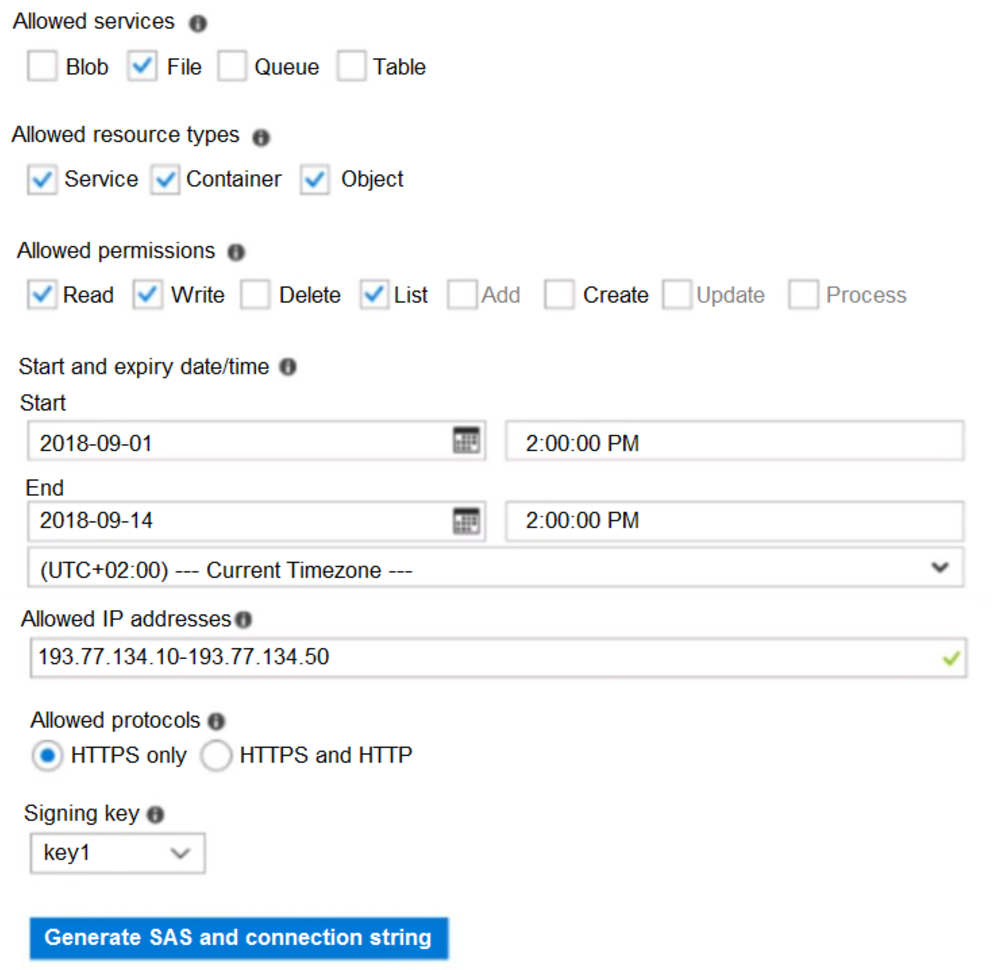
To answer, select the appropriate options in the answer area.
NOTE: Each correct selection is worth one point.
Hot Area:
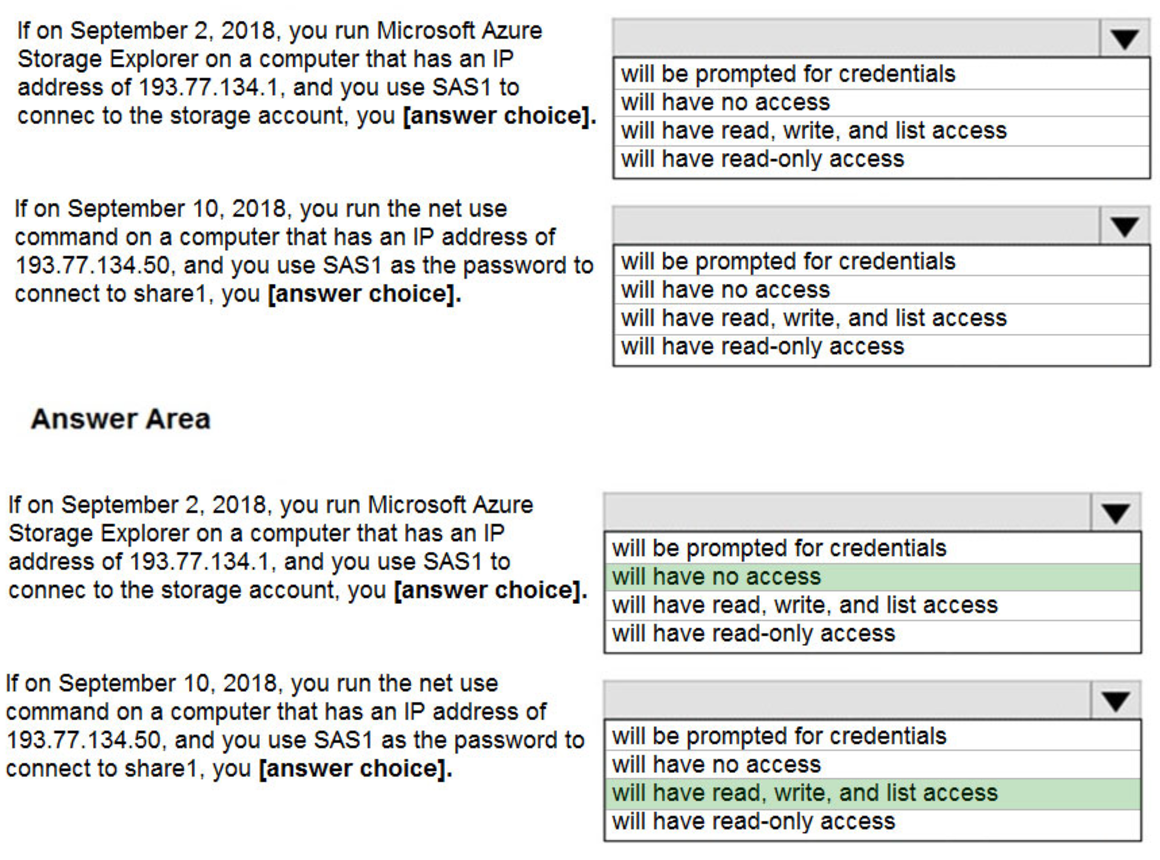
Box 1: Will have no access –
The IP 193.77.134.1 does not have access on the SAS.
Box 2: Will have read, write, and list access
The net use command is used to connect to file shares.
Reference:
https://docs.microsoft.com/en-us/azure/storage/common/storage-dotnet-shared-access-signature-part-1 https://docs.microsoft.com/en-us/azure/vs-azure-tools-storage-manage-with-storage-explorer?tabs=windows
HOTSPOT –
You have a pay-as-you-go Azure subscription that contains the virtual machines shown in the following table.

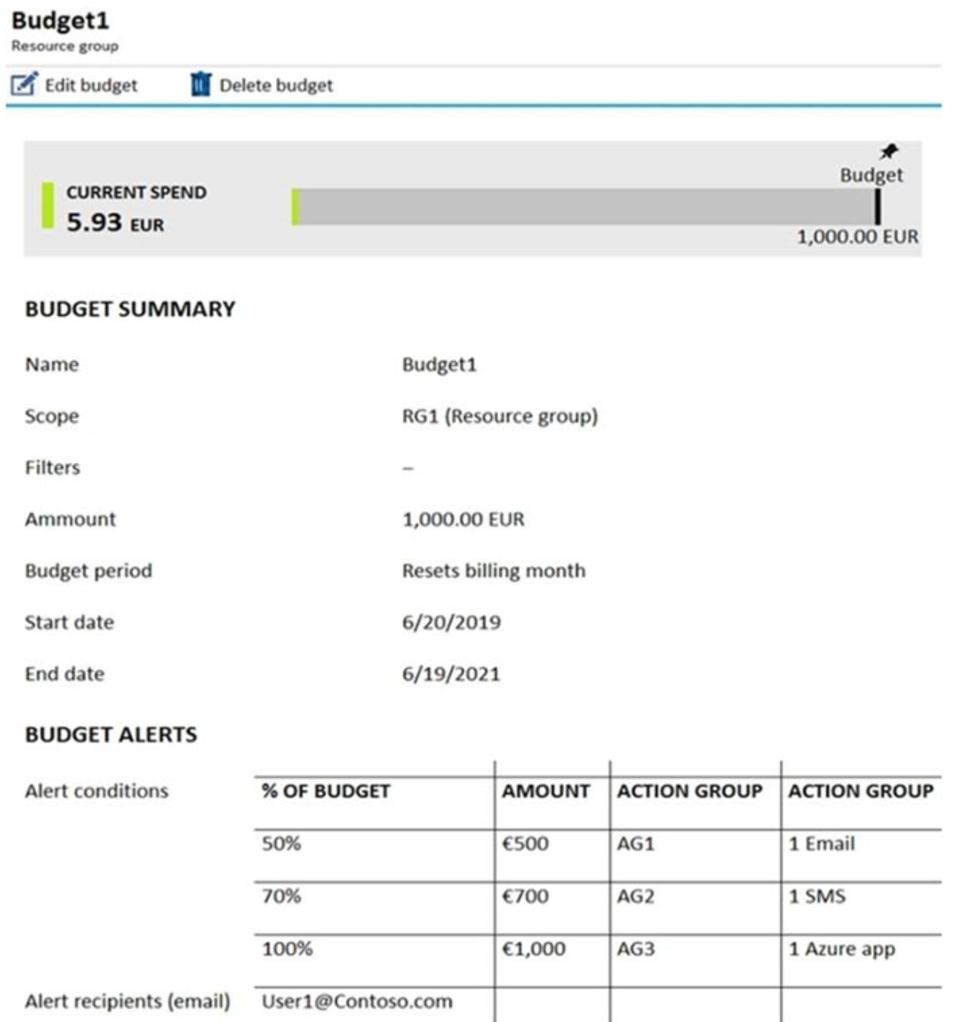
The AG1 action group contains a user named admin@contoso.com only.
Use the drop-down menus to select the answer choice that completes each statement based on the information presented in the graphic.
Hot Area:
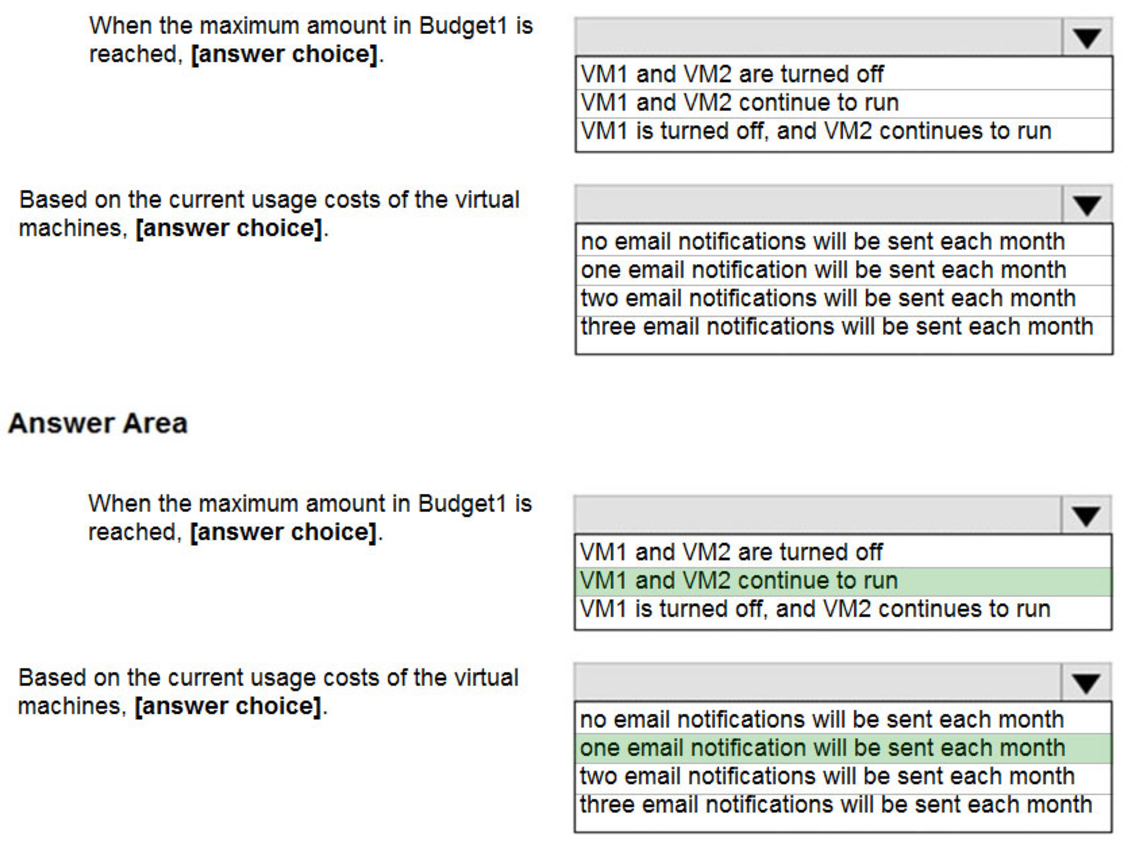
Box 1: VM1 and VM2 continue to run
The budget alerts are for Resource Group RG1, which include VM1, but not VM2. However, when the budget thresholds you’ve created are exceeded, only notifications are triggered. None of your resources are affected and your consumption isn’t stopped.
Box 2: one email notification will be sent each month.
Budget alerts for Resource Group RG1, which include VM1, but not VM2.VM1 consumes 20 Euro/day. The 50%, 500 Euro limit, will be reached in 25 days, and an email will be sent.
The 70% and 100% alert conditions will not be reached within a month, and they don’t trigger email actions anyway.
Credit alerts: Credit alerts are generated automatically at 90% and at 100% of your Azure credit balance. Whenever an alert is generated, it’s reflected in cost alerts and in the email sent to the account owners. 90% and 100% will not be reached though.
Reference:
https://docs.microsoft.com/en-us/azure/cost-management-billing/costs/cost-mgt-alerts-monitor-usage-spending https://docs.microsoft.com/en-gb/azure/cost-management-billing/costs/tutorial-acm-create-budgets
Note: This question is part of a series of questions that present the same scenario. Each question in the series contains a unique solution that might meet the stated goals. Some question sets might have more than one correct solution, while others might not have a correct solution.
After you answer a question in this section, you will NOT be able to return to it. As a result, these questions will not appear in the review screen.
You have a computer named Computer1 that has a point-to-site VPN connection to an Azure virtual network named VNet1. The point-to-site connection uses a self-signed certificate.
From Azure, you download and install the VPN client configuration package on a computer named Computer2.
You need to ensure that you can establish a point-to-site VPN connection to VNet1 from Computer2.
Solution: You modify the Azure Active Directory (Azure AD) authentication policies.
Does this meet the goal?
- A. Yes
- B. No
You have an Azure subscription named Subscription1 that contains an Azure Log Analytics workspace named Workspace1.
You need to view the error events from a table named Event.
Which query should you run in Workspace1?
- A. search in (Event) “error”
- B. Event | where EventType is “error”
- C. select * from Event where EventType == “error”
- D. Get-Event Event | where {$_.EventType == “error”}
You have two Azure virtual machines named VM1 and VM2. You have two Recovery Services vaults named RSV1 and RSV2.
VM2 is backed up to RSV1.
You need to back up VM2 to RSV2.
What should you do first?
- A. From the RSV1 blade, click Backup items and stop the VM2 backup
- B. From the RSV2 blade, click Backup. From the Backup blade, select the backup for the virtual machine, and then click Backup
- C. From the VM2 blade, click Disaster recovery, click Replication settings, and then select RSV2 as the Recovery Services vault
- D. From the RSV1 blade, click Backup Jobs and export the VM2 job
Note: This question is part of a series of questions that present the same scenario. Each question in the series contains a unique solution that might meet the stated goals. Some question sets might have more than one correct solution, while others might not have a correct solution.
After you answer a question in this section, you will NOT be able to return to it. As a result, these questions will not appear in the review screen.
You have a computer named Computer1 that has a point-to-site VPN connection to an Azure virtual network named VNet1. The point-to-site connection uses a self-signed certificate.
From Azure, you download and install the VPN client configuration package on a computer named Computer2.
You need to ensure that you can establish a point-to-site VPN connection to VNet1 from Computer2.
Solution: You join Computer2 to Azure Active Directory (Azure AD).
Does this meet the goal?
- A. Yes
- B. No