

Pass Microsoft AZ-104 in Just 3 Days – Stress-Free, No Study Needed!
Have questions? Contact us directly on WhatsApp for quick support!
You plan to deploy several Azure virtual machines that will run Windows Server 2019 in a virtual machine scale set by using an Azure Resource Manager template.
You need to ensure that NGINX is available on all the virtual machines after they are deployed.
What should you use?
- A. a Desired State Configuration (DSC) extension
- B. the New-AzConfigurationAssignment cmdlet
- C. Azure Application Insights
- D. a Microsoft Endpoint Manager device configuration profile
You have an Azure subscription named Subscription1.
You have 5 TB of data that you need to transfer to Subscription1.
You plan to use an Azure Import/Export job.
What can you use as the destination of the imported data?
- A. Azure File Storage
- B. an Azure Cosmos DB database
- C. Azure Data Factory
- D. Azure SQL Database
HOTSPOT –
You have an Azure subscription named Subscription1 that contains the following resource group:
– Name: RG1
– Region: West US
– Tag: `tag1`: `value1`
You assign an Azure policy named Policy1 to Subscription1 by using the following configurations:
– Exclusions: None
– Policy definition: Append a tag and its value to resources
– Assignment name: Policy1
– Parameters:
– Tag name: tag2
Tag value: value2 –

After Policy1 is assigned, you create a storage account that has the following configuration:
– Name: storage1
– Location: West US
– Resource group: RG1
– Tags: `tag3`: `value3`
You need to identify which tags are assigned to each resource.
What should you identify? To answer, select the appropriate options in the answer area.
NOTE: Each correct selection is worth one point.
Hot Area:
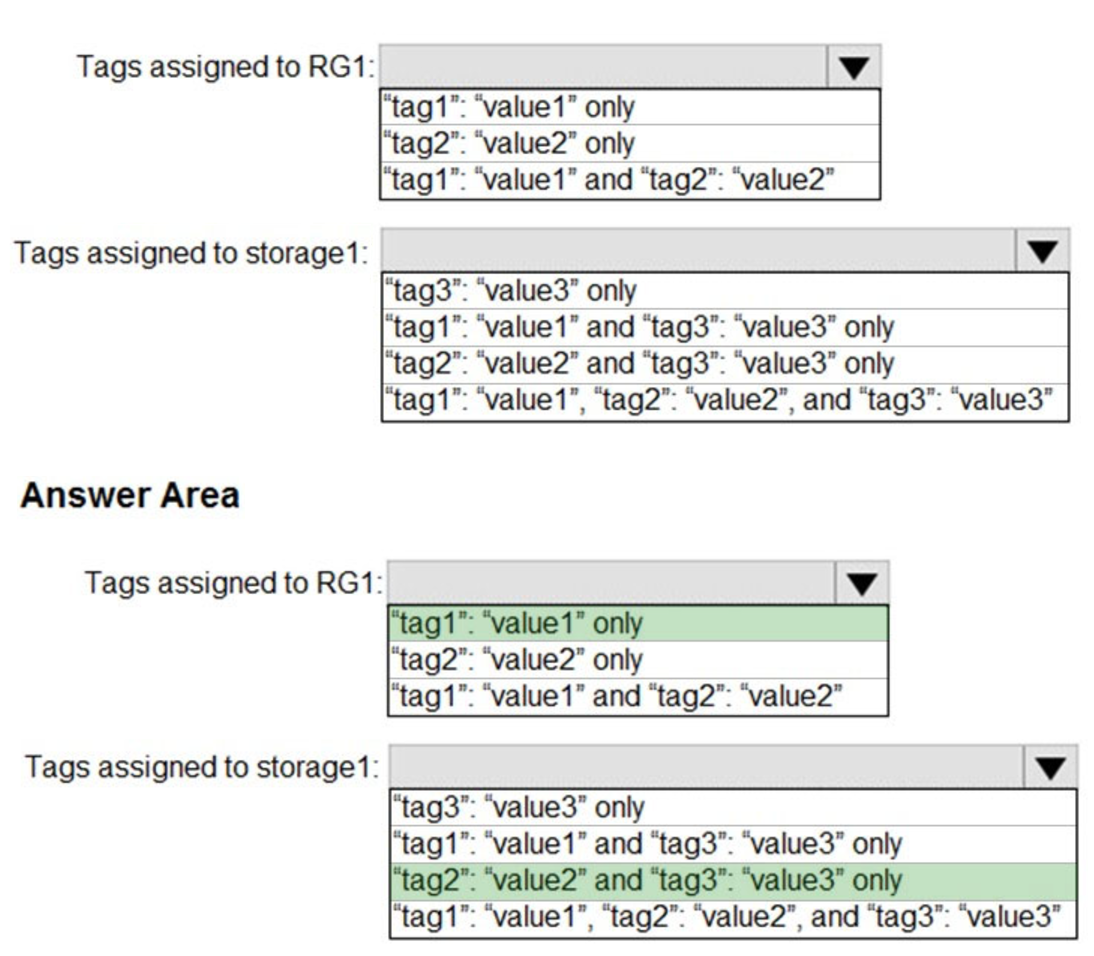
Box 1: “tag1”: “value1” only –
Box 2: “tag2”: “value2” and “tag3”: “value3” only
Tags applied to the resource group are not inherited by the resources in that resource group.
Reference:
https://docs.microsoft.com/en-us/azure/azure-resource-manager/resource-group-using-tags
You have an Azure subscription that contains eight virtual machines and the resources shown in the following table.
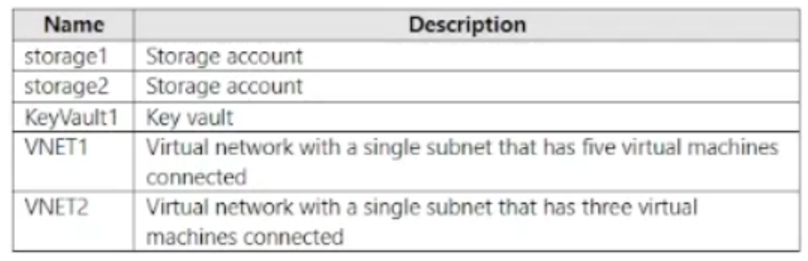
You need to configure access for VNET1. The solution must meet the following requirements:
• The virtual machines connected to VNET1 must be able to communicate with the virtual machines connected to VNET2 by using the Microsoft backbone.
• The virtual machines connected to VNET1 must be able to access storage1, storage2, and Azure AD by using the Microsoft backbone.
What is the minimum number of service endpoints you should add to VNET1?
- A. 1
- B. 2
- C. 3
- D. 5
HOTSPOT –
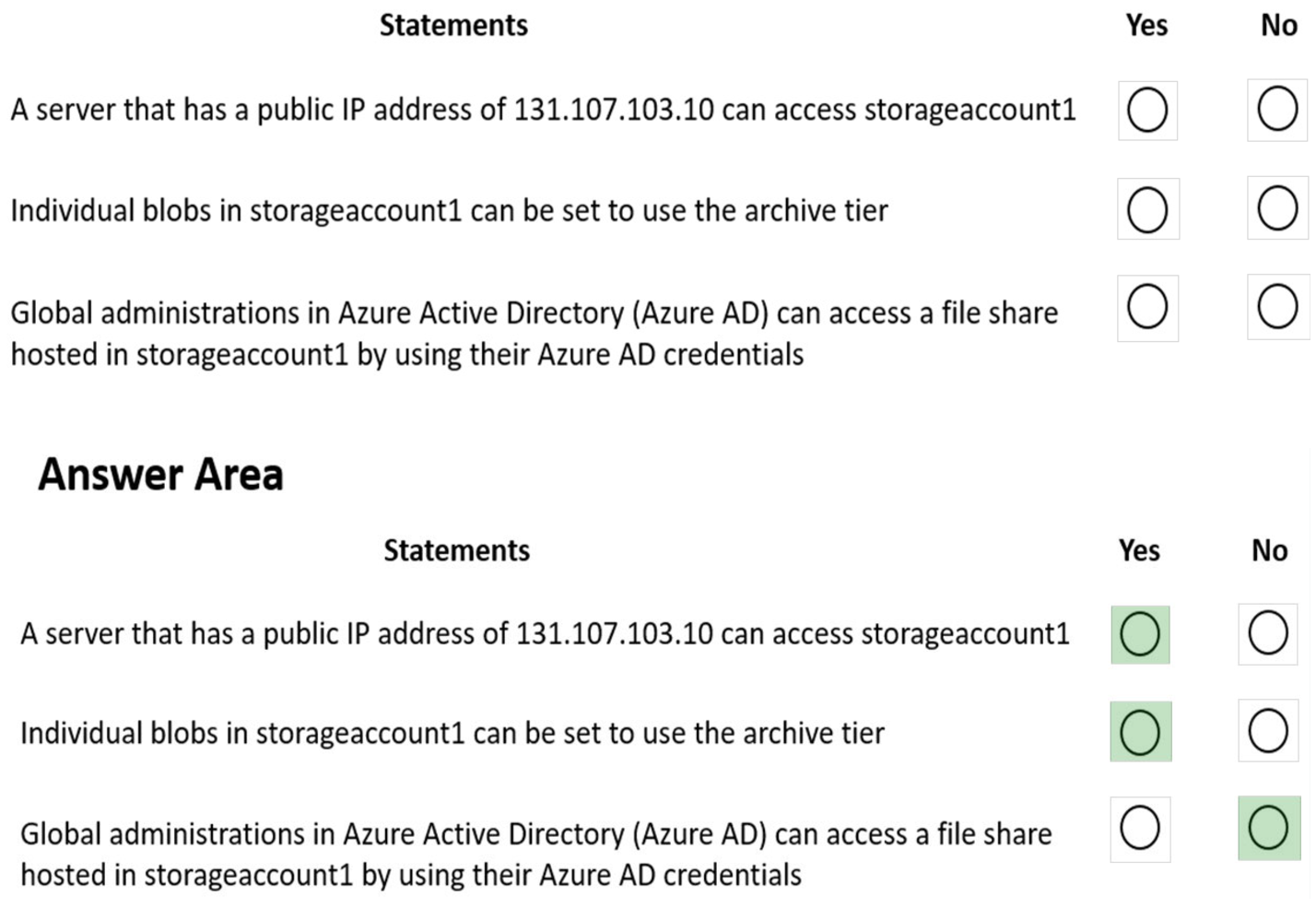
You have an Azure subscription that contains an Azure Storage account named storageaccount1.
You export storageaccount1 as an Azure Resource Manager template. The template contains the following sections.
HOTSPOT –
You have an Azure subscription named Subscription1.
In Subscription1, you create an alert rule named Alert1.
The Alert1 action group is configured as shown in the following exhibit.
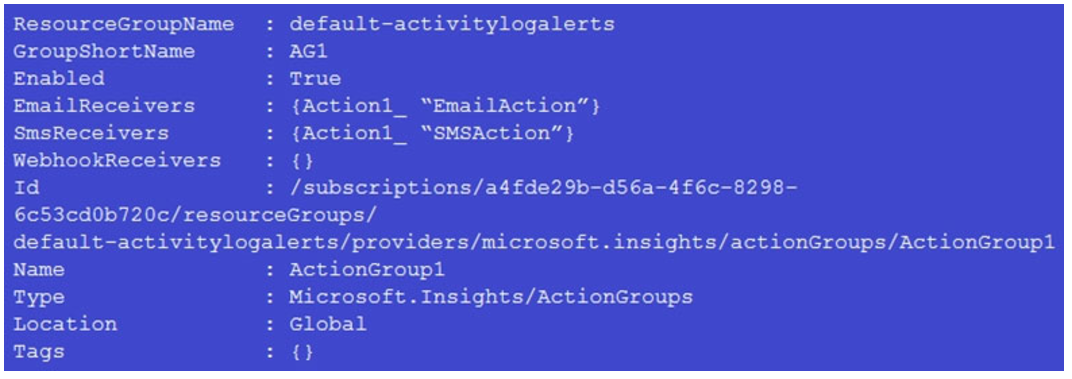
Alert1 alert criteria triggered every minute.
Use the drop-down menus to select the answer choice that completes each statement based on the information presented in the graphic.
NOTE: Each correct selection is worth one point.
Hot Area:
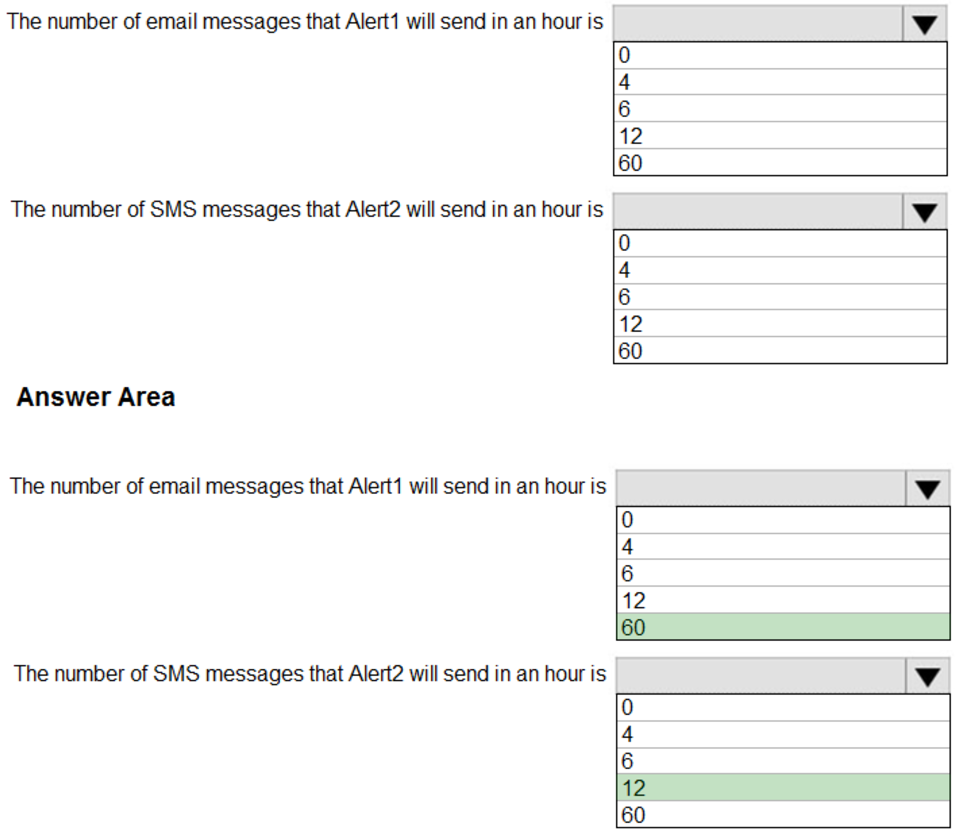
Box 1: 60 –
One alert per minute will trigger one email per minute.
Box 2: 12 –
No more than 1 SMS every 5 minutes can be send, which equals 12 per hour.
Note: Rate limiting is a suspension of notifications that occurs when too many are sent to a particular phone number, email address or device. Rate limiting ensures that alerts are manageable and actionable.
The rate limit thresholds are:
– SMS: No more than 1 SMS every 5 minutes.
– Voice: No more than 1 Voice call every 5 minutes.
– Email: No more than 100 emails in an hour.
– Other actions are not rate limited.
Reference:
https://docs.microsoft.com/en-us/azure/azure-monitor/platform/alerts-rate-limiting
You have the Azure virtual network named VNet1 that contains a subnet named Subnet1. Subnet1 contains three Azure virtual machines. Each virtual machine has a public IP address.
The virtual machines host several applications that are accessible over port 443 to users on the Internet.
Your on-premises network has a site-to-site VPN connection to VNet1.
You discover that the virtual machines can be accessed by using the Remote Desktop Protocol (RDP) from the Internet and from the on-premises network.
You need to prevent RDP access to the virtual machines from the Internet, unless the RDP connection is established from the on-premises network. The solution must ensure that all the applications can still be accessed by the Internet users.
What should you do?
- A. Modify the address space of the local network gateway
- B. Create a deny rule in a network security group (NSG) that is linked to Subnet1
- C. Remove the public IP addresses from the virtual machines
- D. Modify the address space of Subnet1
You need to configure an Azure web app named contoso.azurewebsites.net to host www.contoso.com.
What should you do first?
- A. Create A records named www.contoso.com and asuid.contoso.com.
- B. Create a TXT record named asuid that contains the domain verification ID.
- C. Create a CNAME record named asuid that contains the domain verification ID.
- D. Create a TXT record named www.contoso.com that has a value of contoso.azurewebsites.net.
You have an Azure subscription that contains a storage account named storage1.
You have the devices shown in the following table.
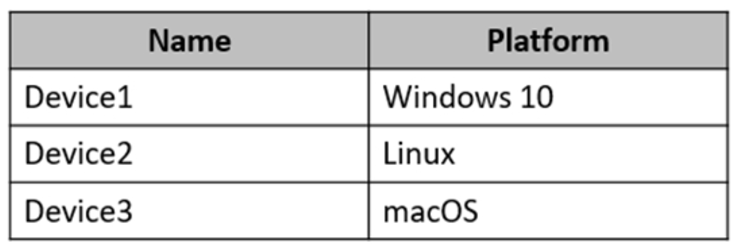
From which devices can you use AzCopy to copy data to storage1?
- A. Device 1 only
- B. Device1, Device2 and Device3
- C. Device1 and Device2 only
- D. Device1 and Device3 only
You have an Azure subscription that contains the resources in the following table.
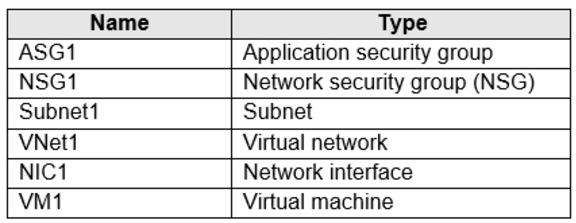
Subnet1 is associated to VNet1. NIC1 attaches VM1 to Subnet1.
You need to apply ASG1 to VM1.
What should you do?
- A. Associate NIC1 to ASG1
- B. Modify the properties of ASG1
- C. Modify the properties of NSG1