
Pass Microsoft AI-900 in Just 3 Days – Stress-Free!
Get your Microsoft Azure AI Fundamentals (AI-900) certification with 100% pass guarantee. Pay only after passing!
Click here to secure your guaranteed certification now!
Have questions? Contact us directly on WhatsApp for quick support!
In which two scenarios can you use a speech synthesis solution? Each correct answer presents a complete solution.
NOTE: Each correct selection is worth one point.
- A. an automated voice that reads back a credit card number entered into a telephone by using a numeric keypad
- B. generating live captions for a news broadcast
- C. extracting key phrases from the audio recording of a meeting
- D. an AI character in a computer game that speaks audibly to a player
DRAG DROP –
You need to scan the news for articles about your customers and alert employees when there is a negative article. Positive articles must be added to a press book.
Which natural language processing tasks should you use to complete the process? To answer, drag the appropriate tasks to the correct locations. Each task may be used once, more than once, or not at all. You may need to drag the split bar between panes or scroll to view content.
NOTE: Each correct selection is worth one point.
Select and Place:
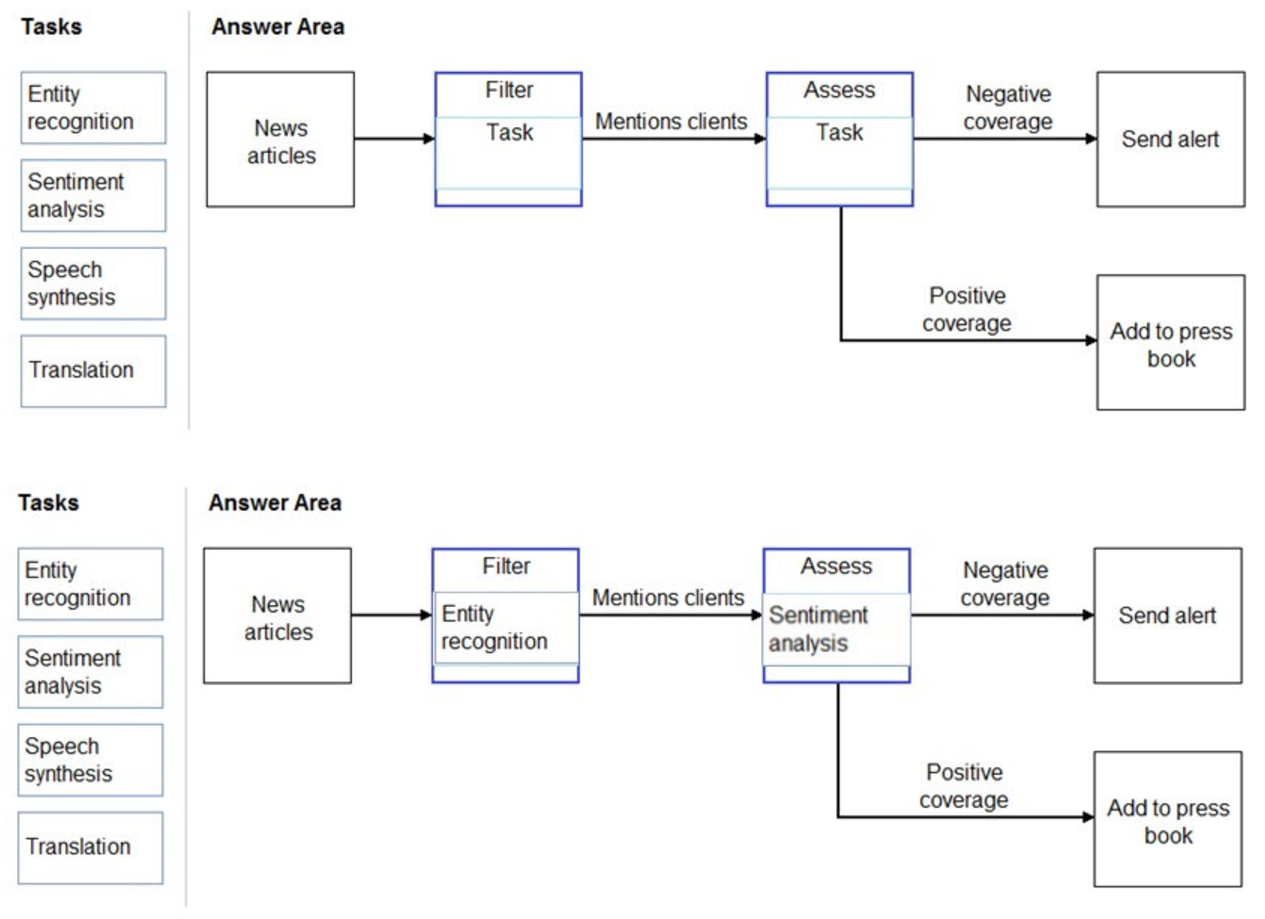
Box 1: Entity recognition –
the Named Entity Recognition module in Machine Learning Studio (classic), to identify the names of things, such as people, companies, or locations in a column of text.
Named entity recognition is an important area of research in machine learning and natural language processing (NLP), because it can be used to answer many real-world questions, such as:
– Which companies were mentioned in a news article?
– Does a tweet contain the name of a person? Does the tweet also provide his current location?
– Were specified products mentioned in complaints or reviews?
Box 2: Sentiment Analysis –
The Text Analytics API’s Sentiment Analysis feature provides two ways for detecting positive and negative sentiment. If you send a Sentiment Analysis request, the API will return sentiment labels (such as “negative”, “neutral” and “positive”) and confidence scores at the sentence and document-level.
Reference:
https://docs.microsoft.com/en-us/azure/machine-learning/studio-module-reference/named-entity-recognition https://docs.microsoft.com/en-us/azure/cognitive-services/text-analytics/how-tos/text-analytics-how-to-sentiment-analysis
You are building a knowledge base by using QnA Maker.
Which file format can you use to populate the knowledge base?
- A. PPTX
- B. XML
- C. ZIP
- D. PDF
In which scenario should you use key phrase extraction?
- A. identifying whether reviews of a restaurant are positive or negative
- B. generating captions for a video based on the audio track
- C. identifying which documents provide information about the same topics
- D. translating a set of documents from English to German
You have insurance claim reports that are stored as text.
You need to extract key terms from the reports to generate summaries.
Which type of AI workload should you use?
- A. natural language processing
- B. conversational AI
- C. anomaly detection
- D. computer vision
HOTSPOT –
To complete the sentence, select the appropriate option in the answer area.
Hot Area:
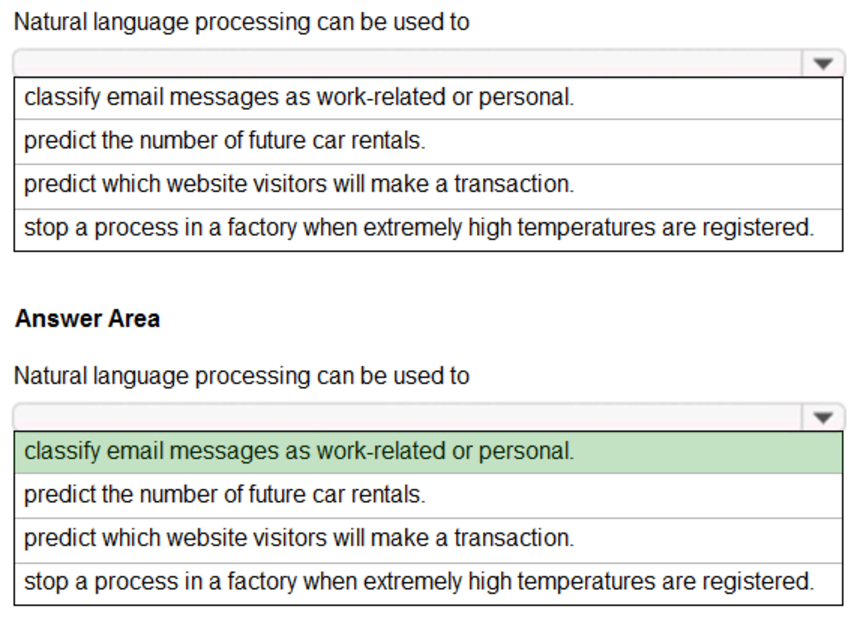
Natural language processing (NLP) is used for tasks such as sentiment analysis, topic detection, language detection, key phrase extraction, and document categorization.
Reference:
https://docs.microsoft.com/en-us/azure/architecture/data-guide/technology-choices/natural-language-processing
You are developing a chatbot solution in Azure.
Which service should you use to determine a user’s intent?
- A. Translator
- B. QnA Maker
- C. Speech
- D. Language Understanding (LUIS)
You need to make the written press releases of your company available in a range of languages.
Which service should you use?
- A. Translator
- B. Text Analytics
- C. Speech
- D. Language Understanding (LUIS)
HOTSPOT –
For each of the following statements, select Yes if the statement is true. Otherwise, select No.
NOTE: Each correct selection is worth one point.
Hot Area:
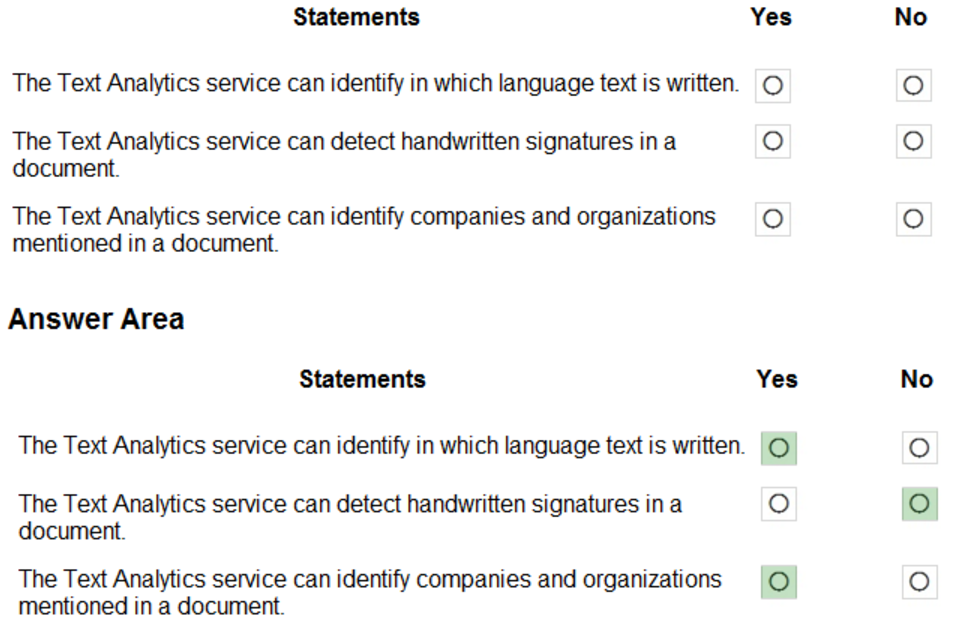
The Text Analytics API is a cloud-based service that provides advanced natural language processing over raw text, and includes four main functions: sentiment analysis, key phrase extraction, named entity recognition, and language detection.
Box 1: Yes –
You can detect which language the input text is written in and report a single language code for every document submitted on the request in a wide range of languages, variants, dialects, and some regional/cultural languages. The language code is paired with a score indicating the strength of the score.
Box 2: No –
Box 3: Yes –
Named Entity Recognition: Identify and categorize entities in your text as people, places, organizations, date/time, quantities, percentages, currencies, and more.
Well-known entities are also recognized and linked to more information on the web.
Reference:
https://docs.microsoft.com/en-us/azure/cognitive-services/text-analytics/overview
DRAG DROP –
Match the types of natural languages processing workloads to the appropriate scenarios.
To answer, drag the appropriate workload type from the column on the left to its scenario on the right. Each workload type may be used once, more than once, or not at all.
NOTE: Each correct selection is worth one point.
Select and Place:
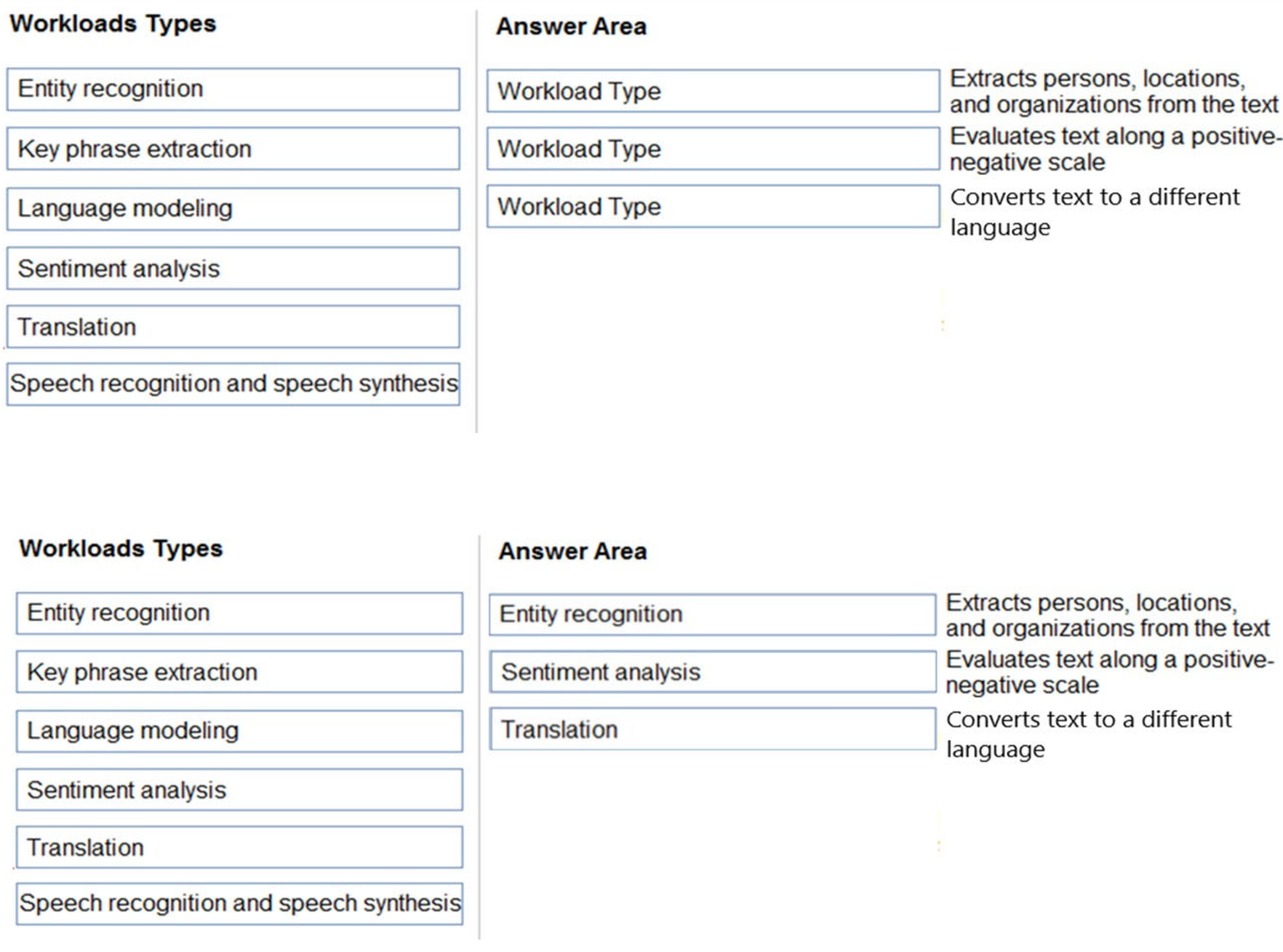
Box 1: Entity recognition –
Named Entity Recognition (NER) is the ability to identify different entities in text and categorize them into pre-defined classes or types such as: person, location, event, product, and organization.
Box 2: Sentiment analysis –
Sentiment Analysis is the process of determining whether a piece of writing is positive, negative or neutral.
Box 3: Translation –
Using Microsoft’s Translator text API
This versatile API from Microsoft can be used for the following:
Translate text from one language to another.
Transliterate text from one script to another.
Detecting language of the input text.
Find alternate translations to specific text.
Determine the sentence length.
Reference:
https://docs.microsoft.com/en-in/azure/cognitive-services/text-analytics/how-tos/text-analytics-how-to-entity-linking?tabs=version-3-preview https://azure.microsoft.com/en-us/services/cognitive-services/text-analytics