
Pass Microsoft AZ-900 in Just 3 Days – Stress-Free, No Study Needed!
Have questions? Contact us directly on WhatsApp for quick support!
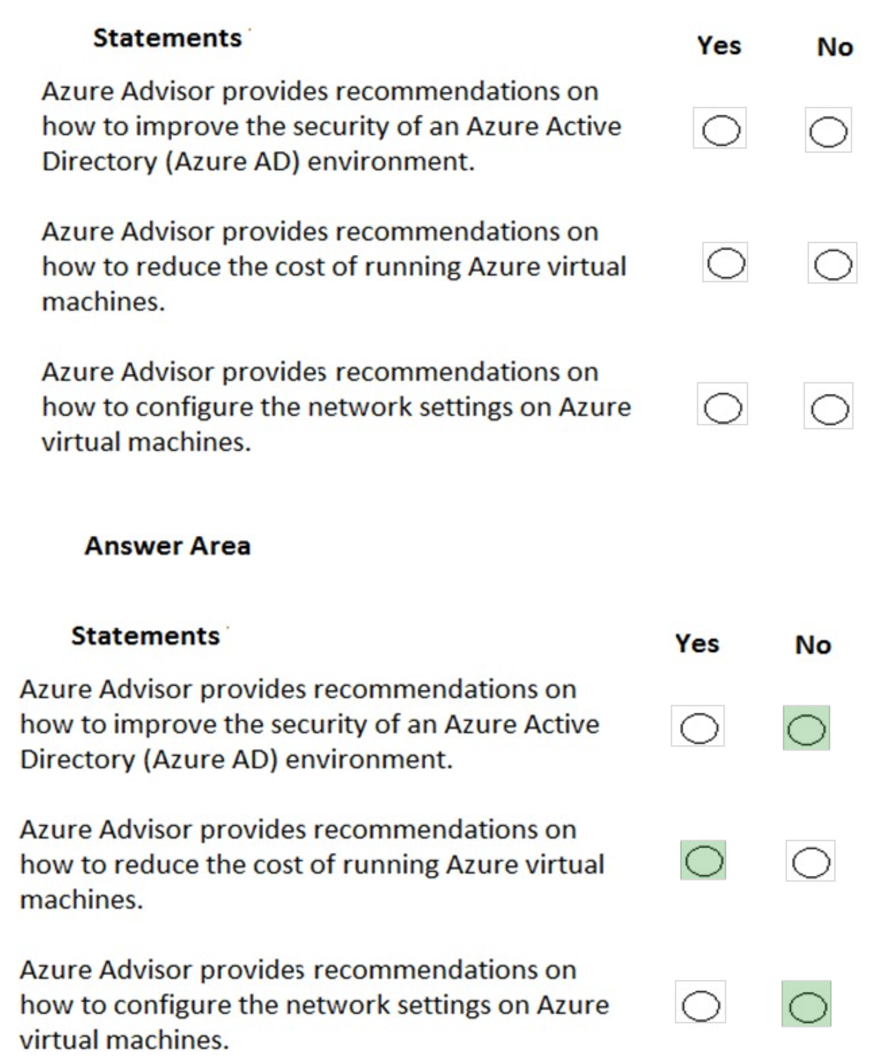
HOTSPOT –
For each of the following statements, select Yes if the statement is true. Otherwise, select No.
NOTE: Each correct selection is worth one point.
Hot Area:
Note: This question is part of a series of questions that present the same scenario. Each question in the series contains a unique solution that might meet the stated goals. Some question sets might have more than one correct solution, while others might not have a correct solution.
After you answer a question in this section, you will NOT be able to return to it. As a result, these questions will not appear in the review screen.
You have an Azure subscription named Subscription1. You sign in to the Azure portal and create a resource group named RG1.
From Azure documentation, you have the following command that creates a virtual machine named VM1. az vm create –resource-group RG1 –name VM1 –image UbuntuLTS –generate-ssh-keys
You need to create VM1 in Subscription1 by using the command.
Solution: From the Azure portal, launch Azure Cloud Shell and select PowerShell. Run the command in Cloud Shell.
Does this meet the goal?
- A. Yes
- B. No
Note: This question is part of a series of questions that present the same scenario. Each question in the series contains a unique solution that might meet the stated goals. Some question sets might have more than one correct solution, while others might not have a correct solution.
After you answer a question in this section, you will NOT be able to return to it. As a result, these questions will not appear in the review screen.
You have an Azure subscription named Subscription1. You sign in to the Azure portal and create a resource group named RG1.
From Azure documentation, you have the following command that creates a virtual machine named VM1. az vm create –resource-group RG1 –name VM1 –image UbuntuLTS
–generate-ssh-keys
You need to create VM1 in Subscription1 by using the command.
Solution: From a computer that runs Windows 10, install Azure CLI. From PowerShell, sign in to Azure and then run the command.
Does this meet the goal?
- A. Yes
- B. No
Note: This question is part of a series of questions that present the same scenario. Each question in the series contains a unique solution that might meet the stated goals. Some question sets might have more than one correct solution, while others might not have a correct solution.
After you answer a question in this section, you will NOT be able to return to it. As a result, these questions will not appear in the review screen.
You have an Azure subscription named Subscription1. You sign in to the Azure portal and create a resource group named RG1.
From Azure documentation, you have the following command that creates a virtual machine named VM1. az vm create –resource-group RG1 –name VM1 –image UbuntuLTS
–generate-ssh-keys
You need to create VM1 in Subscription1 by using the command.
Solution: From a computer that runs Windows 10, install Azure CLI. From a command prompt, sign in to Azure and then run the command.
Does this meet the goal?
- A. Yes
- B. No
HOTSPOT –
Several support engineers plan to manage Azure by using the computers shown in the following table:
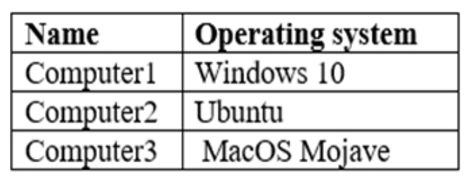
You need to identify which Azure management tools can be used from each computer.
What should you identify for each computer? To answer, select the appropriate options in the answer area.
NOTE: Each correct selection is worth one point.
Hot Area:
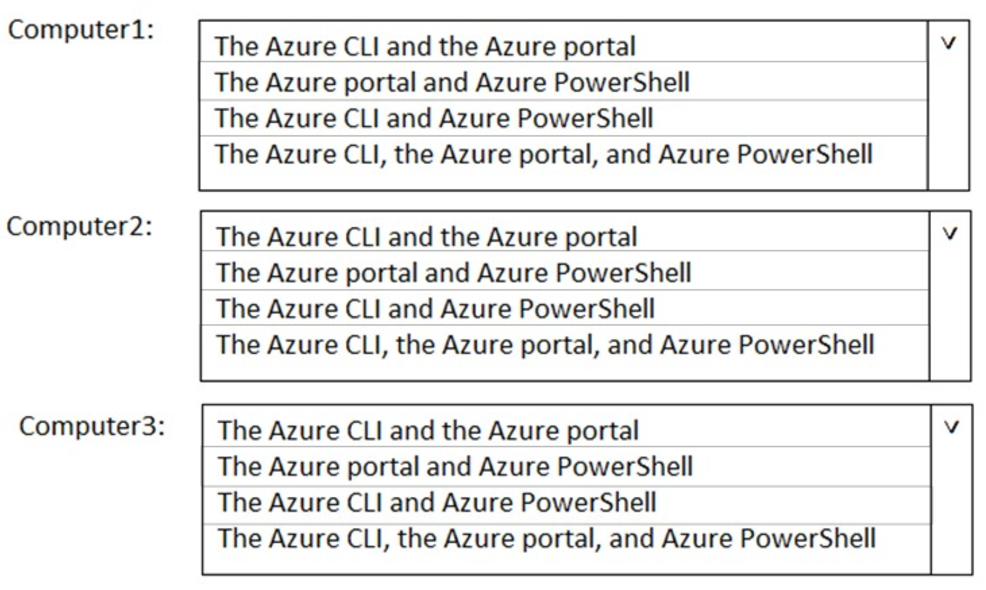
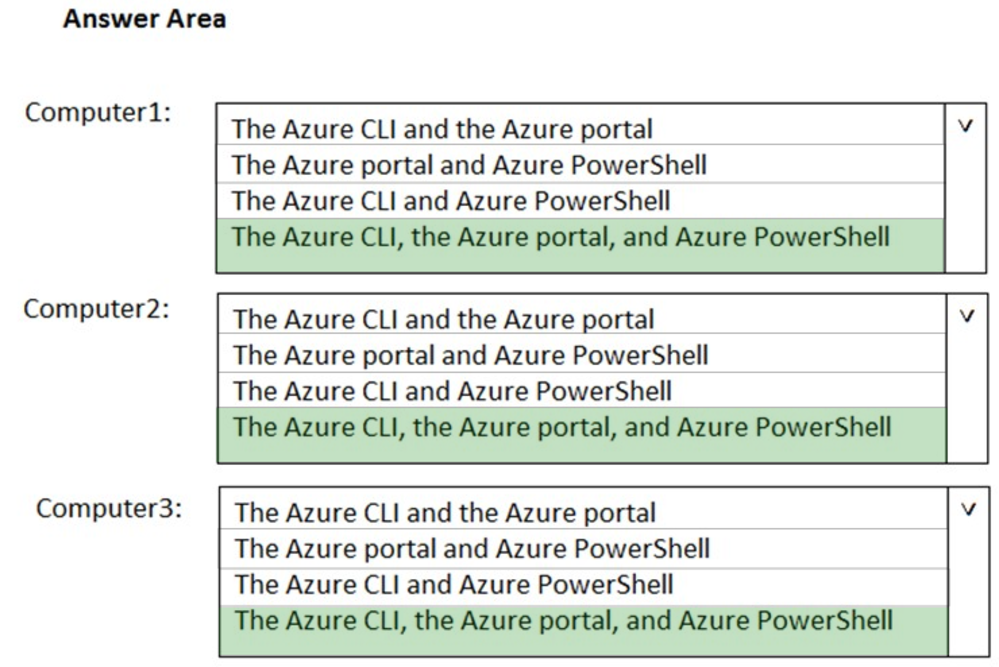
Previously, the Azure CLI (or x-plat CLI) was the only option for managing Azure subscriptions and resources from the command-line on Linux and macOS. Now with the open source and cross-platform release of PowerShell, you’ll be able to manage all your Azure resources from Windows, Linux and macOS using your tool of choice, either the Azure CLI or Azure PowerShell cmdlets.
The Azure portal runs in a web browser so can be used in either operating system.
Reference:
https://buildazure.com/2016/08/18/powershell-now-open-source-and-cross-platform-linux-macos-windows/
HOTSPOT –
To complete the sentence, select the appropriate option in the answer area.
Hot Area:
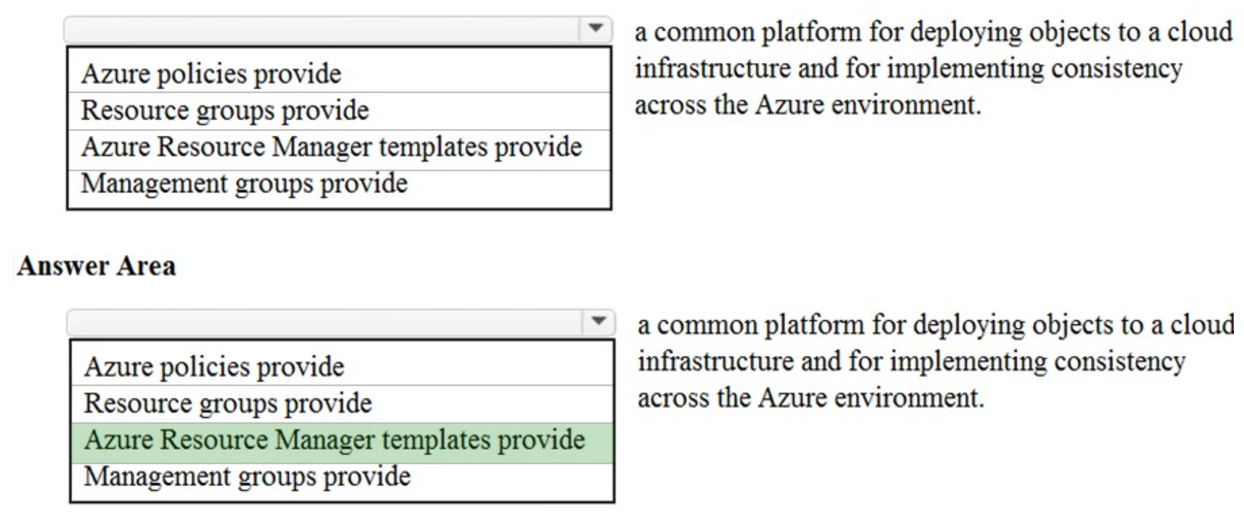
Azure Resource Manager templates provides a common platform for deploying objects to a cloud infrastructure and for implementing consistency across the
Azure environment.
Azure policies are used to define rules for what can be deployed and how it should be deployed. Whilst this can help in ensuring consistency, Azure policies do not provide the common platform for deploying objects to a cloud infrastructure.
Reference:
https://docs.microsoft.com/en-us/azure/governance/policy/overview
DRAG DROP –
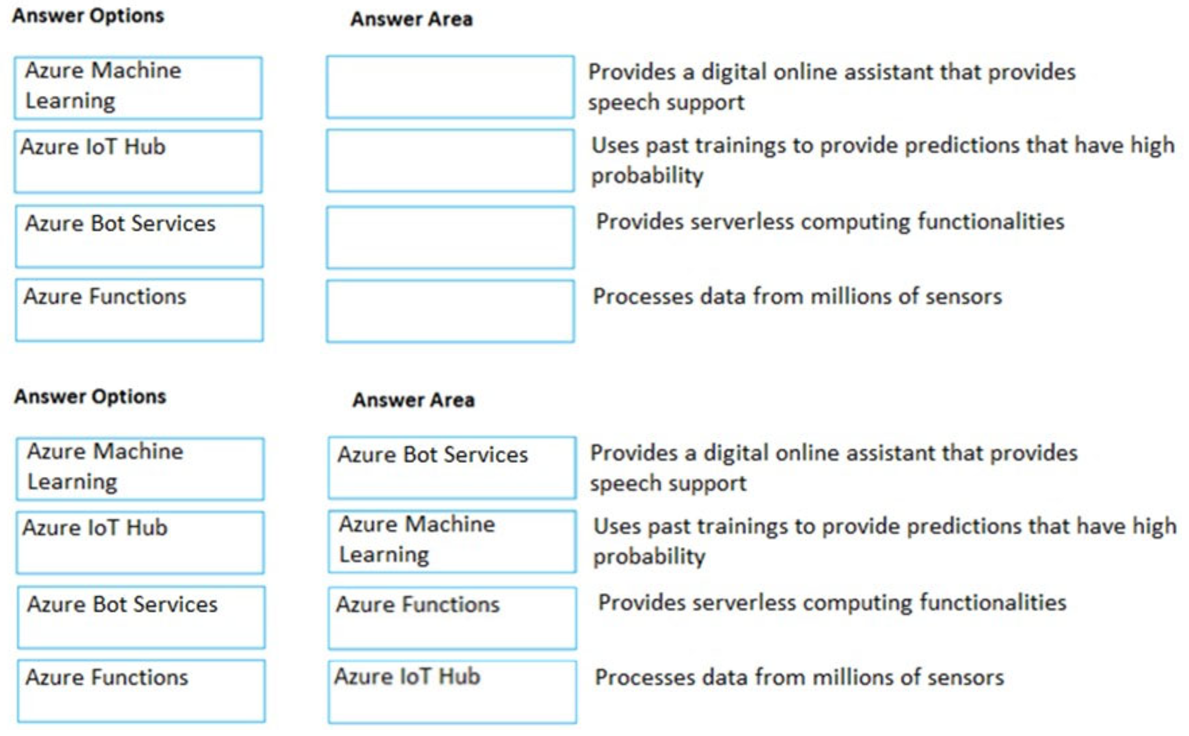
Match the Azure service to the correct description.
Instructions: To answer, drag the appropriate Azure service from the column on the left to its description on the right. Each service may be used once, more than once, or not at all.
NOTE: Each correct selection is worth one point.
Select and Place:
Note: This question is part of a series of questions that present the same scenario. Each question in the series contains a unique solution that might meet the stated goals. Some question sets might have more than one correct solution, while others might not have a correct solution.
After you answer a question in this section, you will NOT be able to return to it. As a result, these questions will not appear in the review screen.
An Azure administrator plans to run a PowerShell script that creates Azure resources.
You need to recommend which computer configuration to use to run the script.
Solution: Run the script from a computer that runs Windows 10 and has the Azure PowerShell module installed.
Does this meet the goal?
- A. Yes
- B. No
DRAG DROP –
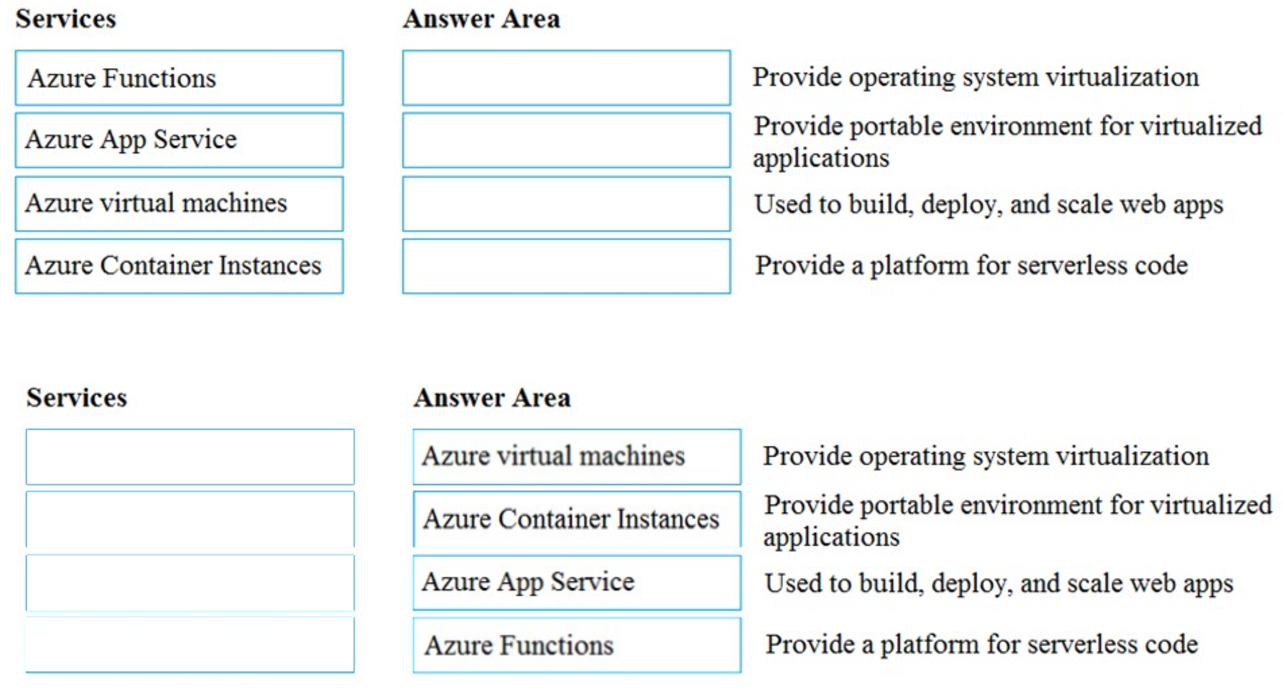
Match the Azure services to the correct description.
Instructions: To answer, drag the appropriate Azure service from the column on the left to its description on the right. Each service may be used once, more than once, or not at all.
NOTE: Each correct selection is worth one point.
Select and Place:
Box 1:
Azure virtual machines provide operation system virtualization.
Azure Virtual Machines (VM) is one of several types of on-demand, scalable computing resources that Azure offers. Typically, you choose a VM when you need more control over the computing environment than the other choices offer.
Box 2:
Azure Container Instances provide portable environments for virtualized applications.
Containers are becoming the preferred way to package, deploy, and manage cloud applications. Azure Container Instances offers the fastest and simplest way to run a container in Azure, without having to manage any virtual machines and without having to adopt a higher-level service.
Containers offer significant startup benefits over virtual machines (VMs). Azure Container Instances can start containers in Azure in seconds, without the need to provision and manage VMs.
Box 3:
Azure App Service is used to build, deploy and scale web apps.
Azure App Service is a platform-as-a-service (PaaS) offering that lets you create web and mobile apps for any platform or device and connect to data anywhere, in the cloud or on-premises. App Service includes the web and mobile capabilities that were previously delivered separately as Azure Websites and Azure Mobile
Services.
Box 4:
Azure Functions provide a platform for serverless code.
Azure Functions is a serverless compute service that lets you run event-triggered code without having to explicitly provision or manage infrastructure.
References:
https://docs.microsoft.com/en-us/azure/virtual-machines/windows/overview https://docs.microsoft.com/en-us/azure/security/fundamentals/paas-applications-using-app-services https://docs.microsoft.com/en-us/azure/azure-functions/ https://docs.microsoft.com/en-us/azure/container-instances/container-instances-overview
Which service provides serverless computing in Azure?
- A. Azure Virtual Machines
- B. Azure Functions
- C. Azure storage account
- D. Azure dedicated hosts