
Pass Microsoft AZ-900 in Just 3 Days – Stress-Free, No Study Needed!
Have questions? Contact us directly on WhatsApp for quick support!
HOTSPOT –
For each of the following statements, select Yes if the statement is true. Otherwise, select No.
NOTE: Each correct selection is worth one point.
Hot Area:
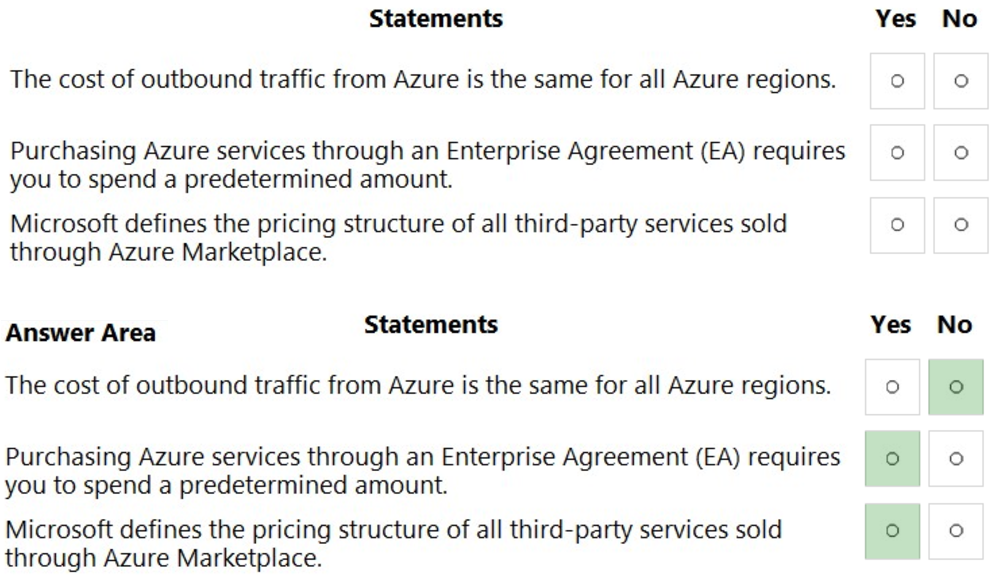
Box 1: No –
Within most of the areas, there are clearly more expensive regions and less expensive regions.
The least expensive regions, on average across these instance types are us-west-2, us-west-central, and korea-south.
The most expensive regions are asia-pacific-east, japan-east, and australia-east.
Box 2: Yes –
Many organizations with Microsoft Enterprise Agreements (EA) are adding Azure to their EA to enjoy the benefits it offers, such as:
Minimizing Azure upfront costs by locking in pricing with consumption pre-commitment
Using Azure EA Portal to manage Azure Subscriptions easily and organize them under a single billing account
Box 3: Yes –
Reference:
https://www.parkmycloud.com/blog/azure-region-pricing/
https://blog.turbonomic.com/introducing-microsoft-azure-enterprise-agreement-ea-support-in-turbonomic-6.4
HOTSPOT –
For each of the following statements, select Yes if the statement is true. Otherwise, select No.
NOTE: Each correct selection is worth one point.
Hot Area:
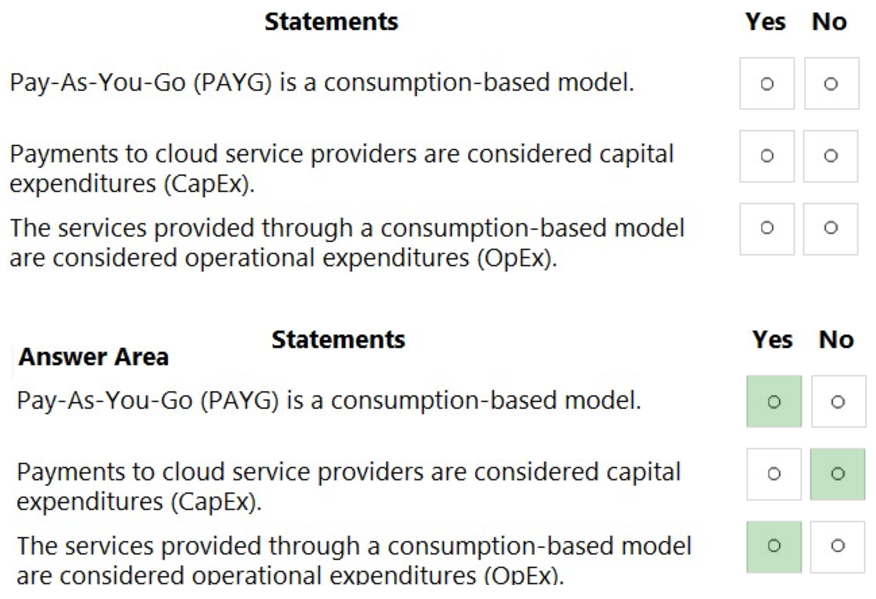
Box 1: Yes –
The Pay as You Go model is billed on a per second basis and you can start or stop the service at any time ג€” paying only for what you use.
Box 2: No –
No, it is OpEx (Operational Expenditures).
OpEx: The business can achieve ROI immediately in many cases because the infrastructure is managed by the cloud provider.
CapEx: ROI is not usually realized until a long time after the purchase was made because the infrastructure needs to be set up and employees need to be trained.
Computers, servers, and other hardware needed for on-premises data centers are all examples of CapEx.
Box 3: Yes –
Operational Expenditures (OpEx) are the ongoing costs related to day-to-day operations. A subscription fee for cloud services is considered OpExג€”the cloud provider is making the infrastructure investment upfront, and you only pay for the resources you need as you need them.
Reference:
https://azure.microsoft.com/en-us/pricing/purchase-options/pay-as-you-go/ https://blogs.vmware.com/cloudhealth/capex-vs-opex-cloud-cost-management/
What is the longest term you can purchase for Azure Reserved VM instances?
- A. one year
- B. five years
- C. four years
- D. three years
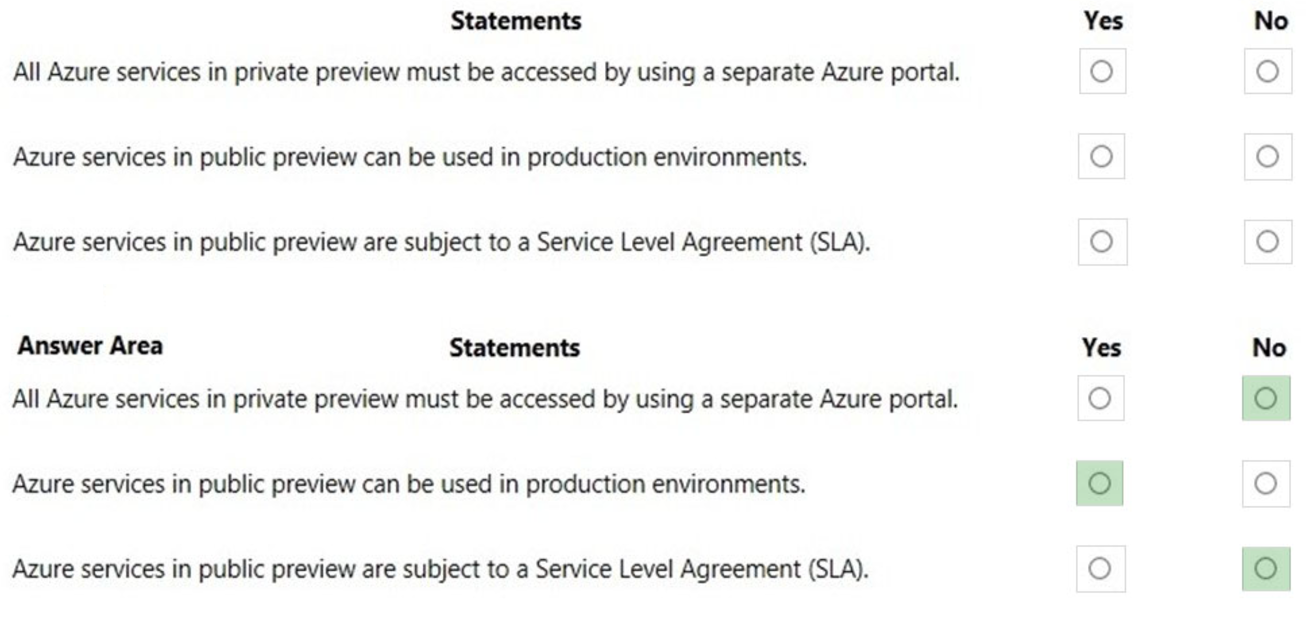
Public Preview means that the service is in public beta and can be tried out by anyone with an Azure subscription. Services in public preview are often offered at a discount price.
Box 1: No –
Services in private preview can be viewed in the regular Azure portal. However, you need to be signed up for the feature in private preview before you can view it.
Access to private preview features is usually by invitation only.
Box 2: Yes –
You can use services in public preview in production environments. However, you should be aware that the service may have faults, is not subject to an SLA and may be withdrawn without notice.
Box 3: No –
Public previews are excluded from SLAs and in some cases, no support is offered.
References:
https://www.neowin.net/news/several-more-azure-services-now-available-in-private-public-preview/
Your company has 10 offices. You plan to generate several billing reports from the Azure portal. Each report will contain the Azure resource utilization of each office.
Which Azure Resource Manager feature should you use before you generate the reports?
- A. tags
- B. templates
- C. locks
- D. policies
HOTSPOT –
For each of the following statements, select Yes if the statement is true. Otherwise, select No.
NOTE: Each correct selection is worth one point.
Hot Area:
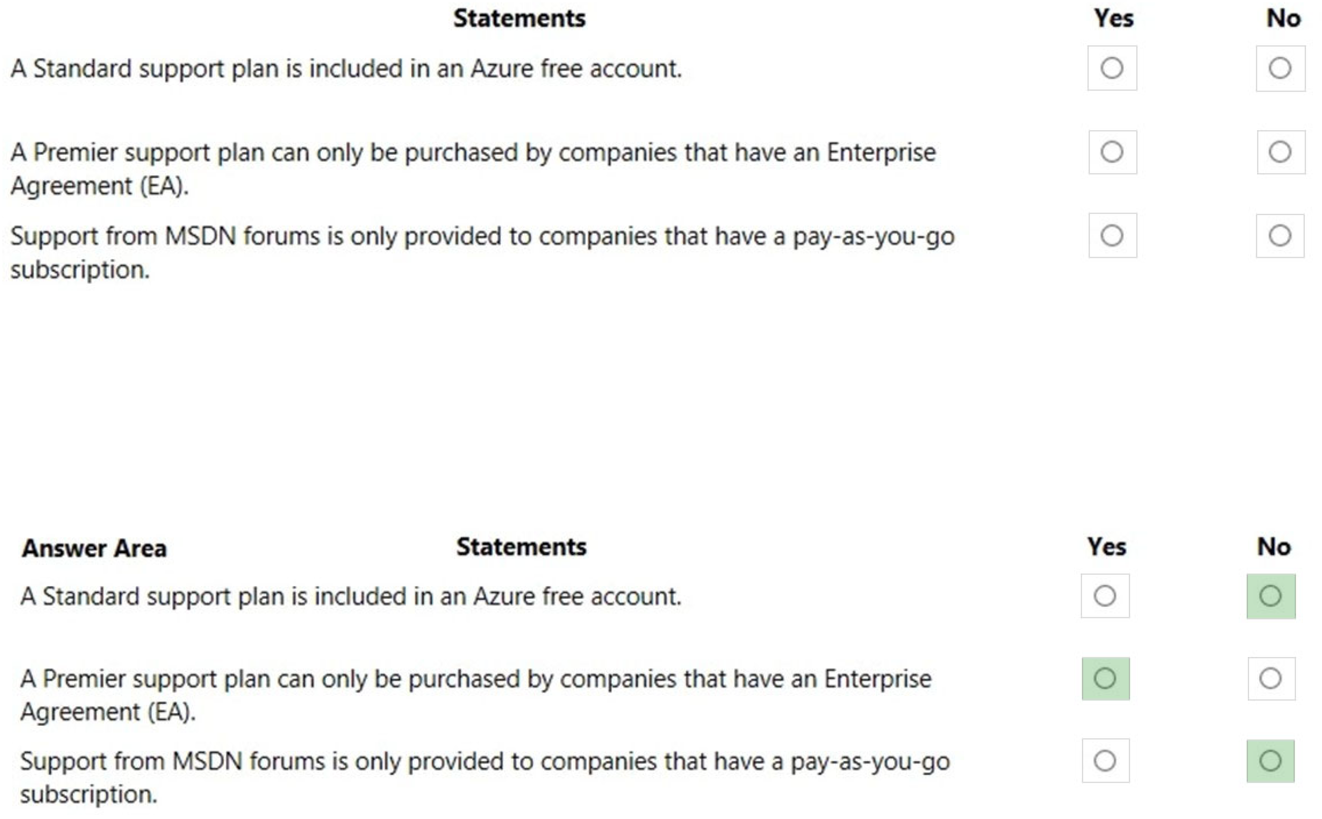
Box 1: No –
An Azure free account comes with a ‘basic’ support plan, not a ‘standard’ support plan.
Box 2: Yes –
You can purchase the Professional Direct, Standard, and Developer support plans with the Microsoft Customer Agreement. You can also purchase the
Professional and Standard support plans with the Enterprise Agreement.
Box 3: No –
Users with any type of Azure subscription (pay-as-you-go, Enterprise Agreement, Microsoft Customer Agreement etc.) can get support from the MSDN forums.
References:
https://azure.microsoft.com/en-us/support/plans/
HOTSPOT –
For each of the following statements, select Yes if the statement is true. Otherwise, select No.
NOTE: Each correct selection is worth one point.
Hot Area:
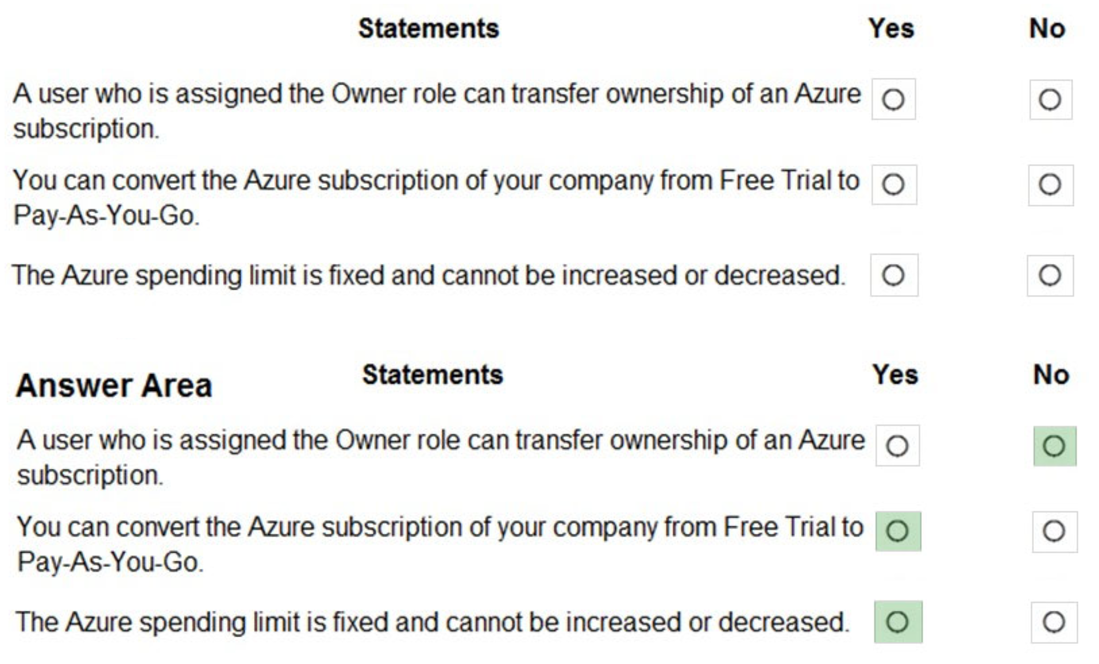
Box 1: No –
You need to be an administrator of the billing account that has the subscription to be able to transfer the subscription. This could be a Billing Administrator or
Global Administrator. A subscription owner can manage all resources and permissions within the subscription but cannot transfer ownership of the subscription.
Box 2: Yes –
You can convert a free trial subscription to Pay-As-You-Go. This is common practice for people who wish to continue using the Azure services when the free trial period expires.
Box 3: Yes –
You can remove the spending limit, but you can’t increase or decrease it.
The spending limit in Azure prevents spending over your credit amount. All new customers who sign up for an Azure free account or subscription types that include credits over multiple months have the spending limit turned on by default. The spending limit is equal to the amount of credit and it can’t be changed. For example, if you signed up for Azure free account, your spending limit is $200 and you can’t change it to $500. However, you can remove the spending limit. So, you either have no limit, or you have a limit equal to the amount of credit.
Reference:
https://docs.microsoft.com/en-us/azure/billing/billing-add-change-azure-subscription-administrator https://docs.microsoft.com/en-us/azure/billing/billing-upgrade-azure-subscription https://docs.microsoft.com/en-us/azure/billing/billing-spending-limit
HOTSPOT –
For each of the following statements, select Yes if the statement is true. Otherwise, select No.
NOTE: Each correct selection is worth one point.
Hot Area:
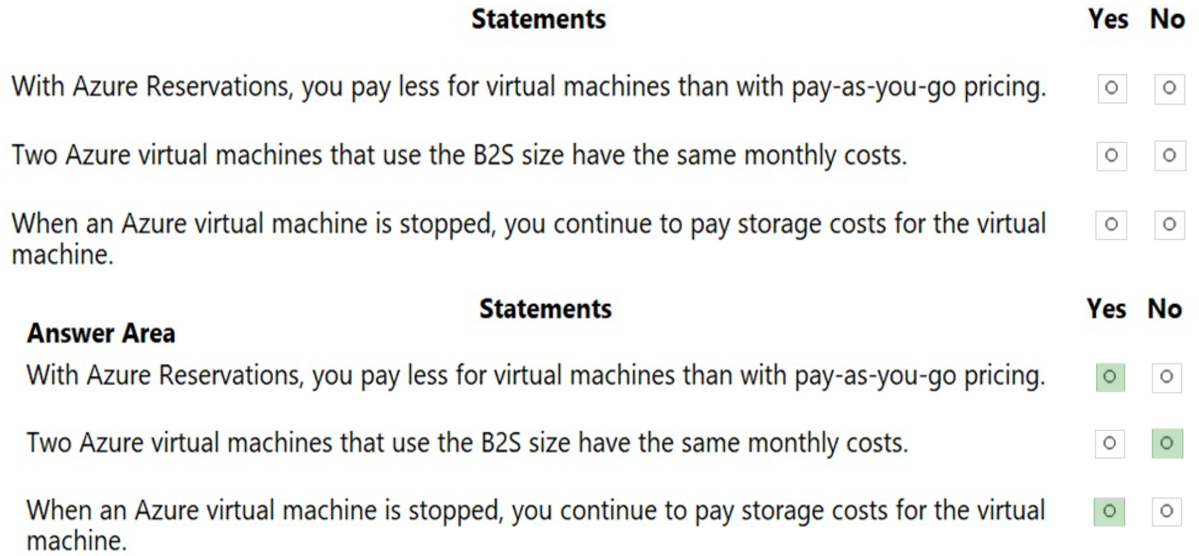
Box 1: Yes –
A reservation is where you commit to pay for a resource (for example a virtual machine) for one or three years. This gives you a discounted price on the resource for the reservation period.
Box 2: No –
There are other factors that influence the cost of a virtual machine such as the virtual hard disks attached to the virtual machine. You could have multiple virtual machines with the same ‘size’ (B2S in this case) but with different virtual hard disk configurations.
Box 3: Yes –
When a virtual machine is stopped (deallocated), the virtual machine is unloaded/dismounted from the physical server in Azure. In this state, you are not charged for the virtual machine itself. However, you are still charged for the storage costs of the virtual hard disks attached to the virtual machine.
If the virtual machine is stopped but not deallocated (this happens if you shut down the virtual machine from the operating system of the virtual machine), the virtual machine is still mounted on the physical server in Azure and you are charged for the virtual machine itself as well as the storage costs. To ensure that a virtual machine is ‘stopped (deallocated)’, you need to stop the virtual machine in the Azure portal.
Reference:
https://azure.microsoft.com/en-us/reservations/
https://docs.microsoft.com/en-us/azure/virtual-machines/linux/b-series-burstable https://blogs.technet.microsoft.com/uspartner_ts2team/2014/10/10/azure-virtual-machines-stopping-versus-stopping-deallocating/
Note: This question is part of a series of questions that present the same scenario. Each question in the series contains a unique solution that might meet the stated goals. Some question sets might have more than one correct solution, while others might not have a correct solution.
After you answer a question in this section, you will NOT be able to return to it. As a result, these questions will not appear in the review screen.
Your company has an Azure subscription that contains the following unused resources:
– 20 user accounts in Azure Active Directory (Azure AD)
– Five groups in Azure AD
– 10 public IP addresses
– 10 network interfaces
You need to reduce the Azure costs for the company.
Solution: You remove the unused network interfaces.
Does this meet the goal?
- A. Yes
- B. No
Note: This question is part of a series of questions that present the same scenario. Each question in the series contains a unique solution that might meet the stated goals. Some question sets might have more than one correct solution, while others might not have a correct solution.
After you answer a question in this section, you will NOT be able to return to it. As a result, these questions will not appear in the review screen.
Your company has an Azure subscription that contains the following unused resources:
– 20 user accounts in Azure Active Directory (Azure AD)
Five groups in Azure AD –
– 10 public IP addresses
– 10 network interfaces
You need to reduce the Azure costs for the company.
Solution: You remove the unused public IP addresses.
Does this meet the goal?
- A. Yes
- B. No