


Microsoft PL-300 Free Exam Questions 161-180 with Answers
Scenario-based practice questions for the Microsoft PL-300 Power BI Data Analyst exam. Each question includes a clear answer, a plain-English explanation, and a reference link to official Microsoft documentation. Work through them as a diagnostic, then focus your study time on the gaps they reveal.
PL-300 Practice Questions 161-165
Question 161
You have a Power BI semantic model that contains the following data.
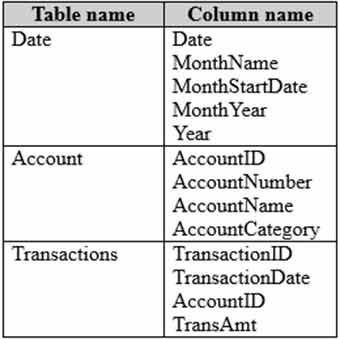
You need to create a solution that meets the following requirements:
• Presents transaction amount totals for each month for the current and prior year
• Follows the star schema modeling approach
• Minimizes the data model size
Which three actions should you perform? Each correct answer presents part of the solution.
NOTE: Each correct selection is worth one point.
Reference: Understand star schema and the importance for Power BI
Question 162
HOTSPOT
You have a Power BI semantic model that contains three tables named Products, OrderHistory, and Date.
The Products table is a dimension table that contains the following columns:
• ProductID
• ProductName
The OrderHistory table is a fact table that contains the following columns:
• OrderID
• ProductID
• OrderDate
The Date table is a dimension table that contains the following columns:
• Year
• Date
• Week
• Month
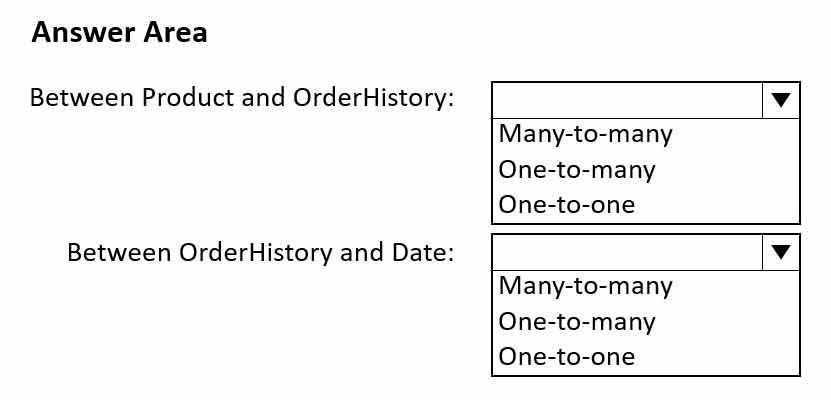
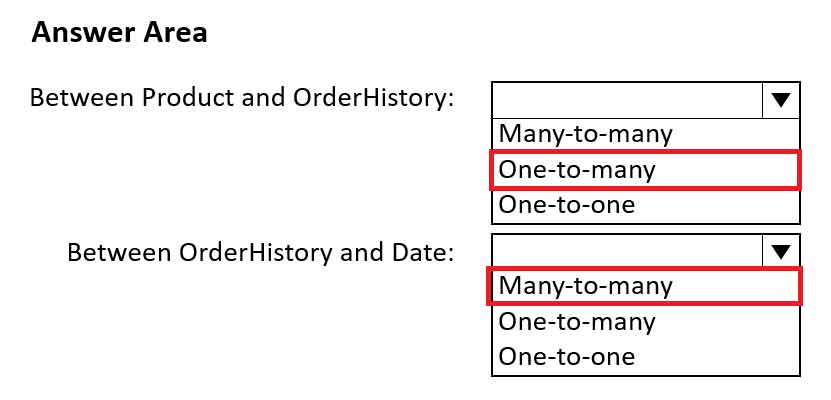
You need to define a relationship from Products to OrderHistory and from OrderHistory to Date.
Which cardinality should you configure? To answer, select the appropriate options in the answer area.
NOTE: Each correct answer is worth one point.
Reference: Relationships in Power BI Desktop
Question 163
HOTSPOT
You have a Power BI semantic model.
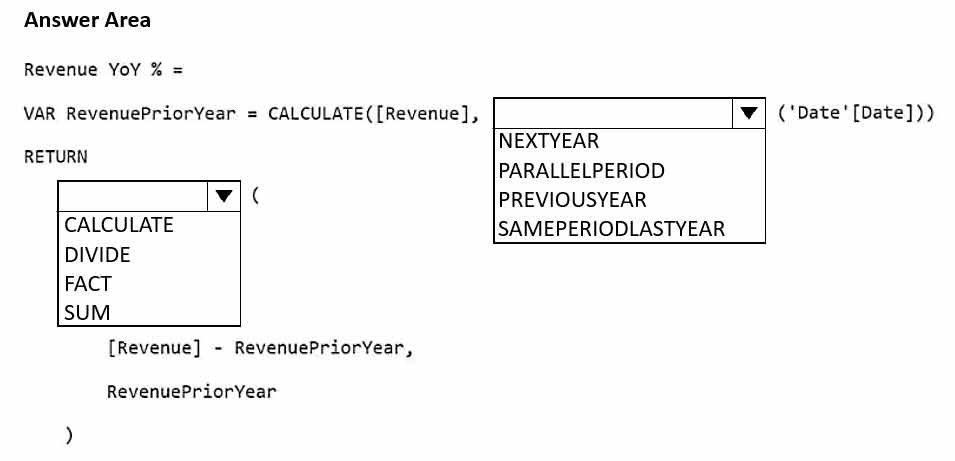
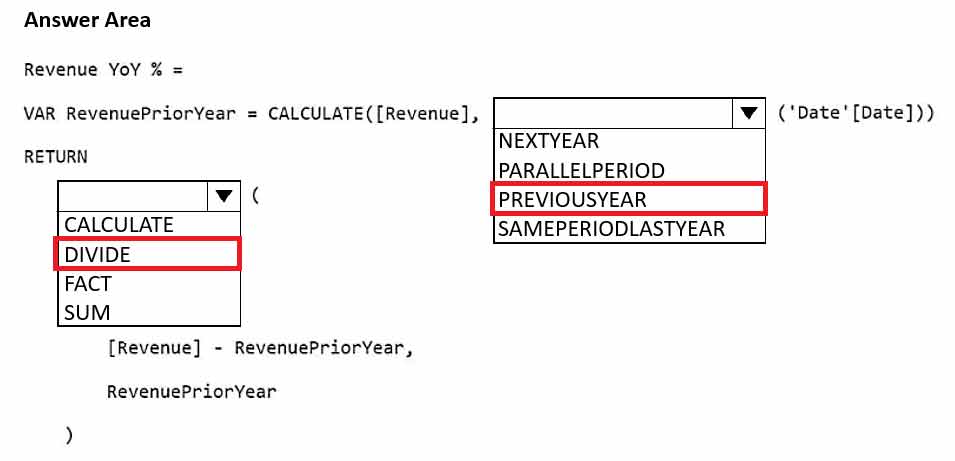
You need to create a column that will contain year-over-year (YOY) revenue. The column must contain a ratio of change factor compared to the previous year’s monthly revenue.
How should you complete the DAX formula? To answer, select the appropriate options in the answer area.
NOTE: Each correct selection is worth one point.
Reference: SAMEPERIODLASTYEAR function (DAX)
Question 164
HOTSPOT
You use Microsoft Power BI Desktop to review the data shown in the following exhibit.
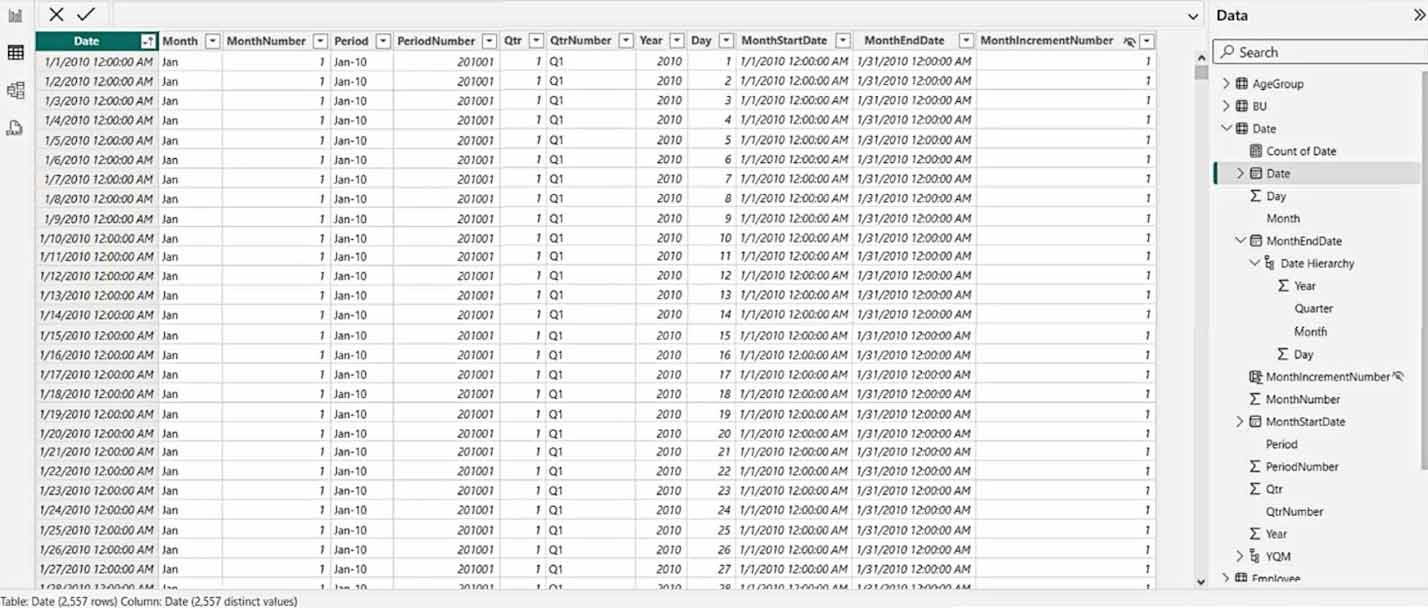
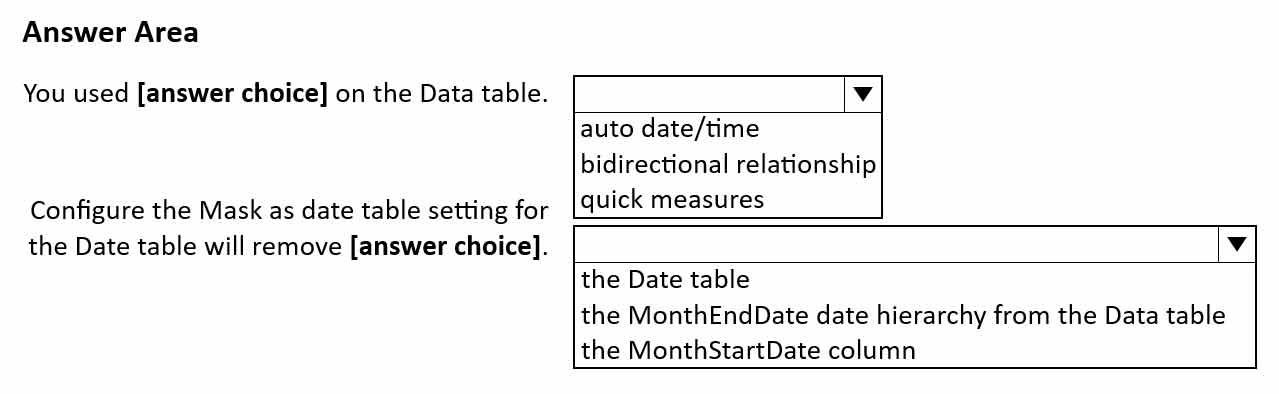
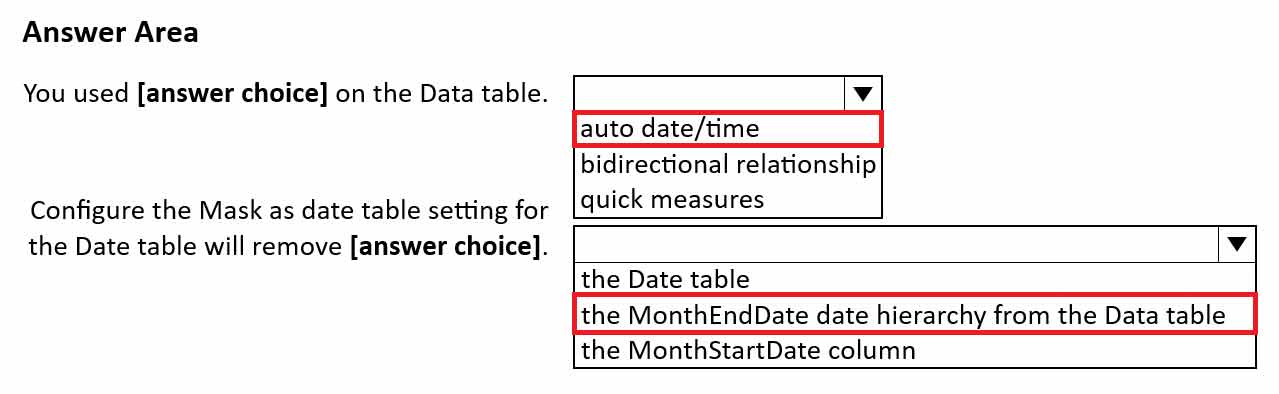
Use the drop-down menus to select the answer choice that completes each statement based on the information presented in the graphic.
NOTE: Each correct selection is worth one point.
Reference: Data profiling tools in Power Query
Question 165
HOTSPOT
You have a Power BI semantic model that contains two tables named Sales and Forecast. Both tables contain a date column.
You need to create a calculated table that will cover the range of dates in both tables.
How should you complete the DAX expression? To answer, select the appropriate options in the answer area.
NOTE: Each correct selection is worth one point.


Reference: CALENDAR function (DAX)
PL-300 Practice Questions 166-170
Question 166
You have a Power BI semantic model named Model1 that contains two tables named DimDate and FactSales. There is an active relationship between DimDate and FactSales. DimDate is marked as the date table. FactSales contains the following data.
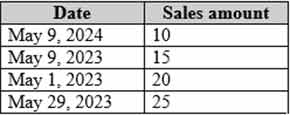
Model1 contains the following measure.
Previous Year Sales = CALCULATE([Sales Amount], PREVIOUSYEAR(‘Date'[Date]))
You have a report that uses Model1. The report has a single report page that has a page level filter set to May 9, 2024. The result of the Previous Year Sales measure is displayed in a card visual.
Which value will appear in the card visual?
Reference: PREVIOUSYEAR function (DAX)
Question 167
You have a Power BI query named Expenses that imports the following data.
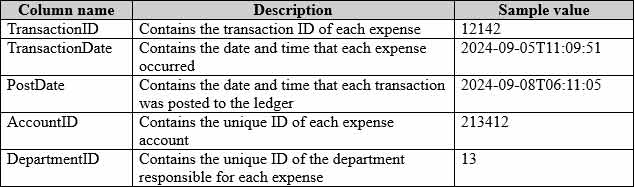
Users only use the date portion of the TransactionDate value when performing data analysis.
You need to minimize the model size without affecting the analysis.
Which two actions should you perform? Each correct answer presents part of the solution.
NOTE: Each correct selection is worth one point.
Question 168
You have a Power BI semantic model that contains two tables named DimCustomer and FactOrderDetails.
The primary key of DimCustomer is CustomerID.
FactOrderDetails contains a column named CustomerID that can be used to relate to DimCustomer. Multiple rows in FactOrderDetails possibly have the same CustomerID value.
You need to create a relationship from FactOrderDetails to DimCustomer. The solution must optimize query performance.
What should you create?
Reference: Relationships in Power BI Desktop
Question 169
You have a Power BI model that contains a table named Expenses. The table contains the following columns:
• Date
• Amount
• Category
• Expense ID
• Employee ID
Expenses are recorded by employees, and each expense has a unique expense ID.
You need to create a DAX measure that will calculate the total amount of expenses.
Which DAX expression should you use?
Reference: SUM function (DAX)
Question 170
HOTSPOT
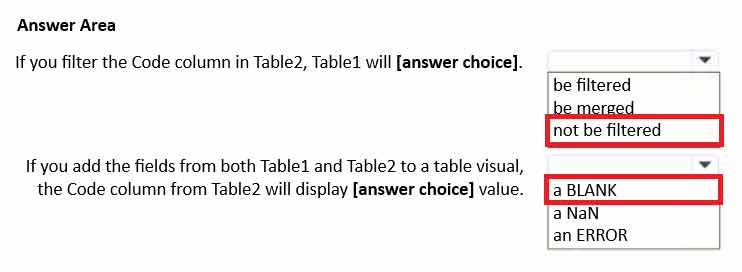
You have a Power BI report with the Edit relationship page open as shown in the following exhibit.
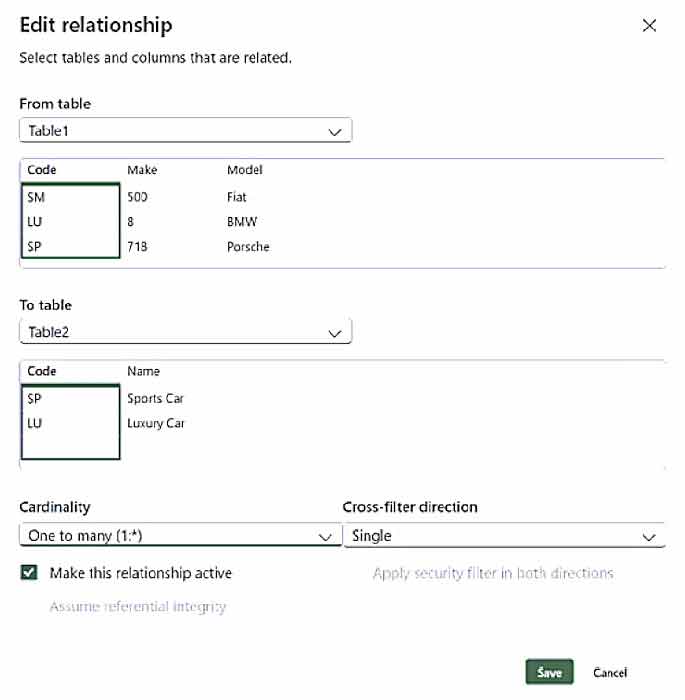
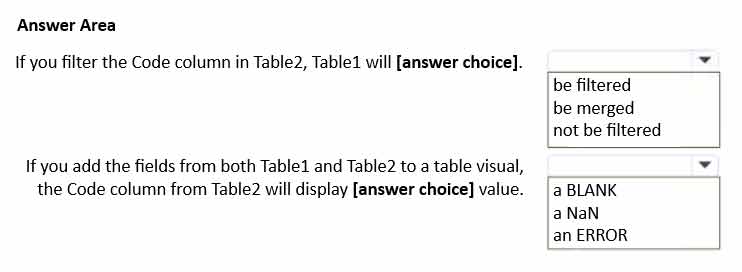
Use the drop-down menus to select the answer choice that completes each statement based on the information presented in the graphic.
NOTE: Each correct selection is worth one point.
Reference: Relationships in Power BI Desktop
PL-300 Practice Questions 171-175
Question 171
HOTSPOT
You have a semantic model named Model1 that contains the following tables.
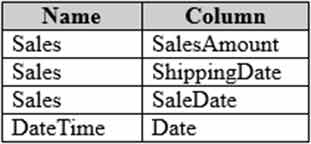
There is an active relationship between SaleDate and Date.
There is an inactive relationship between ShippingDate and Date.
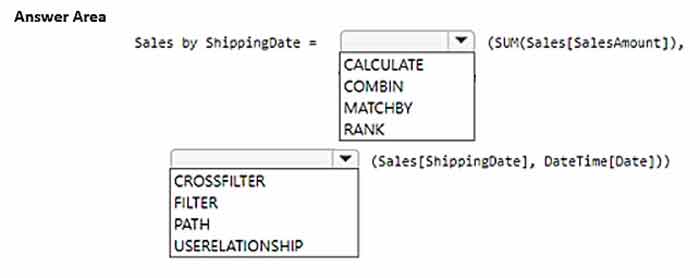
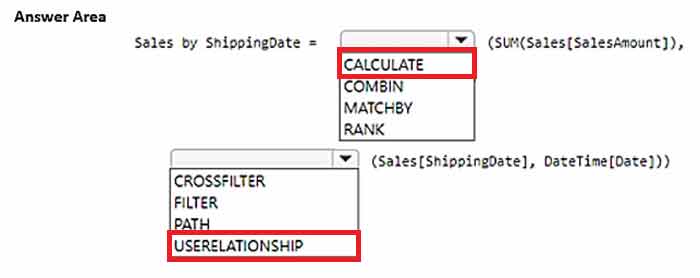
You need to create a new measure that will display the total amount of sales and support slicing by ShippingDate.
How should you complete the DAX expression? To answer, select the appropriate options in the answer area.
NOTE: Each correct selection is worth one point.
Reference: USERELATIONSHIP function (DAX)
Question 172
You have a query in Power Query Editor that contains the following data.

You need to transform the data to appear as shown in the following table.
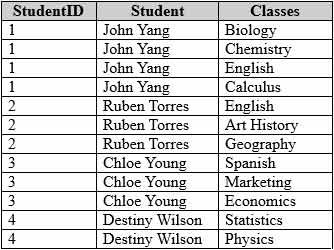
What should you do?
Reference: Split columns by delimiter in Power Query
Question 173
You have a Microsoft Fabric eventhouse named Eventhouse1 that contains high-velocity and high-volume data from IoT devices.
Eventhouse1 can be queried to deliver data to reports in near-real-time (NRT).
You plan to use Power BI Desktop to create a report that will contain both historical and live data.
You need to connect to Eventhouse1. The solution must minimize development effort.
What should you do?
Reference: Composite models in Power BI
Question 174
You have a Power BI semantic model that contains the following tables.
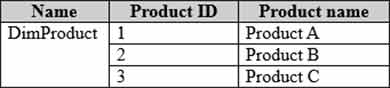

You need to define a relationship from FactSales to DimProduct. The solution must ensure the fastest DAX query performance.
Which cardinality should you use?
Reference: Relationships in Power BI Desktop
Question 175
DRAG DROP
You have a Power BI semantic model that contains two tables named Dim Location and Fact Deliveries. The relationships between the tables are configured as shown in the following table.

The model contains one measure that has the following formula.
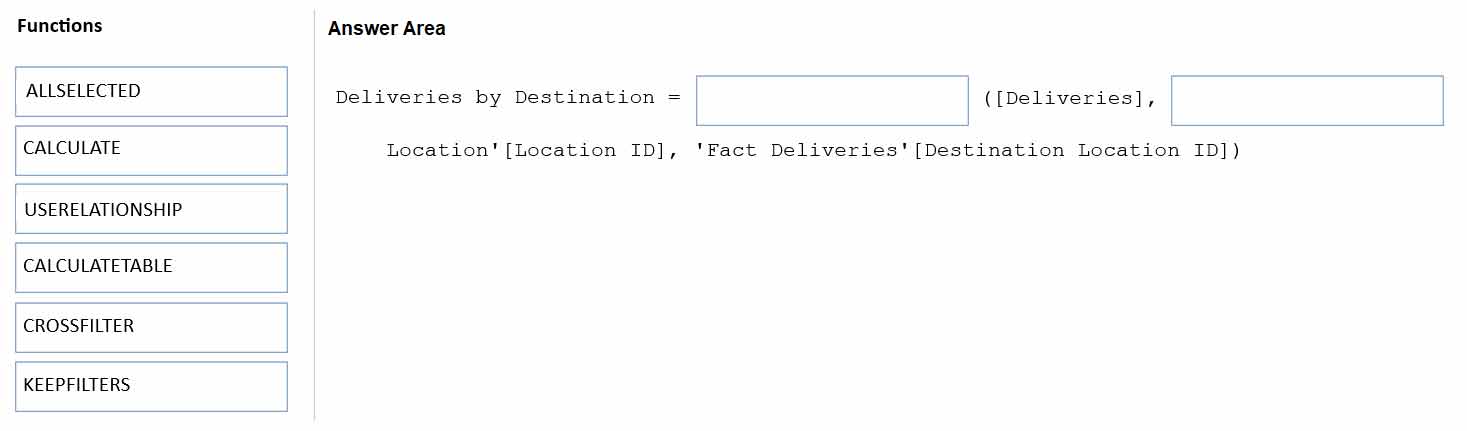
Deliveries = COUNTROWS(‘Fact Deliveries’)
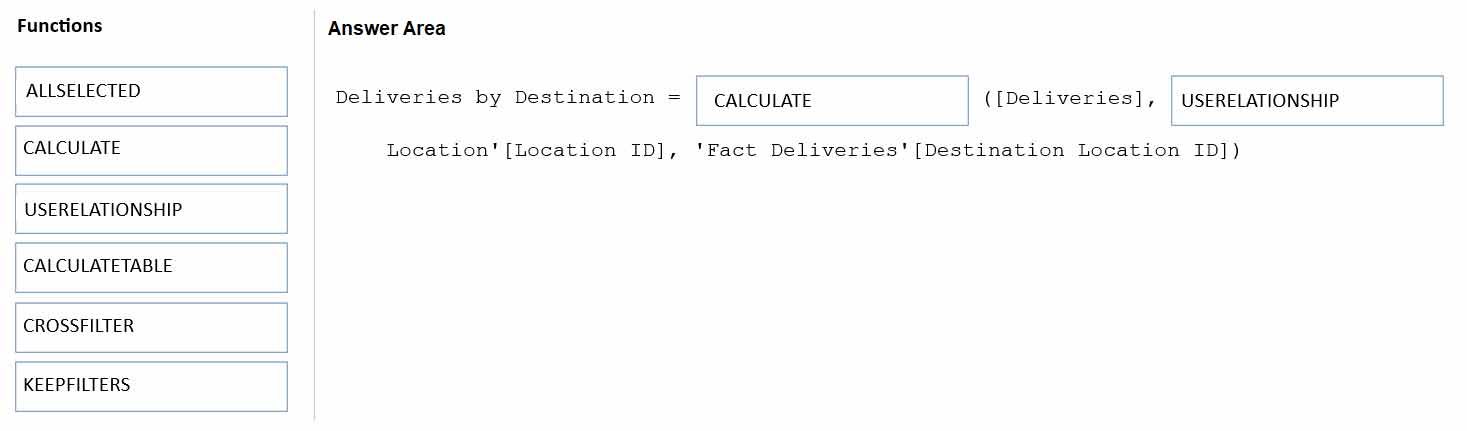
You need to create a new measure that counts the number of deliveries based on the destination location.
How should you complete the DAX expression? To answer, drag the appropriate functions to the correct targets. Each function may be used once, more than once, or not at all. You may need to drag the split bar between panes or scroll to view content.
NOTE: Each correct selection is worth one point.
Reference: USERELATIONSHIP function (DAX)
PL-300 Practice Questions 176-180
Question 176
HOTSPOT
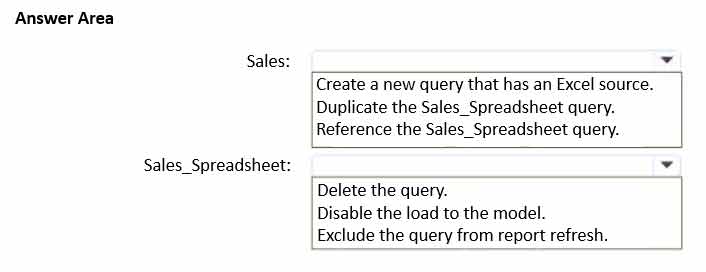
You import a Microsoft Excel spreadsheet into Power Query Editor and name the query Sales_Spreadsheet.
Sales_Spreadsheet contains the following columns:
• Customer ID
• Customer Name
• Date
• Total Sales Amount
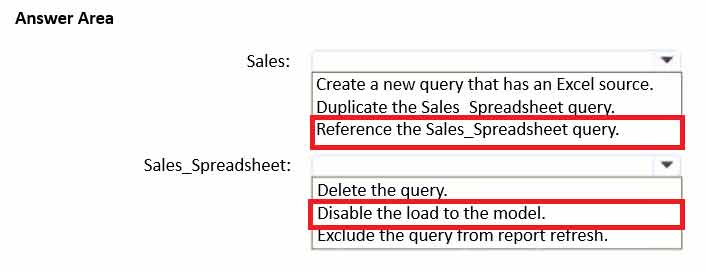
You plan to use the Sales Spreadsheet query to load two tables named Customer and Sales into the associated semantic model. The tables relate to each other on the Customer ID column of each query. The solution must meet the following requirements:
• The Customer query must contain the Customer ID and Customer Name columns.
• The Sales query must contain the Customer ID, Date, and Total Sales Amount columns.
• Power Query logic must be consolidated to avoid the duplication of logic across the queries and ensure that only one location is used to update the logic.
You need to identify how to create the Sales query, and what to do to the Sales_Spreadsheet query before loading the model?
What should you do? To answer, select the appropriate options in the answer area.
NOTE: Each correct selection is worth one point.
Reference: Reference queries in Power Query
Question 177
HOTSPOT
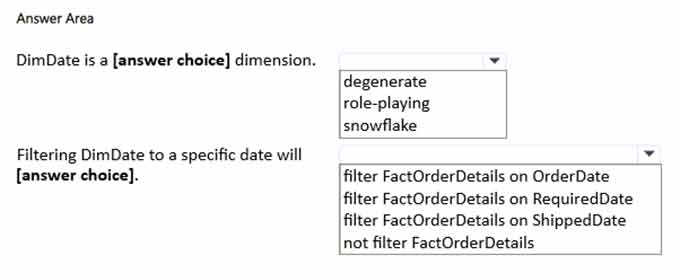
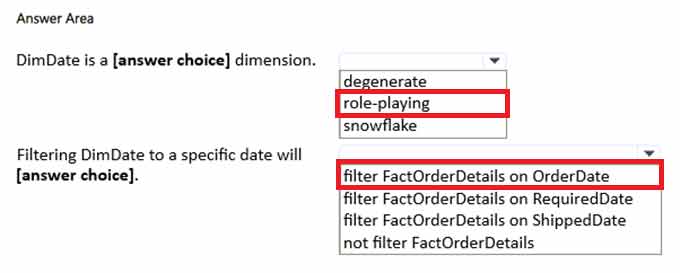
You have a semantic model that has the relationships shown in the following exhibit.
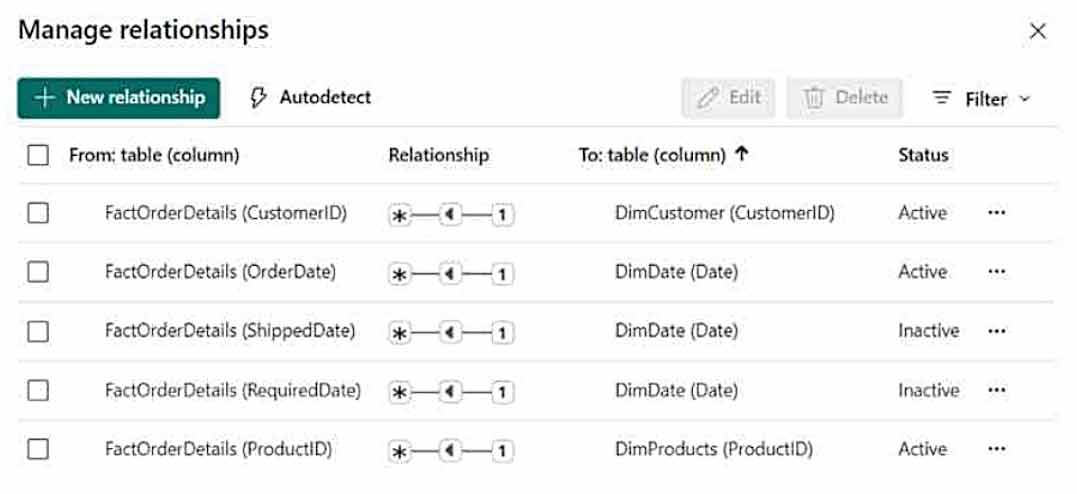
Use the drop-down menus to select the answer choice that completes each statement based on the information presented in the graphic.
NOTE: Each correct selection is worth one point.
Question 178
HOTSPOT
You use Power Query Editor to ingest data into Power BI Desktop.
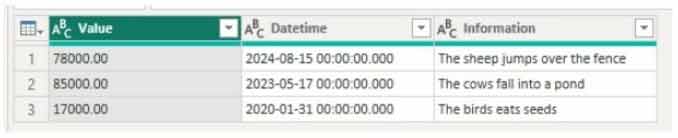
The total dataset contains 250,000 rows. All the rows match the format of the data as shown in the following exhibit.
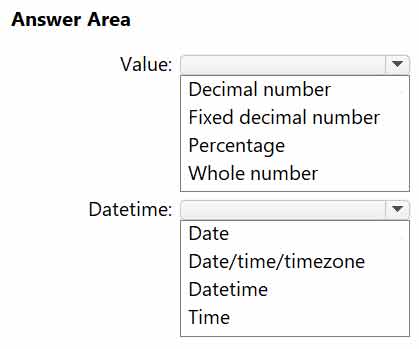
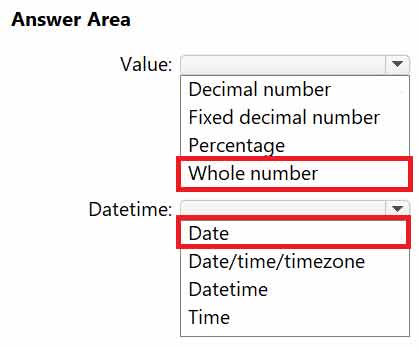
You need to optimize the data model size of the table.
Which type of data should you use for the Value column and the Datetime column? To answer, select the appropriate options in the answer area.
NOTE: Each correct selection is worth one point.
Reference: Data types in Power Query
Question 179
You have a Power BI semantic model that contains a table named Table1. Table1 runs in Import storage mode.
You need to update the model to change the storage mode of Table1 to DirectQuery.
What should you do?
Reference: Storage modes in Power BI Desktop
Question 180
HOTSPOT
You have a Power BI semantic model that contains the following tables.
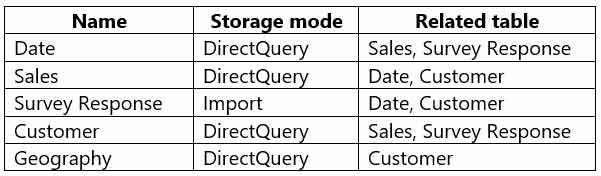
All the tables use the same data source.
You need to reduce the number of limited relationships in the model by changing the storage mode of certain tables. The solution must NOT affect the latency of the data.
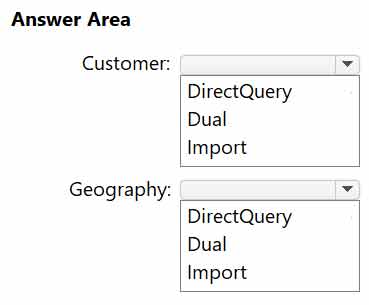
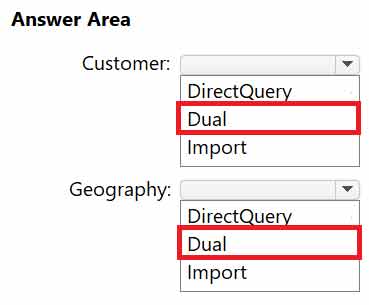
Which storage mode should you select for the Customer and Geography tables? To answer, select the appropriate options in the answer area.
NOTE: Each correct selection is worth one point.
Reference: Storage modes in Power BI Desktop