


Default Route in RIP: Distributing Internet Access Across All Routers
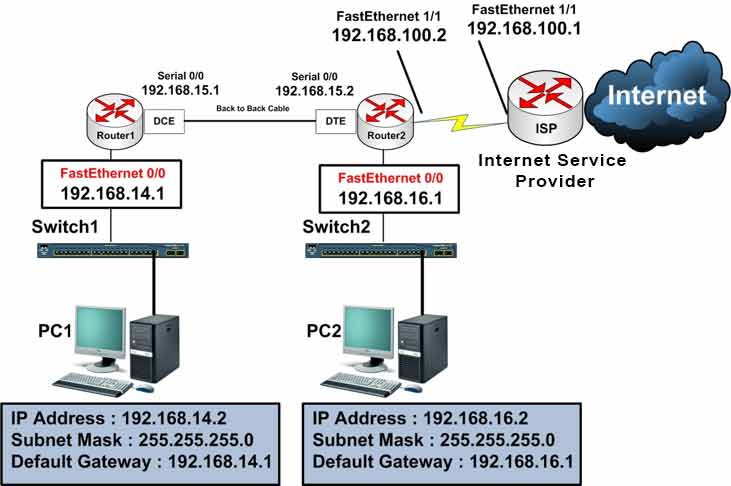
Lab Objective
- Configure a default route and distribute it through the RIP routing protocol
🛠️ Equipment Needed for This Lab
- 2 Cisco routers
- 2 Cisco 2960 switches
- 2 PCs
- 1 internet access connection
Router Interface Configuration
| Router | Interface | IP Address | Subnet Mask | Serial Type |
|---|---|---|---|---|
| Router 1 | FastEthernet 0/0 | 192.168.14.1 | 255.255.255.0 | — |
| Router 1 | Serial 0/0 | 192.168.15.1 | 255.255.255.0 | DCE |
| Router 2 | Serial 0/0 | 192.168.15.2 | 255.255.255.0 | DTE |
| Router 2 | FastEthernet 0/0 | 192.168.16.1 | 255.255.255.0 | — |
| Router 2 | FastEthernet 1/1 | 192.168.100.2 | 255.255.255.0 | — |
ISP Router Interface Configuration
| Router | Interface | IP Address | Subnet Mask |
|---|---|---|---|
| ISP | FastEthernet 1/1 | 192.168.100.1 | 255.255.255.0 |
PC Configuration
| Computer | IP Address | Subnet Mask | Default Gateway |
|---|---|---|---|
| PC1 | 192.168.14.2 | 255.255.255.0 | 192.168.14.1 |
| PC2 | 192.168.16.2 | 255.255.255.0 | 192.168.16.1 |
Why Distribute the Default Route?
Earlier labs covered default routing. If you recall, using a default route means manually defining it on every router in an organization.
In large networks, manually configuring the default route on every router makes network management and routing hard.
In this lab, we’ll define the default route only on the router directly connected to the internet. Then we’ll advertise it through RIP — a dynamic routing protocol — so every router in the network learns the default route automatically.
Simply put: the default route defined on Router2 (directly connected to the ISP) is injected into RIP and sent as an update message to all other routers.
Step 1: Configure Router1 and Router2 and Set IP Addresses on Router Interfaces
Configure FastEthernet 0/0 on Router1:
Router1#config t
Router1(config)#interface fastEthernet 0/0
Router1(config-if)#ip address 192.168.14.1 255.255.255.0
Router1(config-if)#no shutdown
Configure Serial 0/0 on Router1:
Router1(config)#interface serial 0/0
Router1(config-if)#ip address 192.168.15.1 255.255.255.0
Router1(config-if)#clock rate 64000
Router1(config-if)#no shutdown
Configure FastEthernet 0/0 on Router2:
Router2#config t
Router2(config)#interface fastEthernet 0/0
Router2(config-if)#ip address 192.168.16.1 255.255.255.0
Router2(config-if)#no shutdown
Configure FastEthernet 1/1 on Router2 (facing the ISP):
Router2(config)#interface fastEthernet 1/1
Router2(config-if)#ip address 192.168.100.2 255.255.255.0
Router2(config-if)#no shutdown
Configure Serial 0/0 on Router2:
Router2(config)#interface serial 0/0
Router2(config-if)#ip address 192.168.15.2 255.255.255.0
Router2(config-if)#no shutdown
Step 2: Configure the RIP Routing Protocol on Router1 and Router2
Configure RIP on Router1:
Router1#config t
Router1(config)#router rip
Router1(config-router)#network 192.168.14.0
Router1(config-router)#network 192.168.15.0
Router1(config-router)#exit
Router1(config)#exit
Configure RIP on Router2:
Router2#config t
Router2(config)#router rip
Router2(config-router)#network 192.168.15.0
Router2(config-router)#network 192.168.16.0
Router2(config-router)#exit
Router2(config)#exit
Step 3: Configure the Default Route on Router2
Configure a default route so all unknown packets (those without a matching route in the routing table) go to the ISP router:
Router2#config t
Router2(config)#ip route 0.0.0.0 0.0.0.0 192.168.100.1
Any packet with any destination (0.0.0.0) and any subnet mask (0.0.0.0) that has no matching route in the routing table is sent to the ISP router at 192.168.100.1.
Note: Configure the default route only on the router directly connected to the internet. No manual default route is needed on other routers.
Step 4: Inject the Default Route into RIP for Distribution to Other Routers
Now we’ll advertise the default route defined on Router2 through RIP so every router learns it automatically. Other routers will receive the default route through RIP updates and add it to their routing tables.
Use the following command on Router2 to redistribute the default route into RIP:
Router2(config)#router rip
Router2(config-router)#default-information originate
Key command: default-information originate tells RIP to advertise the default route to all neighbors. Without it, the default route stays local to Router2.
Step 5: View the Routing Tables on Router1 and Router2
Run show ip route on Router1:
Router1#show ip route

C    192.168.14.0/24 is directly connected, FastEthernet0/0
C    192.168.15.0/24 is directly connected, Serial0/0
R    192.168.16.0/24 [120/1] via 192.168.15.2, 00:00:15, Serial0/0
R*   0.0.0.0/0 [120/1] via 192.168.15.2, 00:00:15, Serial0/0
In the output above, Router1 has learned a default route through RIP — marked as R* in the routing table.
Run show ip route on Router2:
Router2#show ip route

R    192.168.14.0/24 [120/1] via 192.168.15.1, 00:00:06, Serial0/1/0
C    192.168.15.0/24 is directly connected, Serial0/1/0
C    192.168.16.0/24 is directly connected, FastEthernet0/0
C    192.168.100.0/24 is directly connected, FastEthernet0/1
S*   0.0.0.0/0 [1/0] via 192.168.100.1
❓ Why Do Router1 and Router2 Show Different Default Route Codes?
Router1 shows the default route as R* — learned through RIP. Router2 shows it as S* — statically configured. Both point to the same destination, but they’re added differently.
Router1 Final Configuration
hostname Router1
!
!
!
interface fastEthernet 0/0
 ip address 192.168.14.1 255.255.255.0
 no shutdown
!
!
!
interface Serial 0/0
 ip address 192.168.15.1 255.255.255.0
 clock rate 64000
 no shutdown
!
!
!
router rip
 network 192.168.14.0
 network 192.168.15.0
!
!
End
Router2 Final Configuration
hostname Router2
!
!
!
interface fastEthernet 0/0
 ip address 192.168.16.1 255.255.255.0
 no shutdown
!
!
!
interface Serial 0/0
 ip address 192.168.15.2 255.255.255.0
 no shutdown
!
!
!
router rip
 network 192.168.16.0
 network 192.168.15.0
 default-information originate
!
!
ip route 0.0.0.0 0.0.0.0 192.168.100.1
!
!
End
Command Reference
| Command | Description |
|---|---|
| Router2(config)#ip route 0.0.0.0 0.0.0.0 192.168.100.1 | Configures a static default route pointing to the ISP router. |
| Router2(config-router)#default-information originate | Injects the default route into RIP so neighbors learn it automatically. |
| Router1#show ip route | Displays the routing table, including the R* default route learned via RIP. |
| Router2#show ip route | Displays the routing table, including the S* default route configured statically. |
Default Route Distribution Methods
| Method | Configuration | Best For |
|---|---|---|
| Manual per Router | ip route 0.0.0.0 0.0.0.0 [next-hop] on every router |
Small networks |
| Static + RIP Distribution | ip route 0.0.0.0 + default-information originate |
Medium networks |
| OSPF Default Route | default-information originate in OSPF |
Large networks |
| EIGRP Default Route | redistribute static or network 0.0.0.0 |
Large networks |
Routing Table Codes
| Code | Meaning | How It’s Added |
|---|---|---|
| C | Connected | Automatically |
| R | RIP | Dynamic — learned via RIP |
| R* | RIP Default | Dynamic — default route learned via RIP |
| S | Static | Manually |
| S* | Static Default | Manually — ip route 0.0.0.0 |
Default Route Distribution Best Practices
- Configure the default route only on the ISP-facing router.
- Use
default-information originateto inject the default route into RIP. - Verify with
show ip route— Router1 should show R*. - Check that the ISP-facing router shows S* for its locally configured default route.
- Prefer OSPF or EIGRP over RIP for large networks.
- Test with ping from internal PCs to an external destination.
✅ Key Takeaways
- Configure the default route only on the ISP-facing router.
- Use
default-information originateto advertise the default route through RIP. - All other routers learn the default route automatically — no manual config needed.
- Router1 shows the default route as R* — learned through RIP.
- Router2 shows the default route as S* — statically configured.
- This approach simplifies default route management in large networks.
- No need to manually configure the default route on every router.
- RIP automatically propagates the default route through its update messages.
