


Cisco Router & Switch Access Methods: Console, AUX, Telnet, SSH & HTTP
Lab Objective
- Identify all access methods available on Cisco routers and switches
The Five Cisco Access Methods
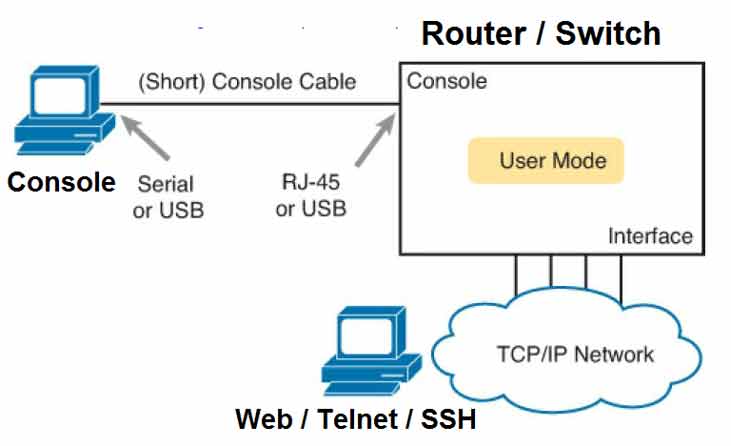
Cisco equipment supports five methods for management access:
- Console Port — Out-of-band, local only
- Auxiliary Port — Out-of-band, dial-up remote
- Telnet — In-band, unencrypted remote
- SSH — In-band, encrypted remote
- HTTP/HTTPS — Web-based GUI access
Quick Comparison
| Method | Type | Encrypted? | Remote? | Best For |
|---|---|---|---|---|
| Console | Out-of-band | No | No | Initial config, recovery |
| AUX | Out-of-band | No | Yes (dial-up) | Backup remote access |
| Telnet | In-band | No | Yes | Legacy (avoid) |
| SSH | In-band | Yes | Yes | Secure remote management |
| HTTP/HTTPS | In-band | HTTPS only | Yes | GUI-based management |
Console
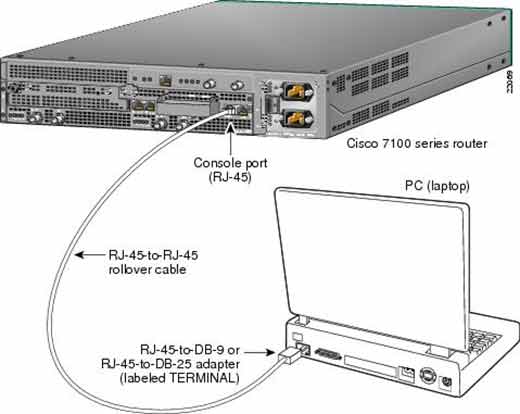
Console Port
Connect the router or switch to a computer through the Console port using a console cable (rollover cable). Cisco equipment is always configured through this method the first time.
Once you have console access, you can configure and enable other access methods — Telnet, SSH, AUX, and more.
AUX
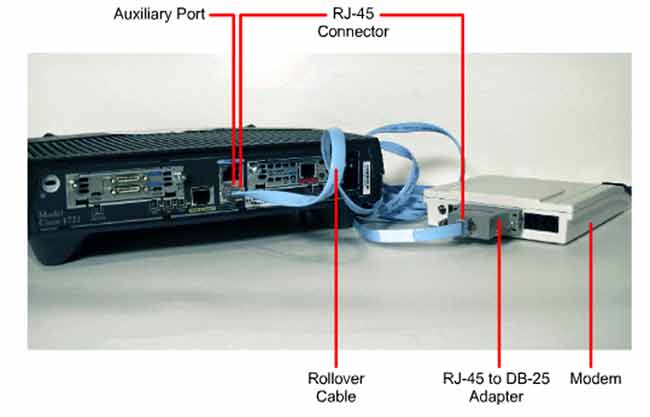
Auxiliary Port
The AUX port connects to an external modem. You must configure AUX access on the router first.
After AUX access is configured, the network administrator can dial the phone number connected to the external modem attached to the router — and reach the router remotely to configure it. This provides a backup path when the primary network is down.
AUX configuration is covered in a future lab.
Telnet
Telnet
Use Telnet when the router interfaces or ports have an IP address and Telnet access has been configured on the router.
With Telnet, you can connect to the router from anywhere on the internal network — or even from the internet.
Telnet configuration is covered in a future lab.
Security warning: Telnet sends all data — including passwords — in plain text. Avoid Telnet on production networks. Use SSH instead.
SSH
SSH (Secure Shell)
SSH provides the same remote access as Telnet — but with much higher security. All data transmitted over SSH connections is encrypted.
SSH has effectively replaced Telnet as the standard for remote router management. Cisco recommends SSH over Telnet for all remote access.
SSH configuration is covered in a future lab.
Why SSH Beats Telnet
- Encryption — all data is encrypted end-to-end
- Authentication — stronger user verification
- Integrity — data can’t be tampered with in transit
- Industry standard — required by most compliance frameworks
HTTP / HTTPS
HTTP / HTTPS
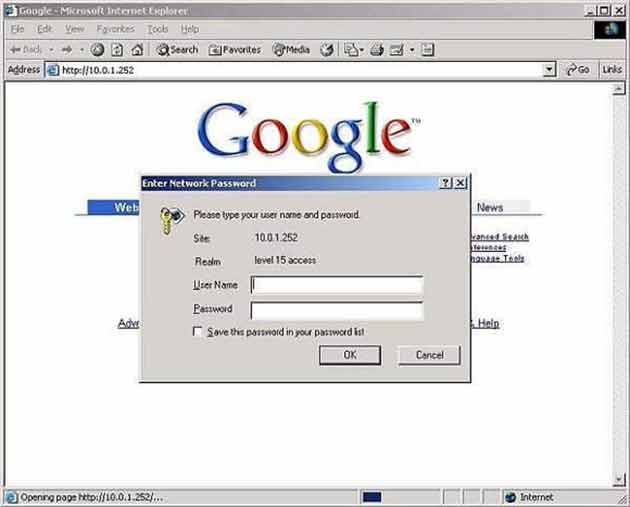
Web-based access uses HTTP or HTTPS protocols to connect to the router through a browser. The HTTPS method provides higher security because it encrypts all data.
When you connect to the router through HTTP or HTTPS, you must enter a username and password before access is granted — as shown in the image below.
Access Methods Deep Dive
| Method | Connection | Requires IP? | Use Case |
|---|---|---|---|
| Console | Console cable (rollover) | No | First-time config, password recovery |
| AUX | External modem + phone line | No | Backup remote access via dial-up |
| Telnet | IP network (TCP port 23) | Yes | Legacy remote access (avoid) |
| SSH | IP network (TCP port 22) | Yes | Secure remote management |
| HTTP | IP network (TCP port 80) | Yes | Web GUI (unencrypted) |
| HTTPS | IP network (TCP port 443) | Yes | Secure web GUI |
Protocol Port Numbers
| Protocol | TCP Port | Encryption |
|---|---|---|
| Telnet | 23 | None |
| SSH | 22 | Yes |
| HTTP | 80 | None |
| HTTPS | 443 | Yes (SSL/TLS) |
Access Method Best Practices
- Always configure the router through the Console port first.
- Enable SSH instead of Telnet on every device.
- Disable Telnet completely with
transport input sshon VTY lines. - Use HTTPS instead of HTTP for web management.
- Restrict access with ACLs and strong passwords.
- Use AUX only as a backup path — keep it disabled by default.
- Set exec-timeout on all lines to auto-disconnect idle sessions.
Which Access Method Should You Use?
| Scenario | Best Method |
|---|---|
| Brand-new router out of the box | Console |
| Password recovery (router locked out) | Console |
| Primary network is down | AUX (if configured) |
| Daily remote management | SSH |
| GUI-based configuration | HTTPS |
| Legacy device with no SSH support | Telnet (temporary only) |
✅ Key Takeaways
- Cisco supports five access methods: Console, AUX, Telnet, SSH, and HTTP/HTTPS.
- Console is out-of-band — used for first-time config and recovery.
- AUX connects to an external modem for dial-up remote access.
- Telnet is in-band but unencrypted — avoid it.
- SSH is in-band, encrypted, and replaces Telnet.
- HTTPS is the secure version of web-based access.
- Console and AUX don’t require an IP address; Telnet, SSH, and HTTP/HTTPS do.
- Port numbers: Telnet 23, SSH 22, HTTP 80, HTTPS 443.
