


Router Hardware & Software Components: RAM, NVRAM, Flash, ROM, and IOS
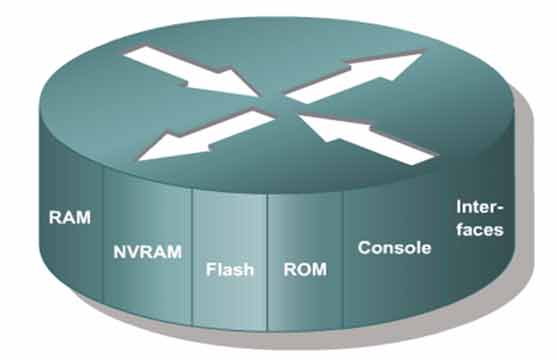
Identify every major hardware and software component inside a Cisco router — what each one stores, how it behaves on reboot, and why it matters for the CCNA 200-301 exam.
Identifying router hardware, software, memory types, and interfaces
Key router hardware components:
• RAM
• NVRAM
• Flash
• ROM
• Interface
• Console
• IOS
Lab Objective
Identify the types of hardware, software, memory, and interfaces inside a Cisco router. By the end of this lab, you’ll know exactly what each memory type stores, which components survive a reboot, and how the router boots its operating system.
Router Components at a Glance
Here’s a quick reference for the key components you need to know:
| Component | Type | What It Stores | Survives Reboot? |
|---|---|---|---|
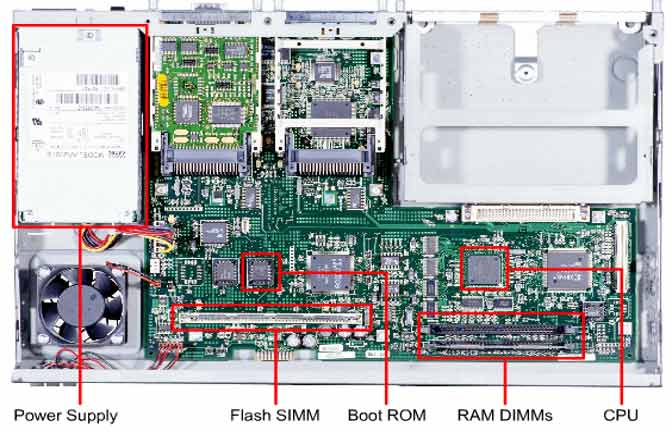
| RAM | Volatile | Routing table, ARP cache, packet buffers, running-config | ❌ No |
| NVRAM | Non-volatile | Startup-config (permanent configuration) | ✅ Yes |
| Flash | Non-volatile | Cisco IOS image(s) | ✅ Yes |
| ROM | Read-only | Bootstrap program, Mini-IOS, POST | ✅ Yes |
| Interfaces | Hardware | LAN/WAN connectivity (onboard or modular) | ✅ Yes |
| Console | Hardware port | Out-of-band management and configuration | ✅ Yes |
| IOS | Software | Operating system that runs the router | ✅ Yes (stored in Flash) |
RAM – Random Access Memory
RAM is volatile memory. It holds active data while the router is powered on and loses everything when the router shuts down. RAM handles several critical jobs:
- Stores the routing table
- Stores the ARP cache
- Handles packet buffering
- Holds the running-config (also called the active config file)
When the router powers off, all RAM contents are wiped. This is why unsaved configuration changes disappear after a reboot.
NVRAM – Non-Volatile RAM
NVRAM is readable, writable, and persistent. It keeps its contents even when the router loses power. NVRAM’s main job:
- Stores the startup-config — the permanent configuration the router loads at boot
Because NVRAM is non-volatile, your saved configuration survives reboots and power failures.
Flash Memory
Flash is readable, writable, and persistent. It stores the router’s operating system — the Cisco IOS image. Key facts:
- Holds the IOS that the router loads at startup
- Contents survive a reboot
- Can store multiple IOS versions at the same time
Keeping more than one IOS image in Flash gives you a backup if the primary image becomes corrupted.
ROM – Read-Only Memory
ROM is read-only memory. It performs three essential jobs:
- Runs the router’s initial boot process
- Stores the bootstrap program
- Stores a limited backup IOS called Mini-IOS
If the main IOS in Flash is missing or corrupted, the router boots into Mini-IOS. From there, you can troubleshoot the problem or replace the IOS with a new version.
Interfaces
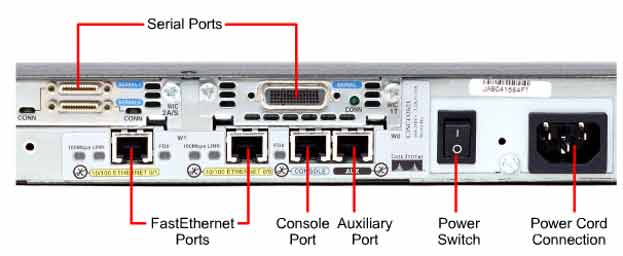
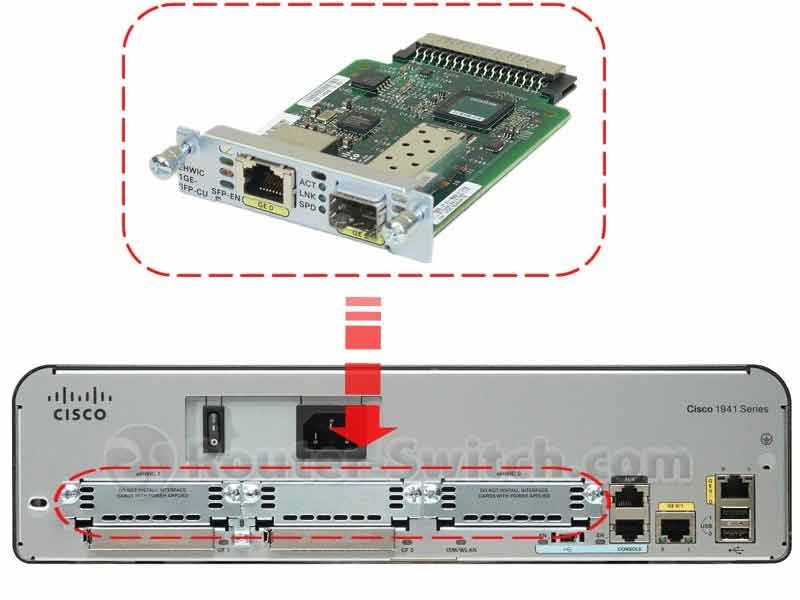
Interfaces connect the router to LAN and WAN networks. They can be built into the router’s main board or added as plug-in modules. Common interface types include:
- Ethernet / FastEthernet / GigabitEthernet — for LAN connections
- Serial — for WAN connections
- Console — for out-of-band management
- AUX — for remote management via modem
Console Port
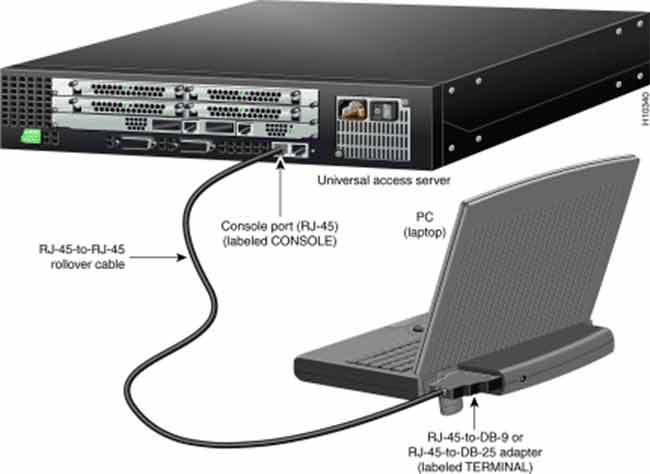
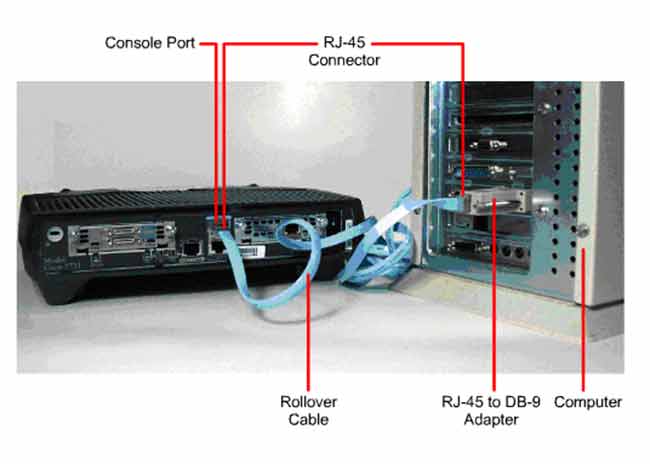
The console port connects the router directly to a computer using a console cable. This is the primary method for initial configuration and out-of-band management. When the network is down or the router is unconfigured, the console port is your lifeline.
Cisco IOS – Internetworking Operating System
Cisco IOS is a text-based operating system built specifically for Cisco equipment. To configure routers and switches, you type commands into the IOS command-line interface (CLI).
Key characteristics of IOS:
- Text-based CLI environment (similar to Linux or Windows shell, but for Cisco hardware)
- Supports copy and paste of commands
- Runs on Cisco routers, switches, and other Cisco devices
- Acts as the bridge between you and the Cisco hardware
Think of IOS as the router’s operating system — just like Windows runs on a PC, IOS runs on Cisco gear.
Exam tip: Know which memory type stores what. RAM = running-config (volatile). NVRAM = startup-config (persistent). Flash = IOS (persistent). ROM = bootstrap + Mini-IOS (read-only).
✅ Key Takeaways
- RAM is volatile — stores routing table, ARP cache, packet buffers, and running-config.
- NVRAM is persistent — stores the startup-config.
- Flash is persistent — stores the Cisco IOS image (can hold multiple versions).
- ROM is read-only — stores bootstrap and Mini-IOS for recovery.
- Interfaces connect the router to LAN and WAN networks.
- Console port provides out-of-band management and initial configuration.
- Cisco IOS is the text-based operating system that runs Cisco routers and switches.
