


Key Routing Protocol Characteristics: Metric, AD & Classful vs Classless
Compare the core characteristics of routing protocols — how they calculate metric, how Cisco uses Administrative Distance to rank them, and how Classful vs Classless behavior affects the network.
Lab Objective
- Understand how routing protocols exchange routing tables dynamically
- Learn Metric and Administrative Distance concepts
- Compare Classful and Classless routing protocols
- Read and clear the routing table
What Routing Protocols Do
Routing protocols like RIP, IGRP, EIGRP, OSPF, BGP, and IS-IS let routers and Layer 3 switches exchange their routing tables dynamically and keep them updated automatically.
To use dynamic routing, you configure these protocols on the router. Routers then exchange routing tables with their neighbors and learn the paths in each other’s tables — updating their own tables automatically.
Routing Protocol Duties
- Exchange routing tables with other routers in the internetwork
- Receive and process update messages from other routers
- Automatically update the routing table between routers
- Calculate all paths to each destination and select the best one
Metric: Choosing the Best Path
In an internetwork, more than one path may reach the same destination. Routers use a unit called Metric to identify the best path.
Each routing protocol calculates its metric differently:
| Protocol | Metric |
|---|---|
| RIP | Hop count |
| IGRP | Composite (bandwidth, delay, load, reliability) |
| EIGRP | Composite (bandwidth, delay, load, reliability) |
| OSPF | Cost (bandwidth-based) |
| IS-IS | Cost |
| BGP | Path attributes |
RIP example: RIP uses hop count — the number of routers along the path. The path with fewer hops has a lower metric and is the better route.
Administrative Distance: Ranking Routing Sources
Cisco routers use another unit to select the best path when multiple routing protocols offer routes to the same destination: Administrative Distance (AD).
When a router’s routing table has multiple routes to the same destination — learned from different routing protocols — the router selects the one with the lowest AD.
AD is a Cisco-proprietary method for ranking routing protocols and sources. It’s a number between 0 and 255:
| Route Source | Administrative Distance |
|---|---|
| Connected interface | 0 |
| Static route | 1 |
| eBGP | 20 |
| EIGRP | 90 |
| IGRP | 100 |
| OSPF | 110 |
| IS-IS | 115 |
| RIP | 120 |
| iBGP | 200 |
❓ Which Route Wins: Static or RIP?
Suppose a router has two routes to the same destination — one from a Static Route and one from RIP. Both can reach the destination. Which route does the router use?
Answer: The Static Route. Its AD is 1, which is lower than RIP’s AD of 120. Lower AD = higher priority.
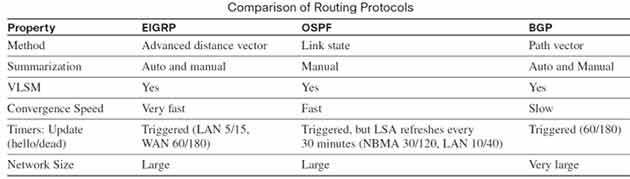
The table below compares three routing protocols side by side
Classful vs. Classless Routing Protocols
All routing protocols fall into one of two categories:
- Classful Routing Protocol
- Classless Routing Protocol
Classful
Classful Routing Protocol
Classful protocols do not include the subnet mask when advertising networks to neighbors.
In the diagram below, two routers — Router1 and Router2 — have a Classful routing protocol configured. When Router1 advertises the 192.168.2.0 network to Router2, it sends only the network address — the subnet mask is not advertised.
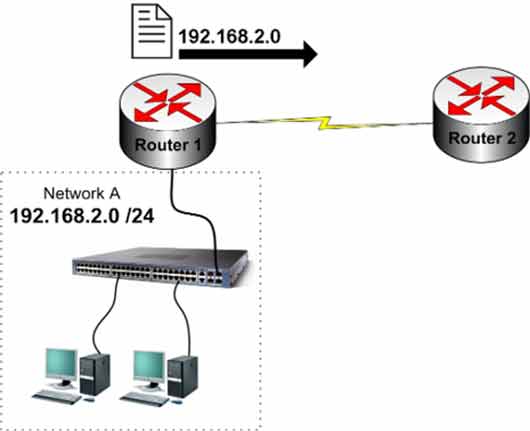
Important: Classful routing protocols do not support VLSM (variable-length subnet masks). Since the subnet mask isn’t advertised with the network address, you can’t use variable-length masks in a Classful network.
RIP v1 and IGRP are Classful routing protocols.
Classless
Classless Routing Protocol
Classless protocols include the subnet mask when advertising networks to neighbors. These protocols support VLSM.
In the diagram below, Router1 advertises the 192.168.2.0 network with its subnet mask — Router2 receives both the network address and the mask.
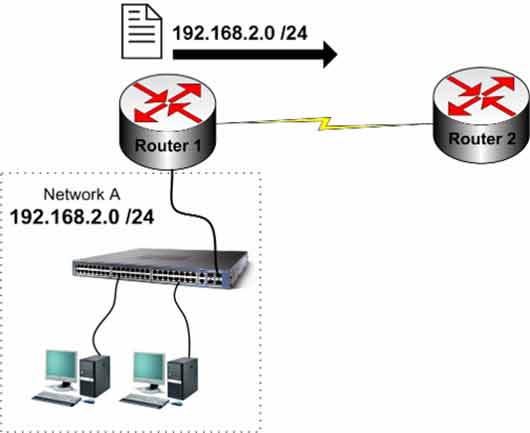
Note: Classless routing protocols support VLSM.
RIP v2, OSPF, EIGRP, and BGP are Classless protocols.
The Routing Table: show ip route
Each router’s routing table contains all paths the router can use to forward packets. As a Cisco engineer, you need a solid understanding of the information in the routing table.
Use the following command to view the routing table on routers and Layer 3 switches:
Router#show ip route

Gateway of last resort is not set
C    192.168.0.0/24 is directly connected, FastEthernet0/0
C    192.168.1.0/24 is directly connected, FastEthernet1/0
R    192.168.3.0/24 [120/1] via 192.168.5.2, 00:00:25, Serial2/0
R    192.168.4.0/24 [120/1] via 192.168.5.2, 00:00:25, Serial2/0
C    192.168.5.0/24 is directly connected, Serial2/0
As you can see in the show ip route output, the list of networks and routes in the router’s routing table is displayed. This command shows the routing table of a router or Layer 3 switch.
When a packet arrives at a router, the router first looks at the destination. It then checks its routing table to find that destination. If the router finds the destination network, it forwards the packet out the correct interface. If no route exists in the routing table for that destination, the router drops the packet.
Routing Table Codes
The show ip route output displays codes that identify the routing protocol used:
| Code | Meaning | Description |
|---|---|---|
| C | Connected | Network directly connected to the router |
| S | Static | Statically configured route |
| R | RIP | Route learned through RIP |
| I | IGRP | Route learned through IGRP |
| D | EIGRP | Route learned through EIGRP |
| O | OSPF | Route learned through OSPF |
| B | BGP | Route learned through BGP |
| i | IS-IS | Route learned through IS-IS |
Routing Table Breakdown
| Code | Network | Connection | Next Hop | Update Time | Interface |
|---|---|---|---|---|---|
| C | 192.168.0.0/24 | directly connected | — | — | FastEthernet0/0 |
| C | 192.168.1.0/24 | directly connected | — | — | FastEthernet1/0 |
| R | 192.168.3.0/24 | [120/1] | 192.168.5.2 | 00:00:25 | Serial2/0 |
| R | 192.168.4.0/24 | [120/1] | 192.168.5.2 | 00:00:25 | Serial2/0 |
| C | 192.168.5.0/24 | directly connected | — | — | Serial2/0 |
The [120/1] format: 120 is the Administrative Distance for RIP, and 1 is the metric (hop count).
Clearing the Routing Table
Sometimes you need to remove all entries from the router’s routing table. Use this command:
Router#clear ip route *
This command clears all entries in the routing table. The routing protocols then repopulate the table automatically.
To remove a specific route, use:
Router#clear ip route [network] [subnet-mask]
For example:
Router#clear ip route 192.168.3.0 255.255.255.0
In this example, only the route for 192.168.3.0 with mask 255.255.255.0 is removed from the router’s routing table.
Routing Protocol Comparison
Routing protocols are compared based on:
- Routing algorithm
- Summarization support
- Convergence speed
- Update timing
- Supported network size
| Protocol | Type | Metric | AD | VLSM | Convergence |
|---|---|---|---|---|---|
| RIPv1 | Distance Vector | Hop count | 120 | ❌ | Slow |
| RIPv2 | Distance Vector | Hop count | 120 | ✅ | Slow |
| IGRP | Distance Vector | Composite | 100 | ❌ | Slow |
| EIGRP | Advanced Distance Vector | Composite | 90 | ✅ | Fast |
| OSPF | Link State | Cost | 110 | ✅ | Fast |
| IS-IS | Link State | Cost | 115 | ✅ | Fast |
| BGP | Path Vector | Path attributes | 20 (eBGP) | ✅ | Slow |
Classful vs. Classless Summary
| Feature | Classful | Classless |
|---|---|---|
| Subnet mask in updates | ❌ Not included | ✅ Included |
| VLSM support | ❌ No | ✅ Yes |
| CIDR support | ❌ No | ✅ Yes |
| Protocols | RIPv1, IGRP | RIPv2, EIGRP, OSPF, BGP, IS-IS |
✅ Key Takeaways
- Routing protocols exchange routing tables and select the best path automatically.
- Metric picks the best path within a single protocol — each protocol uses its own metric.
- Administrative Distance picks the best route between different protocols — lower AD wins.
- AD values range from 0 to 255; connected routes are 0, static routes are 1, RIP is 120.
- Classful protocols (RIPv1, IGRP) don’t send subnet masks — no VLSM support.
- Classless protocols (RIPv2, EIGRP, OSPF, BGP, IS-IS) send subnet masks — VLSM supported.
- Routing table codes identify the source: C, S, R, I, D, O, B, i.
- Use
clear ip route *to clear the whole table, or specify a network to remove one route.
