


Subnetting & VLSM in Networks: Optimizing IP Address Allocation
Master subnetting and Variable Length Subnet Mask. Divide large networks into smaller, manageable subnets — and design efficient IP plans that waste fewer addresses.
Default Gateway: Connecting Different Networks
Computers on different networks — with different Network IDs, meaning they’re not on the same segment — need a Default Gateway to communicate.
A default gateway is the IP address of the closest router interface, or the closest server NIC configured to act as a router.
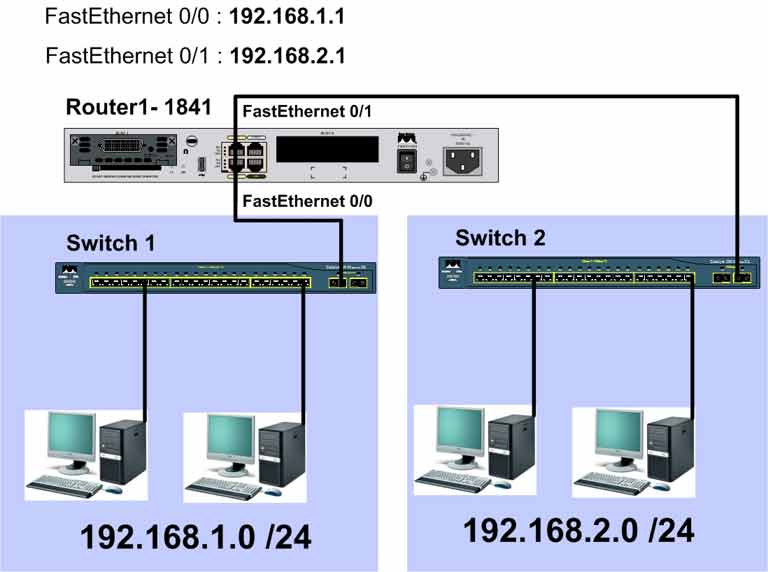
In the diagram above, computers on 192.168.1.0/24 connect to the router through FastEthernet 0/0. The interface IP — 192.168.1.1 — is set as the default gateway for those computers. The same applies to the 192.168.2.0/24 network using FastEthernet 0/1 with 192.168.2.1.
Step 1: Using Subnetting in Networks
Networks grow. When a large flat network becomes hard to manage, subnetting splits it into smaller networks. Here’s why:
- Easier management — splitting a large flat network into smaller ones makes each easier to manage.
- Reduced traffic — improves network performance.
- Independent networks — control traffic in and out of each segment.
- Smaller broadcast domains — fewer broadcasts, more broadcast domains.
IP address design matters. A TCP/IP network shouldn’t have more than 300 hosts on a single segment. Beyond that, broadcast problems emerge.
If you used a Class A address for a small network, most addresses would be wasted. Subnetting — dividing a network into smaller subnets — solves this. On the internet, subnetting prevents wasting public IP addresses.
In subnetting, you borrow bits from the Host ID portion and add them to the Network ID to create subnets. The new subnets have fewer hosts each.
Class C Example: 192.168.1.0/24
A Class C address has 8 bits in the Host ID. That gives 254 usable addresses:
2^8 – 2 = 256 – 2 = 254
The valid host range looks like this:
192.168.1.1
192.168.1.2
...
192.168.1.254
Why subtract 2? Because two addresses are reserved:
192.168.1.0    → Network Range
192.168.1.255  → Broadcast Address
So a Class C network with 8 host bits has 254 usable addresses.
Borrowing 1 Bit from Host ID
How many subnets can you create by borrowing bits? Use this formula:
2^n = number of subnets
Where n = number of bits borrowed from the Host ID. If you borrow 1 bit:
2^1 = 2 subnets
Each subnet has 7 host bits remaining:
2^7 – 2 = 128 – 2 = 126 usable hosts per subnet
So borrowing 1 bit gives you 2 subnets, each with 126 usable hosts. These two subnets are independent — you need a router to connect them.
Example 1: Creating 2 Subnets from 192.168.1.0/24
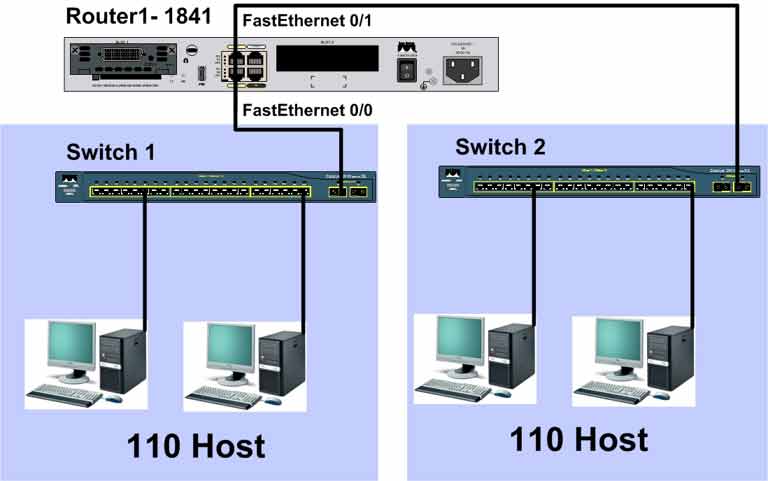
We need 2 subnets, each with at least 110 usable addresses.
Compare Two Approaches
- Without subnetting: use two Class C networks. Each wastes 144 IP addresses.
- With subnetting: split one Class C into 2 subnets. Each has 126 usable addresses — only 16 wasted per subnet.
Calculating Subnet Mask
Borrow 1 bit from the Host ID. The new subnet mask has an extra 1 bit in the fourth octet:
11111111.11111111.11111111.10000000
255.255.255.128
The mask changes from 255.255.255.0 to 255.255.255.128 — the leftmost bit of the last octet (128) is now part of the network portion.
Calculating Block Size
Subtract the subnet mask value from the magic number 256:
256 – 128 = 128
So the subnets are:
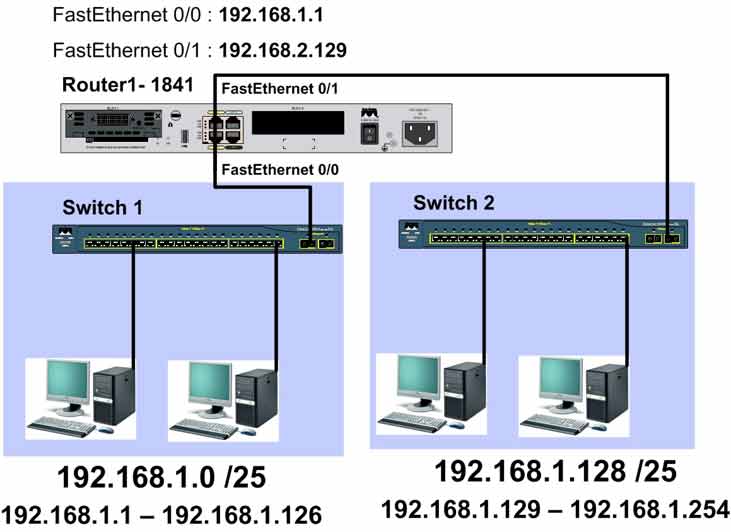
192.168.1.0/25
192.168.1.128/25
Subnet 1 Details
| Property | Value |
|---|---|
| Network Range | 192.168.1.0/25 |
| First Usable IP | 192.168.1.1 |
| Last Usable IP | 192.168.1.126 |
| Broadcast Address | 192.168.1.127 |
Subnet 2 Details
| Property | Value |
|---|---|
| Network Range | 192.168.1.128/25 |
| First Usable IP | 192.168.1.129 |
| Last Usable IP | 192.168.1.254 |
| Broadcast Address | 192.168.1.255 |
Example 2: Creating 4 Subnets from 192.168.1.0/24
We need 4 subnets, each with at least 50 usable addresses.
Borrow 2 bits from the Host ID:
2^2 = 4 subnets
Calculating Subnet Mask
11111111.11111111.11111111.11000000
255.255.255.192
Calculating Block Size
256 – 192 = 64
The 4 subnets are:
192.168.1.0/26
192.168.1.64/26
192.168.1.128/26
192.168.1.192/26
Subnet 1
| Network Range | First Usable | Last Usable | Broadcast |
|---|---|---|---|
| 192.168.1.0/26 | 192.168.1.1 | 192.168.1.62 | 192.168.1.63 |
Subnet 2
| Network Range | First Usable | Last Usable | Broadcast |
|---|---|---|---|
| 192.168.1.64/26 | 192.168.1.65 | 192.168.1.126 | 192.168.1.127 |
Subnet 3
| Network Range | First Usable | Last Usable | Broadcast |
|---|---|---|---|
| 192.168.1.128/26 | 192.168.1.129 | 192.168.1.190 | 192.168.1.191 |
Subnet 4
| Network Range | First Usable | Last Usable | Broadcast |
|---|---|---|---|
| 192.168.1.192/26 | 192.168.1.193 | 192.168.1.254 | 192.168.1.255 |
Subnetting Checklist
- Determine the maximum number of subnets and hosts per subnet
- Determine the subnet mask for each subnet
- Determine the broadcast address for each subnet
- Determine the first and last usable IP addresses for each subnet
Step 2: IP Address Planning in an Organization Using VLSM
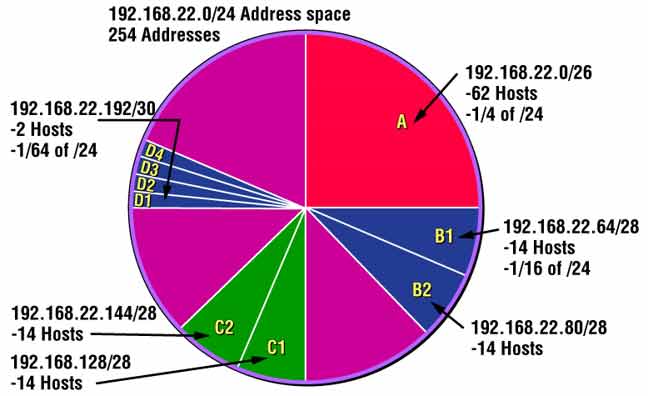
VLSM stands for Variable Length Subnet Mask. It lets you define subnets of different sizes to use IP addresses more efficiently.
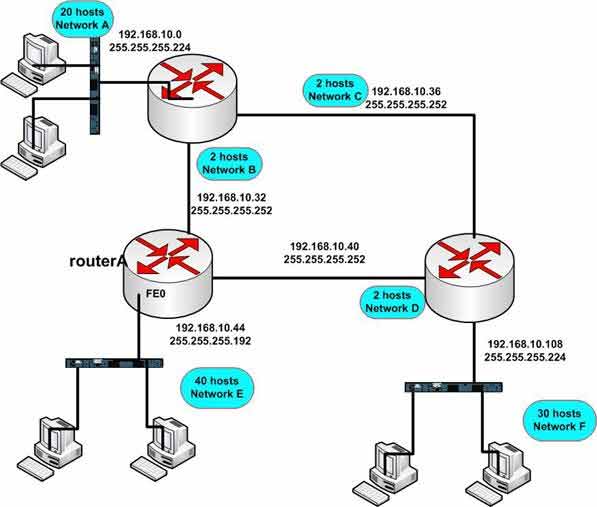
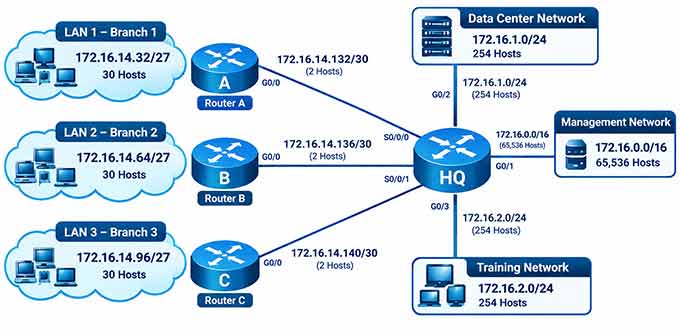
In this topology, 6 subnets exist but each needs a different number of IP addresses. Router-to-router links need only 2 addresses. Network A needs 20 IPs, network F needs 30, and other networks need varying amounts.
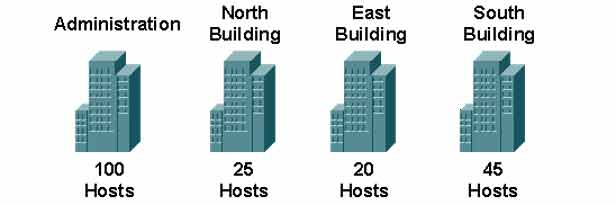
VLSM Example: 130.16.32.0/24
We want to create multiple subnets of different sizes from 130.16.32.0/24, based on each building’s needs.
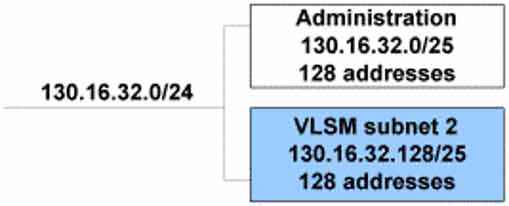
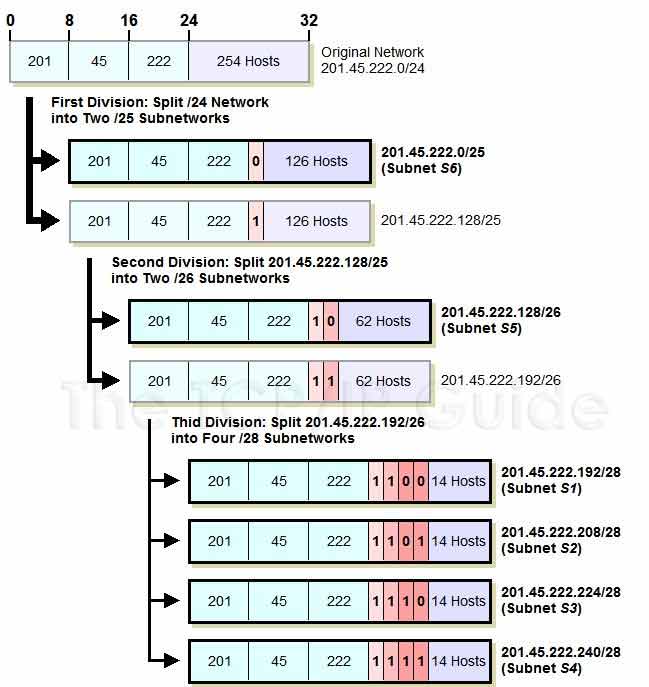
Step 1: Split 130.16.32.0/24 into two /25 subnets, each with 126 usable IPs. Assign 130.16.32.0/25 to the Administration building.
130.16.32.0/25   → Administration building
130.16.32.128/25 → Reserved for further subnetting
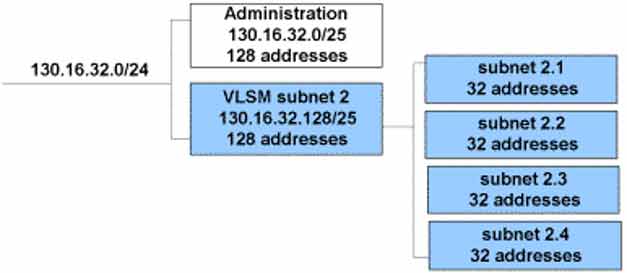
Step 2: Split 130.16.32.128/25 into four /27 subnets:
130.16.32.128/27 → North Building
130.16.32.160/27 → East Building
130.16.32.192/27 → South Building
130.16.32.224/?  → Reserved for future use
| Building | Network Range |
|---|---|
| North Building | 130.16.32.128/27 |
| East Building | 130.16.32.160/27 |
| South Building | 130.16.32.192/27 |
| Reserved for future use | 130.16.32.224/? |
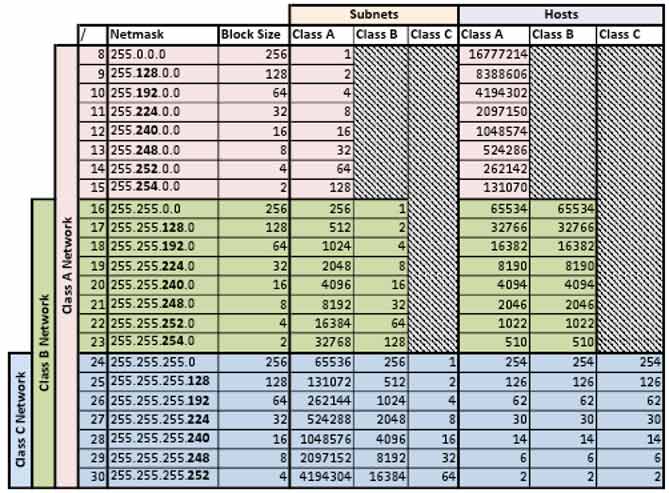
Subnet Mask Cheat Sheet
| CIDR | Subnet Mask | Total IPs | Usable Hosts | Block Size |
|---|---|---|---|---|
| /24 | 255.255.255.0 | 256 | 254 | 256 |
| /25 | 255.255.255.128 | 128 | 126 | 128 |
| /26 | 255.255.255.192 | 64 | 62 | 64 |
| /27 | 255.255.255.224 | 32 | 30 | 32 |
| /28 | 255.255.255.240 | 16 | 14 | 16 |
| /29 | 255.255.255.248 | 8 | 6 | 8 |
| /30 | 255.255.255.252 | 4 | 2 | 4 |
Router-to-router links typically use /30 masks — only 2 usable IPs are needed for a point-to-point link.
Subnetting vs. VLSM
| Feature | Subnetting | VLSM |
|---|---|---|
| Subnet Size | All subnets same size | Subnets can be different sizes |
| Address Efficiency | Moderate | High — matches need |
| Routing Protocol | Classful protocols (RIPv1, IGRP) | Classless protocols (RIPv2, OSPF, EIGRP) |
| Address Wastage | Higher | Lower |
| Complexity | Simpler | More complex design |
| Best For | Uniform networks | Organizations with varied needs |
✅ Key Takeaways
- A Default Gateway is the closest router interface IP on a host’s subnet.
- Subnetting borrows bits from the Host ID to create more networks.
- Formula for number of subnets: 2^n (n = borrowed bits).
- Formula for usable hosts per subnet: 2^h – 2 (h = remaining host bits).
- Block size = 256 – subnet mask value (in the changed octet).
- The two reserved addresses in each subnet are network and broadcast.
- VLSM uses different mask lengths to match each subnet’s actual host needs.
- Router-to-router links typically use /30 (2 usable IPs).
- VLSM requires a classless routing protocol (RIPv2, OSPF, EIGRP).
